Smart Solar Dynamic Battery Night Charging
If you have a solar battery bank and require smart dynamic charging using your low cost overnight grid tariff, then here is the way to do this correctly.Goal: Charge the…
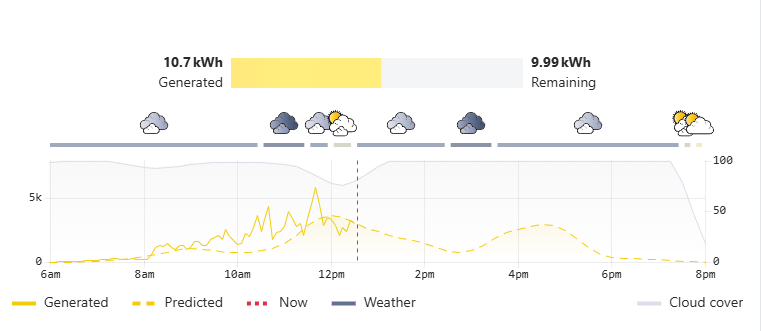
If you have a solar battery bank and require smart dynamic charging using your low cost overnight grid tariff, then here is the way to do this correctly.
Goal: Charge the battery overnight just enough to get through tomorrow, using as much free solar power as possible or available battery capacity.
This avoids excess night rate charging but ensures the predicted solar for the next day will carry you into the next charge cycle.
However, executing this perfectly in Home Assistant is notoriously tricky. Many users turn to complex tools like Predbat or EMHASS. While incredibly powerful, these tools rely on dense YAML configurations, complex mathematical models, and constant micro-adjustments that can sometimes be more frustrating than helpful with hours of problems and constant fixing - however below is the simply and easy way to do this.
If you have a large battery bank (like a 28kWh setup) paired with an Axpert/Voltronic (any) inverter managed via Solar Assistant or direct, you don't need continuous micro-adjustments. You just need smart, reliable math and an automation that won't rapid-cycle your hardware say every 5 minutes to ensure things are on track. This example uses Axpert and Solar Assistant but can be modified easily for any setup, send this website page to a good AI like Claude Pro or Google Pro and ask it to make the changes for you.
Here is how to build a fully localized, transparent, and self-healing overnight charging controller using just Home Assistant, Solcast (the most accurate solar predictor), and Solar Assistant.
The Core Philosophy: Why Native Automations?
The system we are building relies on three core principles:
- Transparency: You can see exactly why the battery is charging because you control the math.
- Hardware Protection (Hysteresis): We use a "Deadband" or "Freeze Zone" to prevent the inverter from rapidly clicking between charge/discharge states when the battery level fluctuates by a decimal point.
- Self-Healing (The Watchdog): Smart home networks drop out. This automation runs on a 5-minute watchdog timer to ensure that if an MQTT command is missed, the system auto-corrects within minutes.
Prerequisites
To implement this guide, you will need:
- Home Assistant up and running.
- Solar Assistant integrated into Home Assistant via MQTT.
- Solcast installed via HACS (Free Tier is fine).
- An Axpert/Voltronic Inverter (or similar) that allows you to change
Output source priorityandCharger source priorityvia Home Assistant entities.
Step 1: Manage Your Solcast API Limits
Solcast's free tier limits you to 10 API calls per day. We need to ensure the absolute freshest data is pulled right before midnight. Disable auto-polling in your Solcast integration and use this automation to pull data strategically:
alias: "Solcast - Fetch API Data"
description: "Pulls Solcast data at specific times to stay within the 10 API limit."
trigger:
  - platform: time
    at: "06:00:00"
  - platform: time
    at: "09:30:00"
  - platform: time
    at: "12:00:00"
  - platform: time
    at: "16:00:00"
  - platform: time
    at: "23:55:00" # The crucial pre-midnight pull
condition: []
action:
  - action: solcast_solar.update_forecasts
    data: {}
mode: single
Step 2: Create the Target Memory (Helper)
Home Assistant needs a place to store its calculated charge target so the watchdog can reference it all night.
- Go to Settings > Devices & Services > Helpers.
- Click + Create Helper and choose Number.
- Name it:
Nightly Charge Target - Set Minimum value to 0 and Maximum value to 100. The template in Step 3 handles all clamping based on your configured reserve_percent, so keep the helper itself wide open. If you constrain the helper to a tighter range and the template produces a value outside it, Home Assistant rejects the write with an "Invalid value … out of range" error and the helper keeps yesterday's stale target all night.
- Click Create.
Step 3: The Midnight Math
This automation triggers at 00:01. It looks at Solcast's prediction for the upcoming day, subtracts it from your average daily house load, and adds your safety reserve. It then saves this target into the Helper we just created.
Create a new automation and click three dots to edit yaml and paste the code.
Note: Adjust daily_load to match your home's average usage in kWh, and battery_capacity to match your bank size.
alias: "Battery - Midnight Target Calculation"
description: ""
triggers:
  - at: "00:01:00"
    trigger: time
actions:
  - action: input_number.set_value
    target:
      entity_id: input_number.nightly_charge_target
    data:
      value: >
        {% set daily_load = 32.0 %} {% set solar_forecast =
        states('sensor.solcast_pv_forecast_forecast_today') | float(0) %}
        {% set battery_capacity = 24.0 %}
        {% set reserve_percent = 0.23 %}

        {% set reserve_kwh = battery_capacity * reserve_percent %} {% set
        needed_kwh = [daily_load - solar_forecast, 0] | max %} {% set target_kwh
        = needed_kwh + reserve_kwh %} {% set target_soc = ((target_kwh /
        battery_capacity) * 100) | round(0) %}

        {% set min_soc = (reserve_percent * 100) | round(0) %}

        {% if target_soc < min_soc %}
          {{ min_soc }}
        {% elif target_soc > 100 %}
          100
        {% else %}
          {{ target_soc }}
        {% endif %}
mode: single
In the above code make sure you edit these values to match your system demands.
data:
value: >
{% set daily_load = 38.0 %} # <-- your average daily kWh usage
{% set solar_forecast = states('sensor.solcast_pv_forecast_forecast_today') | float(0) %}
{% set battery_capacity = 28.0 %} # <-- your battery bank size in kWh
{% set reserve_percent = 0.20 %} # <-- minimum reserve (20% here)
In the above automation, edit these four values to match your system: daily_load is your average daily kWh usage, battery_capacity is your battery bank size in kWh, and reserve_percent is your minimum reserve as a decimal (e.g. 0.20 = 20%). Also update the sensor.solcast_pv_forecast_forecast_today entity name if yours differs.
Three things this version fixes versus naïve implementations: (1) when solar_forecast exceeds daily_load, needed_kwh is clamped at zero so the math can't "un-charge" into your reserve; (2) the minimum SOC is derived from reserve_percent directly, so there's only one place to edit your reserve figure; (3) no inline comments inside the Jinja body — # is not a Jinja comment marker and gets emitted as literal text into the helper value.battery_capacity is your usable capacity in kWh (typically 80–90% of nameplate for LiFePO4, lower for lead-acid). This must match what your battery SOC sensor reports against — if it reads 100% when the BMS considers the battery full, that 100% corresponds to usable capacity, not nameplate.
Example: 10kWh LiFePO4 is likely to be 8kWh true usable.
Leave the helper's min/max at 0 and 100 — the template is the single source of truth for clamping. Your lower bound is driven by reserve_percent, and your upper bound is enforced by the Watchdog in Step 4, which caps the effective target at 96%. Charging all the way to 100% isn't great for the battery and in some cases causes the inverter to rapidly flip between charge and discharge states. You can adjust or remove the 96% cap in Step 4 if you have a reason to, but don't re-add constraints on the helper itself — doing so reintroduces the out-of-range failure mode.
Step 3.5: Reliable Inverter Command Script
Axpert/Voltronic inverters occasionally miss MQTT commands — a known quirk that's worth defending against rather than ignoring. Rather than blindly sending each command twice (which wastes time and still doesn't confirm anything), we'll use a small reusable script that sends a command, waits, checks if it actually took effect, and retries if not. Up to three attempts, with a notification if the inverter still hasn't responded.
Settings → Automations & Scenes
Click the Scripts tab at the top (next to Automations and Scenes) <<<----Pay attention to how this is done.
Click + Add Script (bottom right)
If a wizard appears, click Create new script or skip
Click the three-dot menu (top right) → Edit in YAML
Paste the full script with alias: / mode: / sequence: wrapper:
alias: "Set Inverter Priority (with verify)"
mode: parallel
max: 10
sequence:
  - repeat:
      sequence:
        - action: select.select_option
          target:
            entity_id: "{{ entity_id }}"
          data:
            option: "{{ option }}"
        - delay:
            seconds: 15
      until:
        - condition: or
          conditions:
            - condition: template
              value_template: "{{ states(entity_id) == option }}"
            - condition: template
              value_template: "{{ repeat.index >= 3 }}"
  - if:
      - condition: template
        value_template: "{{ states(entity_id) != option }}"
    then:
      - action: persistent_notification.create
        data:
          title: "Inverter command failed"
          message: >
            {{ entity_id }} did not adopt '{{ option }}' after 3 attempts.
            Currently shows '{{ states(entity_id) }}'.
Save, and confirm the script ID becomes script.set_inverter_priority (you can rename it in the UI if needed — just match it in Step 4 below). mode: parallel lets multiple verify operations run concurrently if the Watchdog ever calls it for both selects in quick succession.
Step 4: The Dynamic Watchdog Controller
This is the brain of the operation. It manages your battery dynamically between your cheap window (e.g., 00:05 to 06:00).
Key Features:
- Pre-Dawn Drain Protection: If your battery hits its target early (e.g., at 2:00 AM), it doesn't just turn off the charger. It forces the house to run on the grid until 6:00 AM, freezing the battery level so it doesn't drain before the sun comes up.
- Dynamic EV Handling: If you plug an EV in at 1:00 AM and it aggressively drains the battery, this controller will instantly detect the drop and switch the house/EV over to the grid the moment your battery hits its safety target.
- The 2% Freeze Zone: To prevent rapid flip-flopping, the system allows a +/- 1% variance around your target. Once it hits the target, it won't reactivate charging or discharging unless the battery drifts significantly.
Ensure you replace the entity names with your specific Solar Assistant entities.
Create a new automation and click three dots to edit yaml and paste the code.
alias: Battery - Dynamic Overnight Controller V2
triggers:
  - at: "00:05:00"
    id: Night_Mode
    trigger: time
  - at: "06:00:00"
    id: Day_Mode
    trigger: time
  - minutes: /5
    id: Night_Mode
    trigger: time_pattern
conditions: []
actions:
  - choose:
      - conditions:
          - condition: trigger
            id: Day_Mode
        sequence:
          - action: select.select_option
            target:
              entity_id: select.output_source_priority
            data:
              option: Solar/Battery/Utility
          - delay:
              seconds: 10
          - action: select.select_option
            target:
              entity_id: select.charger_source_priority
            data:
              option: Solar only
      - conditions:
          - condition: trigger
            id: Night_Mode
          - condition: time
            after: "00:04:00"
            before: "06:00:00"
          - condition: template
            value_template: >
              {{ states('input_number.nightly_charge_target') not in
              ['unavailable', 'unknown', 'none']
                 and states('sensor.battery_state_of_charge') not in ['unavailable', 'unknown', 'none']
                 and states('input_number.nightly_charge_target') | float(0) > 0 }}
        sequence:
          - variables:
              effective_target: >
                {{ [states('input_number.nightly_charge_target') | float(0), 96]
                | min }}
              soc: |
                {{ states('sensor.battery_state_of_charge') | float(0) }}
          - choose:
              - conditions:
                  - condition: template
                    value_template: "{{ soc < (effective_target - 2) }}"
                sequence:
                  - action: select.select_option
                    target:
                      entity_id: select.output_source_priority
                    data:
                      option: Solar/Utility/Battery
                  - delay:
                      seconds: 10
                  - action: select.select_option
                    target:
                      entity_id: select.charger_source_priority
                    data:
                      option: Solar first
              - conditions:
                  - condition: template
                    value_template: "{{ soc > effective_target }}"
                sequence:
                  - action: select.select_option
                    target:
                      entity_id: select.output_source_priority
                    data:
                      option: Solar/Battery/Utility
                  - delay:
                      seconds: 10
                  - action: select.select_option
                    target:
                      entity_id: select.charger_source_priority
                    data:
                      option: Solar only
              - conditions:
                  - condition: template
                    value_template: "{{ (effective_target - 2) <= soc <= effective_target }}"
                sequence:
                  - action: select.select_option
                    target:
                      entity_id: select.output_source_priority
                    data:
                      option: Solar/Utility/Battery
                  - delay:
                      seconds: 10
                  - action: select.select_option
                    target:
                      entity_id: select.charger_source_priority
                    data:
                      option: Solar only
mode: restart
NOTE: To set the MAX charge on your battery, just edit this line in the above code block:

              effective_target: >
                {{ [states('input_number.nightly_charge_target') | float(0), 96] | min }}
              soc: >
                {{ states('sensor.battery_state_of_charge') | float(0) }}

You will see that here we have set max battery to 96% charge. Do not set this value in the helper or any other automation.

Here is one more example where its set to unlimited/100% instead of a value.

effective_target: >
                {{ states('input_number.nightly_charge_target') | float(0) }}

One thing worth noting: this cap only applies to the night-window charging logic (the State A / B / C decisions). It doesn't limit what the inverter itself will accept from solar during the day — if the sun pushes the battery to 100% at 2 PM, that's governed by your inverter's charge controller, not this automation. The 96% here is purely "don't try to grid-charge past 96% overnight," which is the scenario where flip-flopping tends to happen.
If you'd prefer fewer triggers and a more conservative automation that only re-evaluates every 5 minutes, remove the SOC state trigger from the triggers: block above: (THIS IS NOT A RECOMMENDED STEP - ONLY FOR SPECIFIC ISSUES - DO NOT USE UNLESS THERE IS A PROBLEM)
triggers:
  - at: "00:05:00"
    id: Night_Mode
    trigger: time
  - at: "06:00:00"
    id: Day_Mode
    trigger: time
  - minutes: /5
    id: Night_Mode
    trigger: time_pattern
Conclusion
By breaking the problem down into simple math and a state-based controller, you eliminate the black box of massive custom integrations. You know precisely why your inverter is acting the way it is, and your home battery is perfectly primed every morning to maximize your solar yield and minimize your grid bill.