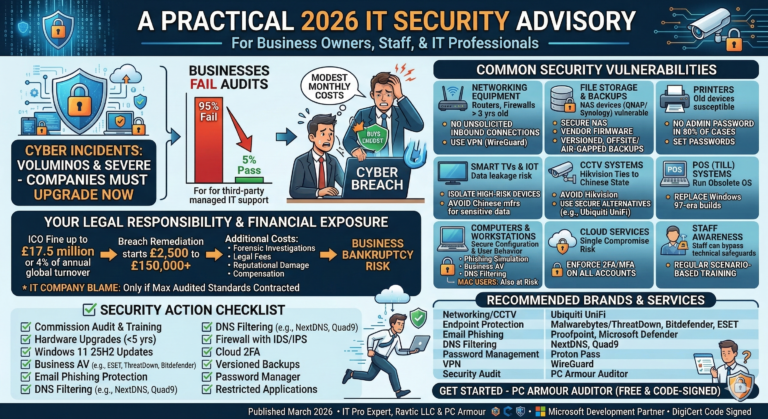
For a typical Small to Medium-sized Enterprise (SME) in the UK, the Cyber Essentials certificate is not legally mandatory, but it becomes essential for mitigating risk, protecting reputation, and ensuring contractual compliance if the business handles any personal or financial information. Certification acts as a vital security baseline to avoid data leaks and potential regulatory action (e.g., under GDPR). Additionally, securing cyber insurance is crucial to cover catastrophic risks like ransomware attacks, which can instantly halt business operations.
Many business owners unfortunately underestimate cyber risk, relying on insufficient security measures or non-specialist IT support, or in rare cases, attempting to falsify compliance. This lack of due diligence often leads to significant financial and reputational harm when a breach occurs. Regardless of pursuing formal certification, implementing these security measures will substantially benefit your business resilience.
Note : Updated rules for 2026 apply.
Who Specifically Requires Cyber Essentials (SMEs) in the UK.
While the scheme is government-backed, most SMEs are only required to have it if they fall into one of these specific categories:
- To Qualify for Specific Cyber Insurance:
- UK organisations with a turnover of less than £20 million can get free Cyber Liability Insurance or up to £250’000 cover (about £550/year) with a good IT security audit along with Cyber Essentials Self Certification. You need the certificate to access these insurance benefits and should you falsify your results in any way or fail to maintain the requirements, your insurance will not pay out and you can also become legally liable should there be a data breach.
Important note: All insurance companies send out a response team to evaluate claims to ensure all measures where in place at the time of a incident.
- UK organisations with a turnover of less than £20 million can get free Cyber Liability Insurance or up to £250’000 cover (about £550/year) with a good IT security audit along with Cyber Essentials Self Certification. You need the certificate to access these insurance benefits and should you falsify your results in any way or fail to maintain the requirements, your insurance will not pay out and you can also become legally liable should there be a data breach.
- Bidding for UK Government/MOD Contracts:
- This is the primary mandatory driver. If your SME wants to tender for certain contracts involving the handling of sensitive and personal data (like payroll, expenses, home addresses, or bank details of UK citizens/employees) or the provision of IT services for a public sector body, the certification is compulsory.
- Part of a Large Supply Chain:
- Many large private and public organisations (including major banks, insurance companies, and corporations) now mandate that their smaller suppliers have Cyber Essentials. They use it as a basic filter to reduce their own supply chain risk. If you want to supply them, you need the certificate.
What SME Data is considered Important in order to require Certification?
For SMEs, the requirement is driven by handling any data you have a legal or contractual obligation to protect.
The certification is designed to protect all data held on the scope of your IT network from common internet-based threats. This includes:
| Data Type | Why it Matters |
| Customer PII | Personal Identifiable Information (Names, addresses, emails, phone numbers). Required under UK GDPR. |
| Employee Data | Payroll, HR records, staff addresses, and bank details. |
| Financial/Payment Data | Credit card details (even if you only process them), invoices, and banking information. |
| Intellectual Property | Confidential business plans, client lists, and commercially sensitive data. |
The Five Core Controls an SME Needs to Implement
The certificate is based on verifying that your business has implemented five key technical controls to defend against the vast majority of common cyber attacks (like phishing, ransomware, and basic hacking):
| Control | What it Means for an SME |
| 1. Firewalls | A secure barrier (software or hardware) between your office network/remote devices and the Internet. Optimally with IDS and DNS protection. Ensure your Wi-Fi password is more than 12 characters. |
| 2. Secure Configuration | Making sure all devices (laptops, phones, servers) are set up securely, removing unnecessary software, and changing default passwords. Laptops that go off-site should be drive encrypted as normal passwords can be bypassed easily if stolen. |
| 3. User Access Control | Managing who has access to your data, strictly limiting administrative (admin) accounts, and using strong passwords/Multi-Factor Authentication (MFA). Use Passkeys (now required default if available) along with an accredited password manager like ProtonPass. Opting out of MFA due to cost is no longer a valid excuse and will cause certification failure after April 2026. |
| 4. Malware Protection | Using certified (eg: Threatdown or Eset) anti-virus/anti-malware software that is actively managed and kept up to date on all devices. |
| 5. Patch Management | Ensuring all operating systems (Windows/Mac/Linux/etc), applications, and firmware are updated as soon as possible after an update or patch is released. Please ensure all computer BIOS firmware is updated or replaced if EOL. If you have old gateways/internet routers, firewalls, network switches (often overlooked), printers (important to validate), WiFi devices, CCTV equipment (recorders and cameras) or any other equipment that may be EOL/Legacy or no longer recently firmware updated (<1yr). If the status is unknown and the equipment is older than 4 years old, it should be replaced. This also includes high risk equipment that may new but have known security vulnerabilities – usually low cost equipment from China under many brand names even well known ones. |
Conclusion for SMEs
For a small business, getting certified is less about a legal obligation and more about mitigating financial risk (a breach can cost tens of thousands or result in total loss of business), enhancing reputation, and unlocking new business opportunities in the supply chain.
Confused as to how much it will cost and what to do next?
If your business has less than £20 million annual turn over – you can have any specialist IT security consultant inspect your business, perform upgrades and complete the self assessments certification questionnaire for you. This is a significant saving over the more expensive IASME assessor and it will qualify you for all cyber insurance requirements in this category.
Achieving Cyber Essentials certification involves two key financial components and provides an insurance benefit:
Certification Costs
The cost of the certification application typically ranges between £320 and £600, depending on the size of the organisation.
Implementation Costs
The cost of preparing for the audit (implementation) is variable and depends on whether you use an external IT security specialist. This specialist’s time will vary based on several factors:
- The number of employees and devices (e.g., Laptops, Mobile Phones, etc..).
- The complexity of your network configuration and servers.
- The time required to rectify any security failings discovered during the pre-audit assessment.
Implementation time can range from half a day to a full week to review the criteria, assess your systems, and fix any issues.
Included Insurance Benefit
The certification fee generally includes £25,000 of free cyber liability insurance (for UK-domiciled organisations with a turnover under £20 million).
In the sub £20 million business category you can add on up to £250’000 insurance for around £550 per year or £100’000 for £300 per year.
The IASME Consortium Cyber Liability Insurance Company : Sutcliffe & Co
However, it is important to note the scope:
Not Covered: Losses resulting from an employee-based error, such as a CEO fraud/fake invoice payment, are usually excluded. You can add this type of cover on to the cyber insurance but there is an extra fee.
Covered: Attacks like a ransomware infection would typically be covered but please check your policy.
Cyber Essentials Documentation: https://iasme.co.uk/cyber-essentials/free-download-of-self-assessment-questions
In addition to the Cyber Essentials here is a list of questions you will need to answer to validate the insurance:
Summary of Cyber Insurance Application Questions
1. Financial and Business Scope
These questions establish the size and nature of the business and its financial exposure.
- Turnover (Revenue):
- What was the Turnover for the last twelve months (£)?
- What is the estimated Turnover for the next twelve months (£)?
- Business Description: What is the Business description?
- Geographic Exposure: What Percentage turnover is generated from the USA/Canada?
- Size: What is the Number of employees?
- Data Volume: What is the Estimated total number of individuals (customers, employees, etc.) whose records are stored/transacted containing personal, financial, or sensitive information?
2. Security Controls and Technical Measures
These questions assess the technical security posture of the network, aligning with best practices like the Cyber Essentials scheme.
- Endpoint Security: Is Anti-Virus software and Anti Spyware installed and updated in accordance with supplier recommendations (Y/N)?
- Network Security: Is a Firewall in place for all external gateways and updated in accordance with supplier recommendations (Y/N)?
- Multi-Factor Authentication (MFA): Do you use MFA for:
- Cloud-based Services (e.g., cloud email) (Y/N)?
- All remote access to your network (Y/N)?
- Internal administrative access (e.g., directory services, backups) (Y/N)?
* Opting out of MFA due to cost is no longer a valid excuse and will cause certification failure after April 2026.
- Remote Access: Do you not allow remote access into your environment without a Virtual Private Network (VPN) (Y/N)?
3. Incident History and Claims
These questions look at the company’s track record concerning security incidents and general financial stability.
- Previous Incidents: Have you previously sustained any unscheduled or unintentional network outage (Y/N)?
- Claims History: Have you had any Previous claims / losses in the last 5 years (Y/N)?
- Regulatory/Financial History: Have you previously declared bankrupt, insolvent or gone into liquidation, or had outstanding CCJ’s, a criminal conviction (other than motoring), or had Insurance previously declined/renewal refused (Y/N)?
4. Financial & Payment Procedures
These questions focus on the security surrounding payment handling and cardholder data.
- Payment Card Industry (PCI): Is the Proposer compliant with the Payment Card Industry Data Security Standards (Y/N/Not Applicable)?
- Payment Authentication:
- Do you obtain verbal authentication when setting up or amending payee details (Y/N)?
- Do you obtain verbal authentication when transferring funds in excess of £25,000 (Y/N)?
5. Resilience and Training
These questions cover the procedures for recovering from an incident and preventing future ones.
- Employee Training: Do you regularly (at least annually) provide cyber security awareness training, including anti-phishing, to all individuals with network or confidential data access (Y/N)?
- Data Backup: Do you back-up critical data to a “cold” or “offline” location that would be unaffected by an issue with your live environment (Y/N)?
- Backup Testing: Do you test to ensure those backups are recoverable (Y/N)?
What is the Cyber Action Toolkit?
The NCSC’s Cyber Action Toolkit, designed for small businesses and sole traders, breaks down cyber protection into three progressive layers. While the tool provides personalised actions upon starting, the general focus and purpose of the tasks within each layer are summarized below:
| Layer | Purpose | Typical Focus of Tasks |
| Foundation | Urgent First Steps (High-Impact, Low-Effort) | This layer focuses on fixing the most common and easily exploitable vulnerabilities. Tasks aim to provide immediate protection against general cyber threats. (Often completed in 1-2 weeks). |
| Improver | Building on the Basics (Best Practices) | This layer builds cyber hygiene around your core IT assets. Tasks focus on protecting critical elements of your business, including data, devices, and staff practices. (Typically takes an additional 1-2 weeks). |
| Enhanced | Cyber Incident Readiness | This final layer focuses on maturity and resilience. Tasks prepare the business to detect, respond to, and recover from a cyber attack, ensuring business continuity. (Typically takes 3-4 weeks). |
Here are the typical areas of focus and corresponding actions for each of the three layers, which directly align with the five security controls of Cyber Essentials:
1. Foundation Layer 🏗️
Goal: Urgent first steps. Establish the essential, high-impact security controls to achieve baseline protection against common attacks like malware and phishing.
| Security Control | Typical Action Focus |
| User Access Control | Setting up strong passwords across all accounts, especially for business email. |
| Malware Protection | Installing and enabling anti-malware and antivirus software on all devices. |
| Security Updates | Ensuring all operating systems and applications are set to auto-update or are updated within a critical timeframe. |
| Secure Configuration | Removing unused software or default user accounts and enforcing a screen lock on all devices. |
| Firewalls | Making sure default device firewalls are turned on and functioning correctly. |
2. Improver Layer 🚀
Goal: Builds on the basics. Introduces best practices for securing data, improving network access, and developing basic staff awareness.
| Security Control | Typical Action Focus |
| User Access Control | Implementing Multi-Factor Authentication (MFA) for all critical services, such as cloud email and important business apps. |
| User Access Control | Restricting access privileges so staff only have the access they absolutely need for their job. |
| Firewalls | Reviewing and properly configuring your Wi-Fi router and internet gateway to block unsolicited inbound connections. |
| Malware Protection | Establishing policies for the use of personal devices and ensuring anti-malware is used on all business-related devices, including mobiles. |
| Data Protection | Implementing a secure backup process for all critical data and testing the recovery process. |
3. Enhanced Layer 🛡️
Goal: Incident readiness. Prepares the business to respond to and recover from a major cyber incident.
| Security Control | Typical Action Focus |
| People/Culture | Conducting regular (e.g., annual) staff security awareness training, including phishing simulation exercises. |
| Secure Configuration | Managing administrative accounts (those with high privileges) by keeping them separate from standard user accounts. |
| Incident Response | Developing a simple, written incident response plan detailing who to call and what steps to take during an attack. |
| Supply Chain | Checking and assuring the security stance of your critical suppliers and partners. |
| Resilience | Ensuring you have offline or “cold” backups that are isolated from your live network to prevent ransomware from encrypting all copies. |
The Five Technical Controls (Core Link)
The tasks throughout all three layers are designed to help your business implement the five core security controls required for Cyber Essentials certification:
- Firewalls (boundary protection)
- Secure Configuration (setting up devices safely)
- User Access Control (managing privileges and strong authentication)
- Malware Protection (using anti-virus/anti-malware)
- Security Update Management (patching software)
The official Cyber Essentials Self-Assessment Questionnaire (SAQ), known by its current version name Willow, is based on the five core controls.
To perform a pre-certification audit, you must verify that all devices, networks, and cloud services in scope meet the rigorous requirements defined under these five technical control areas.
* From April 2026 Cloud services “an on-demand, scalable service, hosted on shared infrastructure, and accessible via the internet” cannot be excluded from scope.
Here is a summarized checklist of the audit-style questions you should be able to answer “Yes” to, organized by the five controls:
1. Boundary Firewalls and Internet Gateways 🧱
These questions verify that your systems are protected from unauthorized access from the internet.
| Verification Point | Audit Question Focus |
| Placement | Is a firewall device or software enabled on the boundary between your network/device and the internet? |
| Default Settings | Have all default administrative passwords on firewalls and routers been changed to a unique, strong password? |
| Configuration | Are all inbound firewall rules reviewed, documented, and approved with a valid business justification? |
| Vulnerable Services | Have vulnerable or unnecessary services (e.g., SSH, Telnet, NetBIOS) been disabled or blocked by default? |
| Remote Access | Is the administrative interface for managing the firewall inaccessible from the internet? |
| Review | Are all firewall rules regularly reviewed and any rules that are no longer needed removed? |
| Remote/Home Workers | For all remote/home workers, is a software firewall (or equivalent) enabled and configured on their work device? |
2. Secure Configuration ⚙️
This control ensures that your devices and software are set up securely to minimize vulnerabilities.
| Verification Point | Audit Question Focus |
| Software Management | Is all unnecessary software, including vendor-bundled applications, removed or disabled from user devices and servers? |
| Unnecessary Accounts | Are all unused, default, or unneeded user accounts (e.g., ‘Guest’) disabled or removed from internal systems? |
| Authentication | Are strong, unique passwords enforced for all devices and systems? |
| Auto-run | Is the auto-run or auto-play feature disabled on all devices to prevent unauthorized software execution from removable media? |
| Configuration Changes | Are all devices, software, and cloud services configured according to vendor best practices (i.e., not using default settings)? |
| Vulnerability Fixes | Are required configuration changes or registry fixes applied if they are the designated solution for a critical or high-rated vulnerability? |
3. User Access Control 🔑
This focuses on managing who can access your data and the steps taken to prevent unauthorized access.
| Verification Point | Audit Question Focus |
| User Accounts | Does every user accessing organizational data have a unique account? |
| MFA/2FA/Passkeys | Is Multi-Factor Authentication (MFA) used to protect all accounts accessing cloud services (e.g., cloud email) and for all remote access to the network? From April 2026 Passkeys (FIDO2) should be the default rather than an option. |
| Principle of Least Privilege | Do staff members (both standard and administrative) only have the minimum privileges necessary to perform their current job role? |
| Administrative Access | Is the use of administrator-level privileges strictly controlled and used only when required for administrative tasks? |
| Leavers Process | Is access (e.g., accounts and privileges) immediately revoked or removed for individuals who leave the organization? |
| Passwordless | If using passwordless authentication (biometrics, security keys), does it meet the required secure standards? |
4. Malware Protection 🦠
This control verifies the systems and processes in place to protect against and detect malicious software.
| Verification Point | Audit Question Focus |
| Deployment | Is an approved anti-malware solution installed on all in-scope devices (desktops, laptops, servers, and mobile devices)? |
| Updating | Is the anti-malware software configured to update its virus definitions automatically (at least daily)? |
| Scanning | Is the anti-malware solution configured to perform automatic, on-demand scanning of files on access? |
| Blocking | Is the anti-malware configured to actively prevent the execution of malicious programs? |
| Third-Party Apps | Are users restricted from downloading or installing applications from unverified or unknown sources? |
5. Security Update Management (Patching) 🛠️
This ensures all operating systems and software are kept up to date to close known security vulnerabilities.
| Verification Point | Audit Question Focus |
| Supported Software | Is all software (including operating systems, applications, and firmware) within the scope of certification currently supported by the vendor? |
| Automatic Updates | Are all in-scope devices and software configured to automatically install updates wherever possible? |
| Patching Timeline | Are all critical or high-severity vulnerability patches applied to operating systems and software within 14 days of their release by the vendor? |
| Removal | Is any unsupported software removed or upgraded immediately, as using unsupported software is an automatic failure? |
Cyber Essentials Information – Vital Questions
A. Scope & Hardware (The Inventory)
- Device List: List all computers, laptops, tablets, servers (incl NAS), VoIP, IoT, printers, mobile phones and any other custom hardware with network connectivity or data storage. (The list must include Make, Model, BIOS/Firmware version and Operating System, e.g., Windows 11 Pro 23H2).
- Software Audit: Please provide a comprehensive list of all software currently installed on the devices.
- Unsupported Software: Are the systems running any operating systems or software that are no longer supported by the vendor (e.g., Windows 7 or 10, old versions of Office)? Note: Unsupported software must be removed to ensure compliance.
- Cloud Services: Please list all cloud services currently in use (e.g., Microsoft 365, Google Workspace, Dropbox, Xero) and confirm if the organization holds the ownership and administrator access to each including exactly which users.
B. Firewalls (Internet Gateways)
- Boundary Firewalls: Is there a firewall present at the boundary of the network (office router/firewall/gateway)? Include a list of open ports, which devices they map to and the reason for not using VPN access instead.
- Configuration Review: When was the last time the firewall rules were reviewed to ensure no unnecessary ports remain open? How often are company wide security reviews taking place? Are firmware updates checked and completed at least monthly? How often are backups verified?
- Internet and IP Address: Who is the ISP, what is the connection type/speed (up/down), is the IP static, give any DynDNS domains, router make, model, firmware release version with date.
- Remote VPN: Who has VPN access, what does this provide access to exactly, what protocol and method is used and are the remote devices secured and compliant with all of the same principals as the business?
- Default Passwords: Have the default administrative passwords on the routers and firewalls been changed to strong, unique passwords? Are they unique for this business only. Are they stored in a password manager? Who has access?
- Software Firewalls: Is the software firewall (e.g., Windows Defender Firewall) enabled on all remote or roaming laptops?
C. Secure Configuration
- Unnecessary Accounts: Are there any old or unused user accounts on the systems that require deletion?
- Auto-Play: Is “Auto-run” or “Auto-play” disabled on all computers (to prevent viruses launching from USB sticks)?
- Unnecessary Software: Is there any software installed that is not required for business operations? Can it be removed, if not why not?
D. User Access Control
- Admin Accounts: Do staff members use “Standard User” accounts for daily work, or are “Administrator” accounts being used?
- Windows Login: Are users logging in with 365 business accounts as their main windows profile, if they are using Google for example what are they using as their Windows login or do they have an Active Directory server?
- Encrypted Data: Is bit locker enabled for all possible devices and are the recovery keys stored safely or available in 365 admin panel?
- Separate Admin Accounts: Are IT admin accounts separate with no staff having access to admin level accounts. Are all admin accounts 2FA/Passkey secured. Are all admin passwords unique, complex and specific to this company? Does this apply to local device and 365/Workspace/Cloud type solutions.
- MFA (Multi-Factor Authentication): Is MFA (2-step verification/2FA) or Passkeys enabled for ALL cloud services used by the organization (Eg: Microsoft 365, email, banking, accounts, CRM, social media)? What apps are used for this, how are the mobile devices secured, are security keys used (if so are their backup keys)? Note: This is a mandatory requirement.
E. Malware Protection
- Anti-Virus: Is anti-malware software (such as Windows Defender, Sophos, McAfee, Malwarebytes, ESET, BitDefender, Threatdown) installed, active, and configured to update automatically on all devices? Is this a business managed anti-malware solution (vs free or family pack) that is monitored continuously by IT? What features of these products are enabled on all devices?
- DNS: Is there a central DNS server that provides secure DNS with monitoring, hourly updated block lists (including malware/phishing sites) and category blocks?
- Signature Updates: How frequently does the anti-virus software check for updates? (The requirement is at least daily). Are failures monitored?
- Application Whitelisting: (For PC/Mac/Mobile devices) Are the devices restricted so that applications can only be installed from the official App Store or a pre approved repository or outright block? Are there any solutions like Microsoft Defender Application Control (AppLocker), Airlock Digital, Threatdown or ThreatLocker being used to control application usage?
F. Security Update Management (Patching)
- Critical Updates: Are the devices configured to install “High” or “Critical” security updates automatically within 14 days of release?
- Verification: What process is in place to verify that updates have been successfully installed on all devices, including remote laptops?