If you need to add an inbound IP abuse protection layer to your VitalPBX/Asterisk server then here is a guide.
Note: This is specific to VitalPBX but should work on Asterisk/Freepbx if you modify a few items slightly.
Once completed make sure it works for 24 hours, after a reboot and that the firewall rules table is in the correct order.
IMPORTANT: This is our beta release, everything worked on perfectly on our test system but make sure you have a full backup before starting.
You should have some Linux knowledge to do this. If you have any feedback, please email us but we assume no risk for this install.
🛡️ VitalPBX/Asterisk Security Suite: Master Installation Guide
Version: 2.0 (Self-Healing + Auto-Sync)
Target OS: Debian/VitalPBX
Role: Protect SIP/SSH from brute force and scanners using AbuseIPDB and APIBan.
⚠️ Prerequisites
Before starting, ensure you have:
- Root Access via SSH.
- AbuseIPDB API Key (Free from
abuseipdb.com). - APIBan API Key (Free from
apiban.org).
Phase 1: System Preparation
First, install the required tools for managing IP lists, persistent firewalls, and downloading data.
Bash
apt update
apt install ipset ipset-persistent iptables-persistent curl tcpdump -y
(If prompted to save current IPv4 rules during install, select YES).
Phase 2: The “Golden Whitelist” (Priority System)
This script reads IPs from the VitalPBX Web Interface (Admin > Firewall > Whitelist) and forces them to the very top of the firewall (Rule #1), bypassing all blocklists. This prevents you from locking yourself out.
1. Create the Script:
Bash
nano /usr/local/bin/whitelist-update.sh
2. Paste the Code:
Bash
#!/bin/bash
# ==============================================================================
# "Golden Whitelist" - Syncs VitalPBX GUI to Top of Firewall
# ==============================================================================
CHAIN_NAME="custom-whitelist"
VPBX_CHAIN="vpbx_white_list"

# 1. Create/Flush Chain
iptables -N $CHAIN_NAME 2>/dev/null
iptables -F $CHAIN_NAME

# 2. Hardcoded Safety Nets (Localhost & Server IP)
iptables -A $CHAIN_NAME -s 127.0.0.1 -j ACCEPT
# Add your Server Public IP below to prevent locking yourself out
# iptables -A $CHAIN_NAME -s YOUR_SERVER_IP -j ACCEPT

# 3. AUTO-SYNC: Import IPs from VitalPBX Web Interface
if iptables -L $VPBX_CHAIN -n >/dev/null 2>&1; then
    # Robust parsing to extract IPs from VitalPBX chain
    IP_LIST=$(iptables -S $VPBX_CHAIN | awk '$3 == "-s" {print $4}' | grep -v "0.0.0.0/0")
    for ip in $IP_LIST; do
        if [ -n "$ip" ]; then iptables -A $CHAIN_NAME -s $ip -j ACCEPT; fi
    done
fi

# 4. ENFORCE POSITION (King of the Hill)
# Ensure this chain is always Rule #1
if ! iptables -C INPUT -j $CHAIN_NAME 2>/dev/null; then
    iptables -I INPUT 1 -j $CHAIN_NAME
fi

# Double check priority: If Rule 1 is NOT our whitelist, fix it.
FIRST_RULE=$(iptables -L INPUT -n --line-numbers | head -n 3 | grep "1" | awk '{print $2}')
if [ "$FIRST_RULE" != "$CHAIN_NAME" ]; then
    iptables -D INPUT -j $CHAIN_NAME 2>/dev/null
    iptables -I INPUT 1 -j $CHAIN_NAME
fi
3. Make Executable:
Bash
chmod +x /usr/local/bin/whitelist-update.sh
Phase 3: APIBan VoIP Shield (Inbound Block)
Downloads active VoIP attacker IPs and blocks them using a self-healing script.
1. Create the Script:
Bash
nano /usr/local/bin/apiban-update.sh
2. Paste the Code (Update YOUR_APIBAN_KEY):
Bash
#!/bin/bash
# APIBan Self-Healing Updater
APIKEY="YOUR_APIBAN_KEY"
IPSET_NAME="apiban"

# 1. Download List
JSON_OUTPUT=$(curl -s "https://apiban.org/api/$APIKEY/banned/0")
IP_LIST=$(echo "$JSON_OUTPUT" | grep -oE '[0-9]{1,3}\.[0-9]{1,3}\.[0-9]{1,3}\.[0-9]{1,3}')

# 2. Create IPSet
ipset create $IPSET_NAME hash:ip hashsize 4096 2>/dev/null

if [ -z "$IP_LIST" ]; then exit 1; fi

# 3. Load Firewall
( echo "flush $IPSET_NAME"; for ip in $IP_LIST; do echo "add $IPSET_NAME $ip -exist"; done ) | ipset restore

# 4. Self-Healing Chain & Rule
if ! iptables -C INPUT -j apiban 2>/dev/null; then
    iptables -N apiban 2>/dev/null
    iptables -A apiban -m set --match-set apiban src -j DROP
    iptables -I INPUT -j apiban
fi

# 5. Re-Apply Whitelist to ensure it stays on top
/usr/local/bin/whitelist-update.sh >/dev/null 2>&1
3. Make Executable:
Bash
chmod +x /usr/local/bin/apiban-update.sh
Phase 4: AbuseIPDB General Shield (Inbound Block)
Blocks the top 10,000 worst IPs (confidence 100).
1. Create the Script:
Bash
nano /usr/local/bin/abuseipdb-update.sh
2. Paste the Code (Update YOUR_ABUSEIPDB_KEY):
Bash
#!/bin/bash
# AbuseIPDB Self-Healing Updater
API_KEY="YOUR_ABUSEIPDB_KEY"
IPSET_NAME="abuseipdb"
CONFIDENCE=100
LIMIT=10000

# 1. Create IPSet
ipset create $IPSET_NAME hash:ip hashsize 4096 2>/dev/null

# 2. Download List (IPv4 Only)
IP_LIST=$(curl -G https://api.abuseipdb.com/api/v2/blacklist \
  -d confidenceMinimum=$CONFIDENCE -d limit=$LIMIT -d ipVersion=4 -d plaintext \
  -H "Key: $API_KEY" -H "Accept: text/plain")

if [[ -z "$IP_LIST" ]] || [[ "$IP_LIST" == *"errors"* ]]; then exit 1; fi

# 3. Load Firewall
( echo "flush $IPSET_NAME"; for ip in $IP_LIST; do echo "add $IPSET_NAME $ip -exist"; done ) | ipset restore

# 4. Self-Healing Rule
if ! iptables -C INPUT -m set --match-set abuseipdb src -j DROP 2>/dev/null; then
    iptables -I INPUT -m set --match-set abuseipdb src -j DROP
fi

# 5. Re-Apply Whitelist to ensure it stays on top
/usr/local/bin/whitelist-update.sh >/dev/null 2>&1
3. Make Executable:
Bash
chmod +x /usr/local/bin/abuseipdb-update.sh
WARNING: VitalPBX Firewall GUI VitalPBX allows you to manage firewall rules in its Web Interface.
However, if you click “Apply Changes” (Reload Firewall) in the GUI, VitalPBX will wipe your custom Whitelist and Shields (Phases 2-4) because it resets iptables.
If you update the Firewall in the GUI, you MUST run this immediately after to restore your shields:
/usr/local/bin/whitelist-update.sh && /usr/local/bin/apiban-update.shPhase 5: Fail2Ban (Outbound Reporting)
Configures the system to report local brute-force attempts back to AbuseIPDB.
1. Edit Config:
Bash
nano /etc/fail2ban/jail.local
2. Paste Config (Update YOUR_ABUSEIPDB_KEY):
Ini, TOML
Note: Check the IGNOREIP = list and modify to your local network
[DEFAULT]
bantime = 8600
findtime = 700
maxretry = 7
chain = vpbx_fail2ban
banaction = firewallcmd-ipset
banaction_allports = firewallcmd-ipset

# --- ABUSEIPDB SETTINGS ---
abuseipdb_apikey = YOUR_ABUSEIPDB_KEY

action = %(action_mw)s
ignoreip = 127.0.0.1 192.168.123.0/24

[sshd]
enabled = true
action = %(action_mw)s
         %(action_abuseipdb)s[abuseipdb_apikey="%(abuseipdb_apikey)s", abuseipdb_category="22"]

[asterisk]
enabled  = true
filter   = asterisk
logpath  = /var/log/asterisk/fail2ban tail
maxretry = 3
action = %(action_mw)s
         %(action_abuseipdb)s[abuseipdb_apikey="%(abuseipdb_apikey)s", abuseipdb_category="18"]

[vitalpbx-gui]
enabled  = true
filter   = vitalpbx-gui
logpath  = /var/log/vitalpbx/authentications.log
action = %(action_mw)s
         %(action_abuseipdb)s[abuseipdb_apikey="%(abuseipdb_apikey)s", abuseipdb_category="18"]

[nginx-botsearch]
enabled  = true
filter   = nginx-botsearch
logpath  = /var/log/nginx/access.log
maxretry = 20
action = %(action_mw)s
         %(action_abuseipdb)s[abuseipdb_apikey="%(abuseipdb_apikey)s", abuseipdb_category="19"]

[nginx-bad-request]
enabled = true
filter = nginx-bad-request
logpath = /var/log/nginx/access.log
maxretry = 50
action = %(action_mw)s
         %(action_abuseipdb)s[abuseipdb_apikey="%(abuseipdb_apikey)s", abuseipdb_category="21"]

[manual-ban]
enabled = true
bantime = -1
3. Restart Fail2Ban:
Bash
touch /var/log/fail2ban.log

systemctl restart fail2ban
Phase 6: Automation (Cron)
Ensures scripts run on schedule and firewall restores on reboot.
1. Edit Crontab:
Bash
crontab -e
2. Add these lines at the bottom:
Bash
PATH=/usr/local/sbin:/usr/local/bin:/sbin:/bin:/usr/sbin:/usr/bin

# APIBan (Every 10 mins) + Sync Whitelist
*/10 * * * * /usr/local/bin/apiban-update.sh >/dev/null 2>&1

# AbuseIPDB (Every 6 hours) + Sync Whitelist
0 */6 * * * /usr/local/bin/abuseipdb-update.sh >/dev/null 2>&1

# Boot Persistence (Restore rules 60s after reboot)
@reboot sleep 60 && /usr/local/bin/apiban-update.sh >/dev/null 2>&1
@reboot sleep 60 && /usr/local/bin/abuseipdb-update.sh >/dev/null 2>&1
@reboot sleep 65 && /usr/local/bin/whitelist-update.sh >/dev/null 2>&1

# Restore Geo-Firewall rules on boot
@reboot sleep 40 && for set in $(ipset list -n | grep "blacklist_"); do iptables -I INPUT -m set --match-set "$set" src -j DROP; done
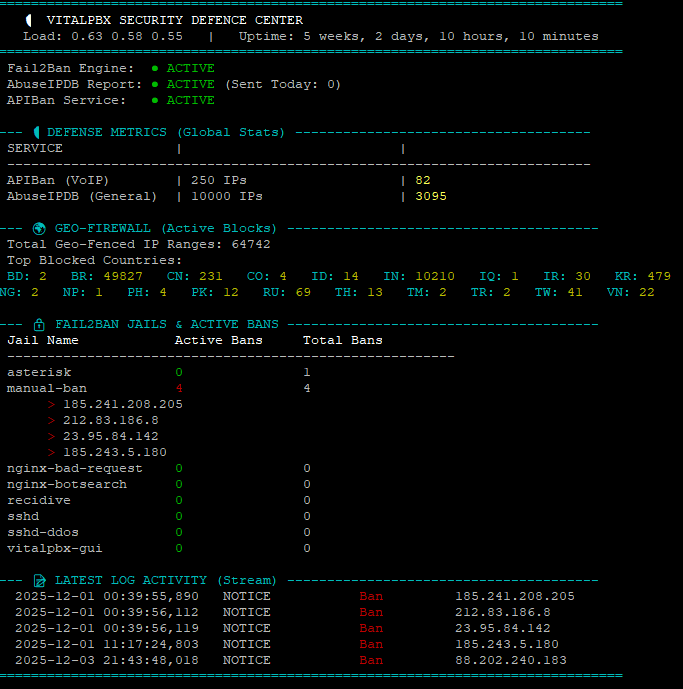
Phase 7: Security Monitor (Dashboard v11)
A dashboard to visualize blocked packets and status.
1. Create Script:
Bash
nano /usr/local/bin/security-monitor
2. Paste Code:
Bash
#!/bin/bash

# ==============================================================================
# VITALPBX SECURITY DASHBOARD (v11 - itproexpert.com)
# Run with: watch -n 2 -c /usr/local/bin/security-monitor
# ==============================================================================

LOG_FILE="/var/log/fail2ban.log"
TODAY=$(date +%Y-%m-%d)

# --- Colors ---
GREEN=$(printf '\033[32m')
RED=$(printf '\033[31m')
YELLOW=$(printf '\033[33m')
CYAN=$(printf '\033[36m')
WHITE=$(printf '\033[97m')
GREY=$(printf '\033[90m')
RESET=$(printf '\033[0m')
BOLD=$(printf '\033[1m')

# --- Snapshots & System Data ---
IPTABLES_SNAPSHOT=$(iptables -L INPUT -v -n)
LOAD=$(cat /proc/loadavg | awk '{print $1" "$2" "$3}')
UPTIME=$(uptime -p | cut -d " " -f 2-)

# --- Helper Functions ---
get_ipset_count() {
    if ipset list -n | grep -q "^$1$"; then
        ipset list "$1" | grep "Number of entries" | cut -d: -f2 | tr -d ' '
    else
        echo "0"
    fi
}

get_drop_count() {
    # Check Main Input
    CNT=$(echo "$IPTABLES_SNAPSHOT" | grep "match-set $1" | awk '{print $1}' | head -n 1)
    # Check Sub-Chains
    if [ -z "$CNT" ]; then
        # If we can't find it in snapshot, check the chain directly
        CNT=$(iptables -L $1 -v -n 2>/dev/null | grep "DROP" | awk '{print $1}' | head -n 1)
    fi
    if [ -z "$CNT" ]; then echo "0"; else echo "$CNT"; fi
}

clear
echo -e "${CYAN}==============================================================================${RESET}"
echo -e "${BOLD}   🛡️   VITALPBX SECURITY DEFENCE CENTER  ${RESET}"
echo -e "   ${WHITE}Load:${RESET} $LOAD   |   ${WHITE}Uptime:${RESET} $UPTIME"
echo -e "${CYAN}==============================================================================${RESET}"

# -----------------------------
# 1. INTEGRATION STATUS
# -----------------------------
if systemctl is-active --quiet fail2ban; then F2B_ICON="${GREEN}● ACTIVE${RESET}"; else F2B_ICON="${RED}● DOWN${RESET}"; fi
ADB_SENT=$(grep "Reported" "$LOG_FILE" | grep "$TODAY" | wc -l)
ADB_ICON="${GREEN}● ACTIVE${RESET} (Sent Today: ${WHITE}${ADB_SENT}${RESET})"
if ipset list -n | grep -q "apiban"; then API_ICON="${GREEN}● ACTIVE${RESET}"; else API_ICON="${RED}● DOWN${RESET}"; fi

printf " Fail2Ban Engine:  %-45s\n" "$F2B_ICON"
printf " AbuseIPDB Report: %-45s\n" "$ADB_ICON"
printf " APIBan Service:   %-45s\n" "$API_ICON"

# -----------------------------
# 2. DEFENSE METRICS
# -----------------------------
echo ""
echo -e "${CYAN}--- 🛡️  DEFENSE METRICS (Global Stats) -------------------------------------${RESET}"

API_DB=$(get_ipset_count "apiban")
API_DROPS=$(get_drop_count "apiban")
ADB_DB=$(get_ipset_count "abuseipdb")
ADB_DROPS=$(get_drop_count "abuseipdb")

printf " ${WHITE}%-20s${RESET} | ${GREY}%-25s${RESET} | ${GREY}%-20s${RESET}\n" "SERVICE" "TOTAL BAD IPs" "PACKETS BLOCKED"
echo " -------------------------------------------------------------------------"
printf " APIBan (VoIP)        | ${WHITE}%-25s${RESET} | ${YELLOW}${BOLD}%-20s${RESET}\n" "$API_DB IPs" "$API_DROPS"
printf " AbuseIPDB (General)  | ${WHITE}%-25s${RESET} | ${YELLOW}${BOLD}%-20s${RESET}\n" "$ADB_DB IPs" "$ADB_DROPS"

# -----------------------------
# 3. GEO-FIREWALL
# -----------------------------
echo ""
echo -e "${CYAN}--- 🌐 GEO-FIREWALL (Active Blocks) ---------------------------------------${RESET}"

GEO_LIST=$(ipset list -n | grep "blacklist_")
TOTAL_GEO_RANGES=0
ACTIVE_BLOCKS=""

if [ -z "$GEO_LIST" ]; then
    echo -e " ${YELLOW}No Country Blocking detected.${RESET}"
else
    for set in $GEO_LIST; do
        CNT=$(ipset list "$set" -t | grep "Number of entries" | cut -d: -f2 | tr -d ' ')
        TOTAL_GEO_RANGES=$((TOTAL_GEO_RANGES + CNT))
        DROPS=$(echo "$IPTABLES_SNAPSHOT" | grep "match-set $set" | awk '{print $1}' | head -n 1)

        if [[ "$DROPS" != "0" && ! -z "$DROPS" ]]; then
             NAME=$(echo "$set" | sed 's/blacklist_//g' | tr '[:lower:]' '[:upper:]')
             ACTIVE_BLOCKS+="${CYAN}${NAME}:${RESET} ${YELLOW}${DROPS}${RESET}   "
        fi
    done

    echo -e " Total Geo-Fenced IP Ranges: ${WHITE}${TOTAL_GEO_RANGES}${RESET}"

    if [ -z "$ACTIVE_BLOCKS" ]; then
        echo -e " ${GREY}(0 Active attacks from Geo-Fenced countries since last reboot)${RESET}"
    else
        echo -e " Top Blocked Countries:"
        echo -e " $ACTIVE_BLOCKS"
    fi
fi

# -----------------------------
# 4. FAIL2BAN JAILS
# -----------------------------
echo ""
echo -e "${CYAN}--- 🔒 FAIL2BAN JAILS & ACTIVE BANS ---------------------------------------${RESET}"
printf " ${BOLD}%-20s %-15s %-15s${RESET}\n" "Jail Name" "Active Bans" "Total Bans"
echo " --------------------------------------------------------"

JAILS=$(fail2ban-client status | grep "Jail list:" | sed 's/.*Jail list://g' | sed 's/,//g')
for jail in $JAILS; do
    STATUS_OUTPUT=$(fail2ban-client status "$jail")
    CURRENT=$(echo "$STATUS_OUTPUT" | grep "Currently banned:" | grep -o '[0-9]*')
    TOTAL=$(echo "$STATUS_OUTPUT" | grep "Total banned:" | grep -o '[0-9]*')
    IP_LIST=$(echo "$STATUS_OUTPUT" | grep "Banned IP list:" | sed 's/.*Banned IP list://g' | tr -s ' ')

    if [ "$CURRENT" -gt 0 ]; then C_COL=$RED; else C_COL=$GREEN; fi

    # FIXED PRINTF LINE (Space at start, arguments separated)
    printf " %-20s %b%-15s%b %-15s\n" "$jail" "$C_COL" "$CURRENT" "$RESET" "$TOTAL"

    if [ "$CURRENT" -gt 0 ]; then
        for ip in $IP_LIST; do
            TIME_BANNED=$(grep "Ban $ip" /var/log/fail2ban.log /var/log/fail2ban.log.1 2>/dev/null | tail -n 1 | awk '{print $1, $2}' | cut -d, -f1)
            if [ -z "$TIME_BANNED" ]; then TIME_BANNED="Unknown Time"; fi
            echo -e "      ${RED}>${RESET} ${WHITE}$ip${RESET}   ${GREY}($TIME_BANNED)${RESET}"
        done
    fi
done

# -----------------------------
# 5. LATEST LOG ACTIVITY
# -----------------------------
echo ""
echo -e "${CYAN}--- 📄 LATEST LOG ACTIVITY (Stream) ---------------------------------------${RESET}"
if [ -f "$LOG_FILE" ]; then
    LAST_LOGS=$(grep " Ban " "$LOG_FILE" | tail -n 5)
    if [ -z "$LAST_LOGS" ]; then
        echo -e "${GREY}   (No bans in current log file)${RESET}"
    else
        echo "$LAST_LOGS" | awk '{printf "  %s %s   %-15s  %-10s  %s\n", $1, $2, $5, "Ban", $NF}' | sed "s/Ban/${RED}Ban${RESET}/g"
    fi
else
    echo -e "${RED}Log file not found.${RESET}"
fi

echo -e "${CYAN}==============================================================================${RESET}"
3. Make Executable:
Bash
chmod +x /usr/local/bin/security-monitor
Phase 8: Persistence & Verification
1. Save initial configuration:
Bash
ipset save > /etc/iptables/ipsets
netfilter-persistent save
2. Verify everything is working:
Run the dashboard to see live statistics.
Bash
watch -n 2 -c /usr/local/bin/security-monitor
3. Testing:
- Check IP in AbuseIPDB:
ipset test abuseipdb 1.2.3.4 - Check IP in APIBan:
iptables -L apiban -n | grep 1.2.3.4 - Monitor specific traffic:
tcpdump -n -i any src net 1.2.3.0/24
📖 Diagnostic Cheat Sheet
| Command | Description |
watch -n 2 -c /usr/local/bin/security-monitor | Launch Dashboard. |
ipset list abuseipdb | head -n 10 | View top AbuseIPDB entries. |
ipset list apiban | head -n 10 | View top APIBan entries. |
iptables -L custom-whitelist -n | View currently whitelisted IPs. |
fail2ban-client set asterisk banip 1.2.3.4 | Manually ban an IP. |
fail2ban-client set asterisk unbanip 1.2.3.4 | Manually unban an IP. |
/usr/local/bin/apiban-update.sh | Manually Update Block Lists |
ipset list -n | while read setname; do echo -n "$setname: " ipset list $setname -t | grep "Number of entries" | cut -d: -f2 done | Manually Check Block Counts |
To Disable Temporally
Edit Crontab
crontab -eChange the following lines by adding a # at the start
# */10 * * * * /usr/local/bin/apiban-update.sh >/dev/null 2>&1
# 0 */6 * * * /usr/local/bin/abuseipdb-update.sh >/dev/null 2>&1Remove Blocking Rules
iptables -D INPUT -j apiban
iptables -D INPUT -m set --match-set abuseipdb src -j DROPThe options below are full a total flush which is not required normally – only for troubleshooting
ipset flush apiban
ipset flush abuseipdb
ipset list apiban | grep "Number of entries"
# Entries should be 0 if disabledRESTORE CHANGES
Edit the Crontab and remove the # from the two entries edited above.
Manual Update
/usr/local/bin/apiban-update.sh
/usr/local/bin/abuseipdb-update.shTROUBLESHOOTING
Section A:
If you update the Firewall in the GUI, you MUST run this immediately after to restore your shields:
/usr/local/bin/whitelist-update.sh && /usr/local/bin/apiban-update.shSection B:
1. Fix Native Firewall (If vpbx_ chains are missing)
This forces VitalPBX to rebuild the standard firewall structure.
Bash
# Ensure firewall is enabled in settings (just in case)
vitalpbx build-firewall

# Force apply the rules
vitalpbx apply-firewall
2. Fix Fail2Ban (If getting “Socket” or “Log file” errors)
This fixes the crash caused by the firewall restart.
Bash
# Create the missing log file that causes the crash
touch /var/log/fail2ban.log

# Force stop the service
systemctl stop fail2ban

# Delete the stale socket file
rm -rf /var/run/fail2ban/fail2ban.sock

# Restart the service
systemctl restart fail2ban

# Verify it is alive (Should say "pong")
fail2ban-client ping
3. Restore Custom Shields (If Whitelist/APIBan disappeared)
This puts your protection back on top (Rule #1 & #2) after the firewall reload wiped them.
Bash
# Restore Golden Whitelist (Rule #1)
/usr/local/bin/whitelist-update.sh

# Restore APIBan / AbuseIPDB (Rule #2)
/usr/local/bin/apiban-update.sh
4. Final Verification
Check that everything is in the “Ironclad” order:
Bash
iptables -L INPUT -n --line-numbers | head -n 10
Look for: custom-whitelist (1st), apiban (2nd), and vpbx_ chains (lower down).
Section C:
🆘 Emergency Restore Command If your firewall crashes, Fail2Ban fails to start, or you accidentally wiped your rules via the GUI, run this one-liner to fix the entire stack:
Bash
touch /var/log/fail2ban.log && systemctl restart fail2ban && /usr/localSection D:
If you AbuseIPDB is not getting reports from your server (check by logging into their website) – any blocks coming from brute force to Asterisk or SSH etc should be on the log and the public IP search.
The issue would be that the Fail2Ban Jail is setup incorrectly or has been over written.
1. Fix Your jail.local
Open the file:
nano /etc/fail2ban/jail.localCheck the contents of this file against the installation file (from Phase 5 section 2) – it should have the AbuseIPDB API key and each entry (asterisk,ssh) should ‘action’ a report to AduseIPDB.
Correct anything that is missing and then save.
Now restart fail2ban.
systemctl restart fail2banYou can also verify its working in the log but wait till an event happens.
grep "AbuseIPDB" /var/log/fail2ban.logSection E:
You might notice that the Fail2Ban numbers are very low (only 1 ban). This is actually a good thing.
Because you have APIBan and AbuseIPDB at the front door (Rules #2), you are blocking the 100,000 known hackers before they can even touch Asterisk to guess a password.
- Without APIBan: Your server logs would be screaming with thousands of failed logins, and Fail2Ban would be working overtime.
- With APIBan: The “Noise” is blocked silently at the firewall. Fail2Ban is now just sitting comfortably in the back, waiting for any new attacker who isn’t on the global blacklists yet.
🔍 How to check the Brute Force Status
To see exactly what the Asterisk protection is doing right now, run this command:
Bash
fail2ban-client status
This will list all the “Jails” (e.g., asterisk-udp, asterisk-tcp, sshd, vitalpbx-gui).
Like this below:
# THIS IS AN EXAMPLE RESULT - DO NOT TYPE THIS IN
Status
|- Number of jail:      8
`- Jail list:   asterisk, manual-ban, nginx-bad-request, nginx-botsearch, recidive, sshd, sshd-ddos, vitalpbx-gui
To look deep inside the Asterisk UDP jail (the most common attack vector), run:
Bash
fail2ban-client status asterisk-udp
What to look for:
- Status: Should say
Currently failed: 0(or a small number). - File list: It should show the log file it is watching (usually
/var/log/asterisk/securityor/var/log/asterisk/full). - Banned IP list: Any IPs listed here are currently in the “Penalty Box” for guessing passwords.
If that command returns status information, then your standard brute-force protection is 100% healthy.
To be 100% sure your system is healthy and the “Ironclad Order” is correct, run these three checks.
If these three outputs match the examples below, your security is perfect.
Check 1: The Firewall Order (Most Critical)
Run this command to see the top 10 rules. This determines who gets in and who gets dropped.
Bash
iptables -L INPUT -n --line-numbers | head -n 10
✅ What you MUST see:
- Line 1:
custom-whitelist(Your trusted IPs must be first). - Line 2:
apiban(orabuseipdb) (Your shields must be second). - Line 3+:
vpbx_...orfail2ban(The standard VitalPBX rules must be below your shields).
❌ dangerous Example: If vpbx_firewall is at Line 1 or 2, and custom-whitelist is missing or at the bottom, VitalPBX has wiped your rules. Run your restore scripts immediately.
Check 2: The Blocklist Capacity
Verify that your “buckets” of banned IPs are actually full.
Bash
ipset list -n | while read setname; do
    echo -n "$setname: "
    ipset list $setname -t | grep "Number of entries" | cut -d: -f2
done
✅ What you MUST see:
apiban: > 0 (Usually 200-500)abuseipdb: 10,000 (Full)vpbx_...: (Should show numbers for country blocks if you enabled them).
Check 3: The “Ping” Test
Ensure the dynamic guard (Fail2Ban) is awake and listening.
Bash
fail2ban-client ping
✅ What you MUST see:
Server replied: pong
🟢 Summary
- Whitelist is Top? Yes.
- Lists are Full? Yes.
- Fail2Ban is PONGing? Yes.
If all three represent “Yes”, your system is healthy, secure, and ready for production.
Security Audit Tool
This tool will check all firewalls, updates and block lists are all working – automatically.
Install the script:
nano /usr/local/bin/security-audit.shPaste the following:
#!/bin/bash

# ==============================================================================
# VITALPBX SECURITY AUDIT TOOL (v2)
# Verifies Firewall Order, Shield Health, Fail2Ban Config, and Reporting.
# ==============================================================================

# --- Colors ---
PASS=$(printf '\033[32m✔ PASS\033[0m')
FAIL=$(printf '\033[31m✖ FAIL\033[0m')
WARN=$(printf '\033[33m! WARN\033[0m')
BOLD=$(printf '\033[1m')
RESET=$(printf '\033[0m')

echo -e "\n${BOLD}🔒 STARTING SECURITY AUDIT...${RESET}"
echo "=========================================================="

# ------------------------------------------------------------------------------
# 1. FIREWALL HIERARCHY CHECK (The "Ironclad" Test)
# ------------------------------------------------------------------------------
echo -e "\n${BOLD}[1] FIREWALL HIERARCHY CHECK${RESET}"

# Get the first 3 input rules
RULES=$(iptables -L INPUT -n --line-numbers | head -n 5)

# Parse Rule 1
RULE_1_TARGET=$(echo "$RULES" | grep "^1" | awk '{print $2}')

# Parse Rule 2 (Capture Target AND Options to detect "match-set")
RULE_2_LINE=$(echo "$RULES" | grep "^2")
RULE_2_TARGET=$(echo "$RULE_2_LINE" | awk '{print $2}')

# Check Rule 1 (Must be Whitelist)
if [[ "$RULE_1_TARGET" == "custom-whitelist" ]]; then
    echo -e " $PASS Rule #1 is Golden Whitelist"
else
    echo -e " $FAIL Rule #1 is '$RULE_1_TARGET' (Expected: custom-whitelist)"
    echo -e "       ${WARN} Run /usr/local/bin/whitelist-update.sh to fix."
fi

# Check Rule 2 (Accepts 'apiban' Chain OR 'DROP' with abuseipdb match)
if [[ "$RULE_2_TARGET" == "apiban" ]]; then
    echo -e " $PASS Rule #2 is Shield (APIBan Chain)"
elif [[ "$RULE_2_TARGET" == "DROP" ]] && echo "$RULE_2_LINE" | grep -q "abuseipdb"; then
    echo -e " $PASS Rule #2 is Shield (AbuseIPDB Direct Drop)"
elif [[ "$RULE_2_TARGET" == "abuseipdb" ]]; then
    echo -e " $PASS Rule #2 is Shield (AbuseIPDB Chain)"
else
    echo -e " $FAIL Rule #2 is '$RULE_2_TARGET' (Expected: apiban or abuseipdb)"
    echo -e "       ${WARN} Run /usr/local/bin/apiban-update.sh to fix."
fi

# ------------------------------------------------------------------------------
# 2. BLOCKLIST CAPACITY CHECK (Are lists empty?)
# ------------------------------------------------------------------------------
echo -e "\n${BOLD}[2] BLOCKLIST CAPACITY CHECK${RESET}"

# Function to check ipset count
check_ipset() {
    NAME=$1
    EXPECTED=$2
    if ipset list -n | grep -q "^$NAME$"; then
        COUNT=$(ipset list $NAME -t | grep "Number of entries" | cut -d: -f2 | tr -d ' ')
        if [ "$COUNT" -gt "$EXPECTED" ]; then
             echo -e " $PASS $NAME: Active with ${BOLD}$COUNT${RESET} blocked IPs."
        else
             echo -e " $FAIL $NAME: Empty or too low ($COUNT entries)."
        fi
    else
        echo -e " $FAIL $NAME: Chain missing from Kernel."
    fi
}

check_ipset "apiban" 50
check_ipset "abuseipdb" 1000

# ------------------------------------------------------------------------------
# 3. FAIL2BAN & REPORTING CHECK
# ------------------------------------------------------------------------------
echo -e "\n${BOLD}[3] FAIL2BAN & REPORTING CHECK${RESET}"

# Service Status
if systemctl is-active --quiet fail2ban; then
    echo -e " $PASS Fail2Ban Service is RUNNING."
else
    echo -e " $FAIL Fail2Ban Service is DEAD."
fi

# Socket Ping
if fail2ban-client ping | grep -q "pong"; then
    echo -e " $PASS Fail2Ban Socket is responsive."
else
    echo -e " $FAIL Fail2Ban Socket is unreachable."
fi

# Reporting Configuration Check
if grep -q "action_abuseipdb" /etc/fail2ban/jail.local; then
     echo -e " $PASS AbuseIPDB Reporting Logic found in config."
else
     echo -e " $FAIL AbuseIPDB Reporting Logic MISSING from jail.local."
fi

# API Key Check
API_KEY=$(grep "abuseipdb_apikey =" /etc/fail2ban/jail.local | cut -d= -f2 | tr -d ' ')
if [[ ${#API_KEY} -gt 10 ]]; then
    echo -e " $PASS Reporting API Key detected."
else
    echo -e " $FAIL Reporting API Key is missing or empty."
fi

# ------------------------------------------------------------------------------
# 4. WHITELIST INTEGRITY (Sync Check)
# ------------------------------------------------------------------------------
echo -e "\n${BOLD}[4] WHITELIST SYNC CHECK${RESET}"

VPBX_WL_COUNT=$(iptables -S vpbx_white_list 2>/dev/null | grep "\-s" | wc -l)
CUSTOM_WL_COUNT=$(iptables -S custom-whitelist 2>/dev/null | grep "\-s" | wc -l)

# We expect Custom to satisfy VitalPBX + 1 (Localhost)
EXPECTED=$((VPBX_WL_COUNT + 1))

if [ "$CUSTOM_WL_COUNT" -ge "$EXPECTED" ]; then
    echo -e " $PASS Whitelist Synced (VitalPBX: $VPBX_WL_COUNT | Active: $CUSTOM_WL_COUNT)"
else
    echo -e " $WARN Whitelist Mismatch! VitalPBX has $VPBX_WL_COUNT, Active has $CUSTOM_WL_COUNT."
    echo -e "       ${WARN} Run /usr/local/bin/whitelist-update.sh to re-sync."
fi

echo -e "\n=========================================================="
echo -e "${BOLD}AUDIT COMPLETE.${RESET}\n"
Save and then chmod
chmod +x /usr/local/bin/security-audit.shRun
/usr/local/bin/security-audit.sh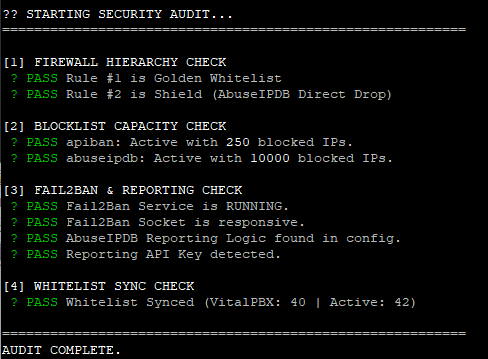
2026 Update – New Feature – Manual CIDR Blocking
🛡️ VitalPBX Security Suite: CIDR Range Blocking Upgrade
Version: 1.0
Compatibility: VitalPBX Security Suite v2.0+
Purpose: Add support for blocking IP ranges (CIDR notation) like 107.189.0.0/19 because the current vitalpbx black list doesn’t always work with CIDR blocks.
Overview
The original VitalPBX Security Suite uses hash:ip ipsets which only support individual IP addresses. This upgrade adds a new manual_cidr ipset using hash:net which natively supports CIDR notation, allowing you to block entire IP ranges.
What This Upgrade Adds
- CIDR Range Blocking – Block entire subnets like
107.189.0.0/19(8,192 IPs) with a single entry - Management Script – Easy add/remove/list/test commands
- Boot Persistence – Survives reboots automatically
- Self-Healing – Recovers after VitalPBX firewall reloads
- Dashboard Integration – See blocked ranges in Security Monitor
- Audit Integration – Security audit recognizes the new shield
Why CIDR Support is Needed
The default ipsets use hash:ip type:
ipset list abuseipdb -t | grep "Type:"
# Output: Type: hash:ip
When you try to add a range like 107.189.0.0/19, it fails silently or only adds the base IP. The hash:net type is required for CIDR support.
Installation
Step 1: Create the Manual Blacklist Script
nano /usr/local/bin/manual-blacklist.shPaste the following:
#!/bin/bash
# ==============================================================================
# Manual CIDR Blacklist Manager v1.0
# Supports individual IPs and CIDR ranges (e.g., 107.189.0.0/19)
# ==============================================================================

IPSET_NAME="manual_cidr"
BLACKLIST_FILE="/etc/security/manual-blacklist.txt"
WHITELIST_SCRIPT="/usr/local/bin/whitelist-update.sh"

# Ensure directory and file exist
mkdir -p /etc/security
touch "$BLACKLIST_FILE"

# Ensure ipset exists (hash:net for CIDR support)
if ! ipset list -n | grep -q "^${IPSET_NAME}$"; then
    ipset create $IPSET_NAME hash:net hashsize 4096 maxelem 65536
    echo "Created ipset: $IPSET_NAME"
fi

# Ensure iptables rule exists
ensure_iptables_rule() {
    if ! iptables -C INPUT -m set --match-set $IPSET_NAME src -j DROP 2>/dev/null; then
        # Insert at position 2 (after whitelist)
        iptables -I INPUT 2 -m set --match-set $IPSET_NAME src -j DROP
        echo "Added iptables rule for $IPSET_NAME"
    fi
    # Re-apply whitelist to maintain priority
    [ -x "$WHITELIST_SCRIPT" ] && $WHITELIST_SCRIPT >/dev/null 2>&1
}

# Validate IP/CIDR format
validate_entry() {
    local entry="$1"
    if [[ "$entry" =~ ^[0-9]+\.[0-9]+\.[0-9]+\.[0-9]+(/[0-9]+)?$ ]]; then
        return 0
    else
        echo "Invalid format: $entry"
        echo "Use: x.x.x.x or x.x.x.x/xx (e.g., 1.2.3.4 or 10.0.0.0/8)"
        return 1
    fi
}

case "$1" in
    add)
        if [ -z "$2" ]; then
            echo "Usage: $0 add <IP or CIDR>"
            echo "Examples:"
            echo "  $0 add 107.189.0.0/19"
            echo "  $0 add 45.155.205.100"
            exit 1
        fi
        validate_entry "$2" || exit 1
        ensure_iptables_rule

        if ipset test $IPSET_NAME "$2" 2>/dev/null; then
            echo "$2 is already in blacklist"
        else
            ipset add $IPSET_NAME "$2"
            echo "$2" >> "$BLACKLIST_FILE"
            sort -u "$BLACKLIST_FILE" -o "$BLACKLIST_FILE"
            echo "✓ Added $2 to blacklist"
        fi
        ;;

    remove|del)
        if [ -z "$2" ]; then
            echo "Usage: $0 remove <IP/CIDR>"
            exit 1
        fi
        if ipset del $IPSET_NAME "$2" 2>/dev/null; then
            sed -i "\|^${2}$|d" "$BLACKLIST_FILE"
            echo "✓ Removed $2 from blacklist"
        else
            echo "$2 was not in blacklist"
        fi
        ;;

    test|check)
        if [ -z "$2" ]; then
            echo "Usage: $0 test <IP>"
            exit 1
        fi
        if ipset test $IPSET_NAME "$2" 2>/dev/null; then
            echo "✓ $2 IS blocked by manual blacklist"
        else
            echo "✗ $2 is NOT in manual blacklist"
        fi
        ;;

    list)
        COUNT=$(ipset list $IPSET_NAME 2>/dev/null | grep -c "^[0-9]")
        echo "=== Manual Blacklist ($COUNT entries) ==="
        ipset list $IPSET_NAME | grep -E "^[0-9]" | sort -t. -k1,1n -k2,2n -k3,3n -k4,4n
        ;;

    count)
        COUNT=$(ipset list $IPSET_NAME 2>/dev/null | grep -c "^[0-9]")
        echo "$COUNT entries in manual blacklist"
        ;;

    stats)
        echo "=== Manual Blacklist Statistics ==="
        COUNT=$(ipset list $IPSET_NAME 2>/dev/null | grep -c "^[0-9]")
        DROPS=$(iptables -L INPUT -v -n | grep "match-set ${IPSET_NAME}" | awk '{print $1}')
        echo "Entries: $COUNT"
        echo "Packets blocked: ${DROPS:-0}"
        ;;

    flush|clear)
        read -p "Are you sure you want to remove ALL entries? (y/N): " confirm
        if [[ "$confirm" =~ ^[Yy]$ ]]; then
            ipset flush $IPSET_NAME
            > "$BLACKLIST_FILE"
            echo "✓ Blacklist cleared"
        else
            echo "Cancelled"
        fi
        ;;

    import)
        # Re-import from file (used for boot persistence)
        ensure_iptables_rule
        if [ -f "$BLACKLIST_FILE" ] && [ -s "$BLACKLIST_FILE" ]; then
            IMPORTED=0
            while IFS= read -r entry || [ -n "$entry" ]; do
                entry=$(echo "$entry" | tr -d '[:space:]')
                if [ -n "$entry" ] && [[ ! "$entry" =~ ^# ]]; then
                    ipset add $IPSET_NAME "$entry" -exist 2>/dev/null && ((IMPORTED++))
                fi
            done < "$BLACKLIST_FILE"
            echo "✓ Imported $IMPORTED entries from $BLACKLIST_FILE"
        else
            echo "No entries to import"
        fi
        ;;

    export)
        echo "# Manual blacklist export - $(date)"
        ipset list $IPSET_NAME | grep -E "^[0-9]"
        ;;

    bulk)
        # Bulk add from file argument
        if [ -z "$2" ] || [ ! -f "$2" ]; then
            echo "Usage: $0 bulk <filename>"
            echo "File should contain one IP/CIDR per line"
            exit 1
        fi
        ensure_iptables_rule
        ADDED=0
        while IFS= read -r entry || [ -n "$entry" ]; do
            entry=$(echo "$entry" | tr -d '[:space:]')
            if [ -n "$entry" ] && [[ ! "$entry" =~ ^# ]]; then
                if ipset add $IPSET_NAME "$entry" -exist 2>/dev/null; then
                    echo "$entry" >> "$BLACKLIST_FILE"
                    ((ADDED++))
                fi
            fi
        done < "$2"
        sort -u "$BLACKLIST_FILE" -o "$BLACKLIST_FILE"
        echo "✓ Added $ADDED entries from $2"
        ;;

    *)
        echo "Manual CIDR Blacklist Manager"
        echo ""
        echo "Usage: $0 <command> [argument]"
        echo ""
        echo "Commands:"
        echo "  add <IP/CIDR>      Add IP or range to blacklist"
        echo "  remove <IP/CIDR>   Remove IP or range from blacklist"
        echo "  test <IP>          Check if IP is blocked"
        echo "  list               Show all blacklisted entries"
        echo "  count              Show number of entries"
        echo "  stats              Show entries and packets blocked"
        echo "  flush              Remove all entries (with confirmation)"
        echo "  import             Reload entries from file (boot recovery)"
        echo "  export             Output entries for backup"
        echo "  bulk <file>        Add multiple entries from file"
        echo ""
        echo "Examples:"
        echo "  $0 add 107.189.0.0/19"
        echo "  $0 add 45.155.205.100"
        echo "  $0 test 107.189.10.70"
        echo "  $0 remove 1.2.3.0/24"
        ;;
esac
Make it executable:
chmod +x /usr/local/bin/manual-blacklist.shStep 2: Add Boot Persistence to Crontab
crontab -eAdd this line after your existing @reboot entries:
@reboot sleep 35 && /usr/local/bin/manual-blacklist.sh import >/dev/null 2>&1Your crontab should now look similar to:
# Define the PATH so Cron can find 'iptables' and 'ipset'
PATH=/usr/local/sbin:/usr/local/bin:/sbin:/bin:/usr/sbin:/usr/bin

# 1. APIBan Updater (Self-Healing)
*/10 * * * * /usr/local/bin/apiban-update.sh >/dev/null 2>&1

# 2. AbuseIPDB Updater (Self-Healing)
0 */6 * * * /usr/local/bin/abuseipdb-update.sh >/dev/null 2>&1

# 3. Boot Safety (Persistence)
@reboot sleep 30 && /usr/local/bin/apiban-update.sh >/dev/null 2>&1
@reboot sleep 30 && /usr/local/bin/abuseipdb-update.sh >/dev/null 2>&1
@reboot sleep 35 && /usr/local/bin/manual-blacklist.sh import >/dev/null 2>&1
Step 3: Add Self-Healing to APIBan Script
When VitalPBX reloads its firewall (e.g., clicking “Apply Changes” in the GUI), it wipes custom iptables rules. The apiban-update.sh script runs every 10 minutes and can restore the manual_cidr rule automatically.
Edit the script:
nano /usr/local/bin/apiban-update.shAdd this block before the final whitelist-update.sh call:
# 6. Self-Healing for Manual CIDR Blacklist
MANUAL_SET="manual_cidr"
if ipset list -n | grep -q "^${MANUAL_SET}$"; then
    if ! iptables -C INPUT -m set --match-set $MANUAL_SET src -j DROP 2>/dev/null; then
        iptables -I INPUT 2 -m set --match-set $MANUAL_SET src -j DROP
    fi
fi

# 7. Self-Healing for Geo-Firewall
for set in $(ipset list -n | grep "blacklist_"); do
    if ! iptables -C INPUT -m set --match-set "$set" src -j DROP 2>/dev/null; then
        iptables -I INPUT -m set --match-set "$set" src -j DROP
    fi
done

# 8. Re-Apply Whitelist to ensure it stays on top
/usr/local/bin/whitelist-update.sh >/dev/null 2>&1
Step 4: Update Security Audit Script
The audit script needs to recognize manual_cidr as a valid shield at Rule #2.
nano /usr/local/bin/security-audit.shReplace all of the code with:
#!/bin/bash

# ==============================================================================
# VITALPBX SECURITY AUDIT TOOL (v2 - Fixed Drop Detection)
# Verifies Firewall Order, Shield Health, Fail2Ban Config, and Reporting.
# ==============================================================================

# --- Colors ---
PASS=$(printf '\033[32m? PASS\033[0m')
FAIL=$(printf '\033[31m? FAIL\033[0m')
WARN=$(printf '\033[33m! WARN\033[0m')
BOLD=$(printf '\033[1m')
RESET=$(printf '\033[0m')

echo -e "\n${BOLD}?? STARTING SECURITY AUDIT...${RESET}"
echo "=========================================================="

# ------------------------------------------------------------------------------
# 1. FIREWALL HIERARCHY CHECK (The "Ironclad" Test)
# ------------------------------------------------------------------------------
echo -e "\n${BOLD}[1] FIREWALL HIERARCHY CHECK${RESET}"

# Get the first 3 input rules
RULES=$(iptables -L INPUT -n --line-numbers | head -n 5)

# Parse Rule 1
RULE_1_TARGET=$(echo "$RULES" | grep "^1" | awk '{print $2}')

# Parse Rule 2 (Capture Target AND Options to detect "match-set")
RULE_2_LINE=$(echo "$RULES" | grep "^2")
RULE_2_TARGET=$(echo "$RULE_2_LINE" | awk '{print $2}')

# Check Rule 1 (Must be Whitelist)
if [[ "$RULE_1_TARGET" == "custom-whitelist" ]]; then
    echo -e " $PASS Rule #1 is Golden Whitelist"
else
    echo -e " $FAIL Rule #1 is '$RULE_1_TARGET' (Expected: custom-whitelist)"
    echo -e "       ${WARN} Run /usr/local/bin/whitelist-update.sh to fix."
fi

# Check Rule 2 (Accepts shields: apiban, abuseipdb, manual_cidr, or geo-firewall)
if [[ "$RULE_2_TARGET" == "apiban" ]]; then
    echo -e " $PASS Rule #2 is Shield (APIBan Chain)"
elif [[ "$RULE_2_TARGET" == "DROP" ]] && echo "$RULE_2_LINE" | grep -q "abuseipdb"; then
    echo -e " $PASS Rule #2 is Shield (AbuseIPDB Direct Drop)"
elif [[ "$RULE_2_TARGET" == "DROP" ]] && echo "$RULE_2_LINE" | grep -q "manual_cidr"; then
    echo -e " $PASS Rule #2 is Shield (Manual CIDR Blacklist)"
elif [[ "$RULE_2_TARGET" == "DROP" ]] && echo "$RULE_2_LINE" | grep -q "blacklist_"; then
    echo -e " $PASS Rule #2 is Shield (Geo-Firewall)"
elif [[ "$RULE_2_TARGET" == "abuseipdb" ]]; then
    echo -e " $PASS Rule #2 is Shield (AbuseIPDB Chain)"
else
    echo -e " $FAIL Rule #2 is '$RULE_2_TARGET' (Expected: apiban, abuseipdb, manual_cidr, or blacklist_)"
    echo -e "       ${WARN} Run /usr/local/bin/apiban-update.sh to fix."
fi

# ------------------------------------------------------------------------------
# 2. BLOCKLIST CAPACITY CHECK (Are lists empty?)
# ------------------------------------------------------------------------------
echo -e "\n${BOLD}[2] BLOCKLIST CAPACITY CHECK${RESET}"

# Function to check ipset count
check_ipset() {
    NAME=$1
    EXPECTED=$2
    if ipset list -n | grep -q "^$NAME$"; then
        COUNT=$(ipset list $NAME -t | grep "Number of entries" | cut -d: -f2 | tr -d ' ')
        if [ "$COUNT" -gt "$EXPECTED" ]; then
             echo -e " $PASS $NAME: Active with ${BOLD}$COUNT${RESET} blocked IPs."
        else
             echo -e " $FAIL $NAME: Empty or too low ($COUNT entries)."
        fi
    else
        echo -e " $FAIL $NAME: Chain missing from Kernel."
    fi
}

check_ipset "apiban" 50
check_ipset "abuseipdb" 1000

# ------------------------------------------------------------------------------
# 3. FAIL2BAN & REPORTING CHECK
# ------------------------------------------------------------------------------
echo -e "\n${BOLD}[3] FAIL2BAN & REPORTING CHECK${RESET}"

# Service Status
if systemctl is-active --quiet fail2ban; then
    echo -e " $PASS Fail2Ban Service is RUNNING."
else
    echo -e " $FAIL Fail2Ban Service is DEAD."
fi

# Socket Ping
if fail2ban-client ping | grep -q "pong"; then
    echo -e " $PASS Fail2Ban Socket is responsive."
else
    echo -e " $FAIL Fail2Ban Socket is unreachable."
fi

# Reporting Configuration Check
if grep -q "action_abuseipdb" /etc/fail2ban/jail.local; then
     echo -e " $PASS AbuseIPDB Reporting Logic found in config."
else
     echo -e " $FAIL AbuseIPDB Reporting Logic MISSING from jail.local."
fi

# API Key Check
API_KEY=$(grep "abuseipdb_apikey =" /etc/fail2ban/jail.local | cut -d= -f2 | tr -d ' ')
if [[ ${#API_KEY} -gt 10 ]]; then
    echo -e " $PASS Reporting API Key detected."
else
    echo -e " $FAIL Reporting API Key is missing or empty."
fi

# ------------------------------------------------------------------------------
# 4. WHITELIST INTEGRITY (Sync Check)
# ------------------------------------------------------------------------------
echo -e "\n${BOLD}[4] WHITELIST SYNC CHECK${RESET}"

VPBX_WL_COUNT=$(iptables -S vpbx_white_list 2>/dev/null | grep "\-s" | wc -l)
CUSTOM_WL_COUNT=$(iptables -S custom-whitelist 2>/dev/null | grep "\-s" | wc -l)

# We expect Custom to satisfy VitalPBX + 1 (Localhost)
EXPECTED=$((VPBX_WL_COUNT + 1))

if [ "$CUSTOM_WL_COUNT" -ge "$EXPECTED" ]; then
    echo -e " $PASS Whitelist Synced (VitalPBX: $VPBX_WL_COUNT | Active: $CUSTOM_WL_COUNT)"
else
    echo -e " $WARN Whitelist Mismatch! VitalPBX has $VPBX_WL_COUNT, Active has $CUSTOM_WL_COUNT."
    echo -e "       ${WARN} Run /usr/local/bin/whitelist-update.sh to re-sync."
fi

# ------------------------------------------------------------------------------
# 5. GEO-FIREWALL RULE CHECK
# ------------------------------------------------------------------------------
echo -e "\n${BOLD}[5] GEO-FIREWALL RULE CHECK${RESET}"

GEO_SETS=$(ipset list -n | grep "blacklist_")
if [ -z "$GEO_SETS" ]; then
    echo -e " ${GREY}No Geo-Firewall sets detected.${RESET}"
else
    GEO_OK=0
    GEO_MISSING=0
    for set in $GEO_SETS; do
        if iptables -C INPUT -m set --match-set "$set" src -j DROP 2>/dev/null; then
            ((GEO_OK++))
        else
            ((GEO_MISSING++))
            echo -e " $FAIL Missing iptables rule for $set"
        fi
    done
    if [ "$GEO_MISSING" -eq 0 ]; then
        echo -e " $PASS All $GEO_OK Geo-Firewall rules active"
    else
        echo -e "       ${WARN} Run: for set in \$(ipset list -n | grep blacklist_); do iptables -I INPUT -m set --match-set \"\$set\" src -j DROP; done"
    fi
fi

echo -e "\n=========================================================="
echo -e "${BOLD}AUDIT COMPLETE.${RESET}\n"
Step 5: Update Security Monitor Dashboard
Add the manual_cidr statistics to the dashboard display.
nano /usr/local/bin/security-monitorFind the DEFENSE METRICS section and update to include:
MANUAL_DB=$(get_ipset_count "manual_cidr")
MANUAL_DROPS=$(get_drop_count "manual_cidr")
And add this line after the AbuseIPDB printf:
printf " Manual CIDR | ${WHITE}%-25s${RESET} | ${YELLOW}${BOLD}%-20s${RESET}\n" "$MANUAL_DB ranges" "$MANUAL_DROPS"Usage Examples
Adding IP Ranges
# Block a /19 range (8,192 IPs)
manual-blacklist.sh add 107.189.0.0/19

# Block a /24 range (256 IPs)
manual-blacklist.sh add 45.155.205.0/24

# Block a single IP
manual-blacklist.sh add 107.54.1.123
Testing if an IP is Blocked
# Test if a specific IP within a range is blocked
manual-blacklist.sh test 107.189.10.70
# Output: ✓ 107.189.10.70 IS blocked by manual blacklist
Viewing Blocked Entries
# List all entries
manual-blacklist.sh list

# Show count only
manual-blacklist.sh count

# Show statistics with packet counts
manual-blacklist.sh stats
Removing Entries
# Remove a specific range
manual-blacklist.sh remove 107.189.0.0/19
Bulk Import from File
Create a file with one entry per line:
# /tmp/bad-ranges.txt
107.189.0.0/19
45.155.205.0/24
193.32.162.0/24
# Comments are ignored
Import:
manual-blacklist.sh bulk /tmp/bad-ranges.txtFirewall Hierarchy
After installation, your firewall rules will be ordered:
| Position | Rule | Purpose |
|---|---|---|
| 1 | custom-whitelist | Trusted IPs bypass all blocks |
| 2 | manual_cidr | Your custom CIDR ranges |
| 3 | abuseipdb | Top 10,000 worst IPs |
| 4 | apiban | Active VoIP attackers |
| 5+ | vpbx_* | VitalPBX native rules |
Verify with:
iptables -L INPUT -n --line-numbers | head -n 10Verification Commands
| Command | Description |
|---|---|
ipset list manual_cidr -t | grep "Type:" | Verify ipset type is hash:net |
manual-blacklist.sh test 107.189.10.70 | Test if IP is blocked |
manual-blacklist.sh stats | View entry count and blocked packets |
/usr/local/bin/security-audit.sh | Run full security audit |
watch -n 2 -c /usr/local/bin/security-monitor | Live security dashboard |
CIDR Quick Reference
| CIDR | IPs Blocked | Example |
|---|---|---|
| /32 | 1 | Single host |
| /24 | 256 | 192.168.1.0/24 |
| /19 | 8,192 | 107.189.0.0/19 |
| /16 | 65,536 | 10.0.0.0/16 |
| /8 | 16,777,216 | 10.0.0.0/8 |
Troubleshooting
Rule disappears after VitalPBX GUI changes?
This is expected. The self-healing in apiban-update.sh will restore it within 10 minutes. For immediate restoration:manual-blacklist.sh import
Security audit shows FAIL for Rule #2?
If manual_cidr is at position 2, update the audit script as described in Step 4. This is a false positive – the rule is working correctly.
Entries not surviving reboot?
Check crontab has the @reboot entry:
crontab -l | grep manual-blacklistShould show:
@reboot sleep 35 && /usr/local/bin/manual-blacklist.sh import >/dev/null 2>&1This upgrade is compatible with VitalPBX Security Suite v2.0