VitalPBX Enhanced Firewall Security
If you need to add an inbound IP abuse protection layer to your VitalPBX/Asterisk server then here is a guide.Note: This is specific to VitalPBX but should work on Asterisk/Freepbx…
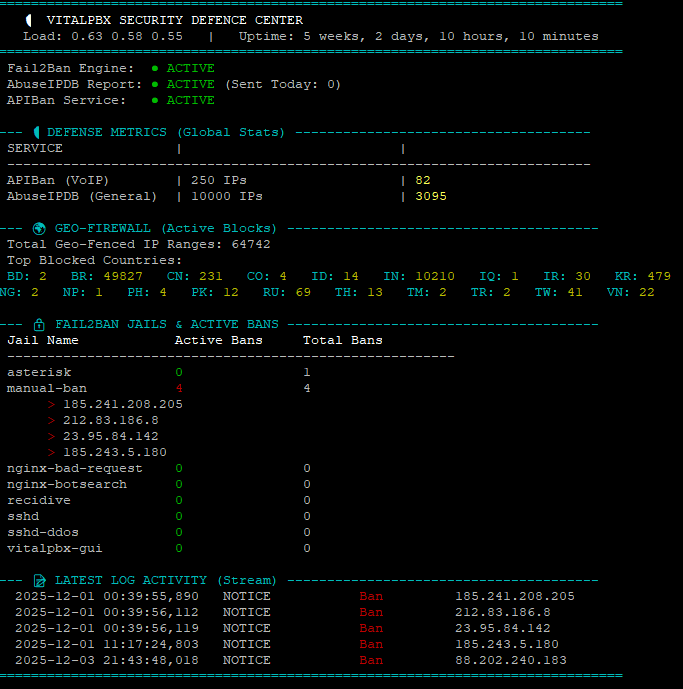
Add an inbound IP abuse protection layer to your VitalPBX or Asterisk server. The suite protects SIP and SSH from brute-force attacks and scanners using AbuseIPDB and APIBan.
It's written for VitalPBX but should also work on Asterisk and FreePBX if you adjust a few items. Once it's installed, check that it keeps working for 24 hours and after a reboot, and that the firewall rules are in the correct order.
Master Installation Guide
Version 2.0 (self-healing and auto-sync) for Debian and VitalPBX. The suite is built from four layers, and each one is installed in its own phase below.
Golden Whitelist
Puts the IPs from your VitalPBX whitelist at Rule #1, above every blocklist, so you can't lock yourself out.
APIBan VoIP Shield
Downloads active VoIP attacker IPs and blocks them with a self-healing script.
AbuseIPDB General Shield
Blocks the top 10,000 worst IPs at a confidence score of 100.
Fail2Ban Reporting
Reports local brute-force attempts back to AbuseIPDB.
Prerequisites
Before you start, make sure you have:
Phase 1: System Preparation
Install the tools for managing IP lists, keeping firewall rules persistent and downloading data.
apt update
apt install ipset ipset-persistent iptables-persistent curl tcpdump -y
If you're prompted to save the current IPv4 rules during the install, select Yes.
Phase 2: The Golden Whitelist (Priority System)
This script reads the IPs from the VitalPBX web interface (Admin > Firewall > Whitelist) and forces them to the very top of the firewall at Rule #1, where they bypass every blocklist. This stops you locking yourself out.
1. Create the script:
nano /usr/local/bin/whitelist-update.sh2. Paste the code:
#!/bin/bash
# ==============================================================================
# "Golden Whitelist" - Syncs VitalPBX GUI to Top of Firewall
# ==============================================================================
CHAIN_NAME="custom-whitelist"
VPBX_CHAIN="vpbx_white_list"

# 1. Create/Flush Chain
iptables -N $CHAIN_NAME 2>/dev/null
iptables -F $CHAIN_NAME

# 2. Hardcoded Safety Nets (Localhost & Server IP)
iptables -A $CHAIN_NAME -s 127.0.0.1 -j ACCEPT
# Add your Server Public IP below to prevent locking yourself out
# iptables -A $CHAIN_NAME -s YOUR_SERVER_IP -j ACCEPT

# 3. AUTO-SYNC: Import IPs from VitalPBX Web Interface
if iptables -L $VPBX_CHAIN -n >/dev/null 2>&1; then
    # Robust parsing to extract IPs from VitalPBX chain
    IP_LIST=$(iptables -S $VPBX_CHAIN | awk '$3 == "-s" {print $4}' | grep -v "0.0.0.0/0")
    for ip in $IP_LIST; do
        if [ -n "$ip" ]; then iptables -A $CHAIN_NAME -s $ip -j ACCEPT; fi
    done
fi

# 4. ENFORCE POSITION (King of the Hill)
# Ensure this chain is always Rule #1
if ! iptables -C INPUT -j $CHAIN_NAME 2>/dev/null; then
    iptables -I INPUT 1 -j $CHAIN_NAME
fi

# Double check priority: If Rule 1 is NOT our whitelist, fix it.
FIRST_RULE=$(iptables -L INPUT -n --line-numbers | head -n 3 | grep "1" | awk '{print $2}')
if [ "$FIRST_RULE" != "$CHAIN_NAME" ]; then
    iptables -D INPUT -j $CHAIN_NAME 2>/dev/null
    iptables -I INPUT 1 -j $CHAIN_NAME
fi
3. Make it executable:
chmod +x /usr/local/bin/whitelist-update.shPhase 3: APIBan VoIP Shield (Inbound Block)
Downloads active VoIP attacker IPs and blocks them using a self-healing script.
1. Create the script:
nano /usr/local/bin/apiban-update.sh2. Paste the code, replacing YOUR_APIBAN_KEY with your key:
#!/bin/bash
# APIBan Self-Healing Updater
APIKEY="YOUR_APIBAN_KEY"
IPSET_NAME="apiban"

# 1. Download List
JSON_OUTPUT=$(curl -s "https://apiban.org/api/$APIKEY/banned/0")
IP_LIST=$(echo "$JSON_OUTPUT" | grep -oE '[0-9]{1,3}\.[0-9]{1,3}\.[0-9]{1,3}\.[0-9]{1,3}')

# 2. Create IPSet
ipset create $IPSET_NAME hash:ip hashsize 4096 2>/dev/null

if [ -z "$IP_LIST" ]; then exit 1; fi

# 3. Load Firewall
( echo "flush $IPSET_NAME"; for ip in $IP_LIST; do echo "add $IPSET_NAME $ip -exist"; done ) | ipset restore

# 4. Self-Healing Chain & Rule
if ! iptables -C INPUT -j apiban 2>/dev/null; then
    iptables -N apiban 2>/dev/null
    iptables -A apiban -m set --match-set apiban src -j DROP
    iptables -I INPUT -j apiban
fi

# 5. Re-Apply Whitelist to ensure it stays on top
/usr/local/bin/whitelist-update.sh >/dev/null 2>&1
3. Make it executable:
chmod +x /usr/local/bin/apiban-update.shPhase 4: AbuseIPDB General Shield (Inbound Block)
Blocks the top 10,000 worst IPs, at a confidence score of 100.
1. Create the script:
nano /usr/local/bin/abuseipdb-update.sh2. Paste the code, replacing YOUR_ABUSEIPDB_KEY with your key:
#!/bin/bash
# AbuseIPDB Self-Healing Updater
API_KEY="YOUR_ABUSEIPDB_KEY"
IPSET_NAME="abuseipdb"
CONFIDENCE=100
LIMIT=10000

# 1. Create IPSet
ipset create $IPSET_NAME hash:ip hashsize 4096 2>/dev/null

# 2. Download List (IPv4 Only)
IP_LIST=$(curl -G https://api.abuseipdb.com/api/v2/blacklist \
  -d confidenceMinimum=$CONFIDENCE -d limit=$LIMIT -d ipVersion=4 -d plaintext \
  -H "Key: $API_KEY" -H "Accept: text/plain")

if [[ -z "$IP_LIST" ]] || [[ "$IP_LIST" == *"errors"* ]]; then exit 1; fi

# 3. Load Firewall
( echo "flush $IPSET_NAME"; for ip in $IP_LIST; do echo "add $IPSET_NAME $ip -exist"; done ) | ipset restore

# 4. Self-Healing Rule
if ! iptables -C INPUT -m set --match-set abuseipdb src -j DROP 2>/dev/null; then
    iptables -I INPUT -m set --match-set abuseipdb src -j DROP
fi

# 5. Re-Apply Whitelist to ensure it stays on top
/usr/local/bin/whitelist-update.sh >/dev/null 2>&1
3. Make it executable:
chmod +x /usr/local/bin/abuseipdb-update.shPhase 5: Fail2Ban (Outbound Reporting)
Configures the system to report local brute-force attempts back to AbuseIPDB.
1. Edit the config:
nano /etc/fail2ban/jail.local2. Paste the config, replacing YOUR_ABUSEIPDB_KEY with your key:
[DEFAULT]
bantime = 8600
findtime = 700
maxretry = 7
chain = vpbx_fail2ban
banaction = firewallcmd-ipset
banaction_allports = firewallcmd-ipset

# --- ABUSEIPDB SETTINGS ---
abuseipdb_apikey = YOUR_ABUSEIPDB_KEY

action = %(action_mw)s
ignoreip = 127.0.0.1 192.168.123.0/24

[sshd]
enabled = true
action = %(action_mw)s
         %(action_abuseipdb)s[abuseipdb_apikey="%(abuseipdb_apikey)s", abuseipdb_category="22"]

[asterisk]
enabled  = true
filter   = asterisk
logpath  = /var/log/asterisk/fail2ban tail
maxretry = 3
action = %(action_mw)s
         %(action_abuseipdb)s[abuseipdb_apikey="%(abuseipdb_apikey)s", abuseipdb_category="18"]

[vitalpbx-gui]
enabled  = true
filter   = vitalpbx-gui
logpath  = /var/log/vitalpbx/authentications.log
action = %(action_mw)s
         %(action_abuseipdb)s[abuseipdb_apikey="%(abuseipdb_apikey)s", abuseipdb_category="18"]

[nginx-botsearch]
enabled  = true
filter   = nginx-botsearch
logpath  = /var/log/nginx/access.log
maxretry = 20
action = %(action_mw)s
         %(action_abuseipdb)s[abuseipdb_apikey="%(abuseipdb_apikey)s", abuseipdb_category="19"]

[nginx-bad-request]
enabled = true
filter = nginx-bad-request
logpath = /var/log/nginx/access.log
maxretry = 50
action = %(action_mw)s
         %(action_abuseipdb)s[abuseipdb_apikey="%(abuseipdb_apikey)s", abuseipdb_category="21"]

[manual-ban]
enabled = true
bantime = -13. Restart Fail2Ban:
touch /var/log/fail2ban.log

systemctl restart fail2ban
Phase 6: Automation (Cron)
Runs the scripts on schedule and restores the firewall after a reboot.
1. Edit the crontab:
crontab -e2. Add these lines at the bottom:
PATH=/usr/local/sbin:/usr/local/bin:/sbin:/bin:/usr/sbin:/usr/bin

# APIBan (Every 10 mins) + Sync Whitelist
*/10 * * * * /usr/local/bin/apiban-update.sh >/dev/null 2>&1

# AbuseIPDB (Every 6 hours) + Sync Whitelist
0 */6 * * * /usr/local/bin/abuseipdb-update.sh >/dev/null 2>&1

# Boot Persistence (Restore rules 60s after reboot)
@reboot sleep 60 && /usr/local/bin/apiban-update.sh >/dev/null 2>&1
@reboot sleep 60 && /usr/local/bin/abuseipdb-update.sh >/dev/null 2>&1
@reboot sleep 65 && /usr/local/bin/whitelist-update.sh >/dev/null 2>&1

# Restore Geo-Firewall rules on boot
@reboot sleep 40 && for set in $(ipset list -n | grep "blacklist_"); do iptables -I INPUT -m set --match-set "$set" src -j DROP; done
Phase 7: Security Monitor (Dashboard v11)
A dashboard that visualises blocked packets and service status.
1. Create the script:
nano /usr/local/bin/security-monitor2. Paste the code:
#!/bin/bash

# ==============================================================================
# VITALPBX SECURITY DASHBOARD (v11 - itproexpert.com)
# Run with: watch -n 2 -c /usr/local/bin/security-monitor
# ==============================================================================

LOG_FILE="/var/log/fail2ban.log"
TODAY=$(date +%Y-%m-%d)

# --- Colors ---
GREEN=$(printf '\033[32m')
RED=$(printf '\033[31m')
YELLOW=$(printf '\033[33m')
CYAN=$(printf '\033[36m')
WHITE=$(printf '\033[97m')
GREY=$(printf '\033[90m')
RESET=$(printf '\033[0m')
BOLD=$(printf '\033[1m')

# --- Snapshots & System Data ---
IPTABLES_SNAPSHOT=$(iptables -L INPUT -v -n)
LOAD=$(cat /proc/loadavg | awk '{print $1" "$2" "$3}')
UPTIME=$(uptime -p | cut -d " " -f 2-)

# --- Helper Functions ---
get_ipset_count() {
    if ipset list -n | grep -q "^$1$"; then
        ipset list "$1" | grep "Number of entries" | cut -d: -f2 | tr -d ' '
    else
        echo "0"
    fi
}

get_drop_count() {
    # Check Main Input
    CNT=$(echo "$IPTABLES_SNAPSHOT" | grep "match-set $1" | awk '{print $1}' | head -n 1)
    # Check Sub-Chains
    if [ -z "$CNT" ]; then
        # If we can't find it in snapshot, check the chain directly
        CNT=$(iptables -L $1 -v -n 2>/dev/null | grep "DROP" | awk '{print $1}' | head -n 1)
    fi
    if [ -z "$CNT" ]; then echo "0"; else echo "$CNT"; fi
}

clear
echo -e "${CYAN}==============================================================================${RESET}"
echo -e "${BOLD}   🛡️   VITALPBX SECURITY DEFENCE CENTER  ${RESET}"
echo -e "   ${WHITE}Load:${RESET} $LOAD   |   ${WHITE}Uptime:${RESET} $UPTIME"
echo -e "${CYAN}==============================================================================${RESET}"

# -----------------------------
# 1. INTEGRATION STATUS
# -----------------------------
if systemctl is-active --quiet fail2ban; then F2B_ICON="${GREEN}● ACTIVE${RESET}"; else F2B_ICON="${RED}● DOWN${RESET}"; fi
ADB_SENT=$(grep "Reported" "$LOG_FILE" | grep "$TODAY" | wc -l)
ADB_ICON="${GREEN}● ACTIVE${RESET} (Sent Today: ${WHITE}${ADB_SENT}${RESET})"
if ipset list -n | grep -q "apiban"; then API_ICON="${GREEN}● ACTIVE${RESET}"; else API_ICON="${RED}● DOWN${RESET}"; fi

printf " Fail2Ban Engine:  %-45s\n" "$F2B_ICON"
printf " AbuseIPDB Report: %-45s\n" "$ADB_ICON"
printf " APIBan Service:   %-45s\n" "$API_ICON"

# -----------------------------
# 2. DEFENSE METRICS
# -----------------------------
echo ""
echo -e "${CYAN}--- 🛡️  DEFENSE METRICS (Global Stats) -------------------------------------${RESET}"

API_DB=$(get_ipset_count "apiban")
API_DROPS=$(get_drop_count "apiban")
ADB_DB=$(get_ipset_count "abuseipdb")
ADB_DROPS=$(get_drop_count "abuseipdb")

printf " ${WHITE}%-20s${RESET} | ${GREY}%-25s${RESET} | ${GREY}%-20s${RESET}\n" "SERVICE" "TOTAL BAD IPs" "PACKETS BLOCKED"
echo " -------------------------------------------------------------------------"
printf " APIBan (VoIP)        | ${WHITE}%-25s${RESET} | ${YELLOW}${BOLD}%-20s${RESET}\n" "$API_DB IPs" "$API_DROPS"
printf " AbuseIPDB (General)  | ${WHITE}%-25s${RESET} | ${YELLOW}${BOLD}%-20s${RESET}\n" "$ADB_DB IPs" "$ADB_DROPS"

# -----------------------------
# 3. GEO-FIREWALL
# -----------------------------
echo ""
echo -e "${CYAN}--- 🌐 GEO-FIREWALL (Active Blocks) ---------------------------------------${RESET}"

GEO_LIST=$(ipset list -n | grep "blacklist_")
TOTAL_GEO_RANGES=0
ACTIVE_BLOCKS=""

if [ -z "$GEO_LIST" ]; then
    echo -e " ${YELLOW}No Country Blocking detected.${RESET}"
else
    for set in $GEO_LIST; do
        CNT=$(ipset list "$set" -t | grep "Number of entries" | cut -d: -f2 | tr -d ' ')
        TOTAL_GEO_RANGES=$((TOTAL_GEO_RANGES + CNT))
        DROPS=$(echo "$IPTABLES_SNAPSHOT" | grep "match-set $set" | awk '{print $1}' | head -n 1)

        if [[ "$DROPS" != "0" && ! -z "$DROPS" ]]; then
             NAME=$(echo "$set" | sed 's/blacklist_//g' | tr '[:lower:]' '[:upper:]')
             ACTIVE_BLOCKS+="${CYAN}${NAME}:${RESET} ${YELLOW}${DROPS}${RESET}   "
        fi
    done

    echo -e " Total Geo-Fenced IP Ranges: ${WHITE}${TOTAL_GEO_RANGES}${RESET}"

    if [ -z "$ACTIVE_BLOCKS" ]; then
        echo -e " ${GREY}(0 Active attacks from Geo-Fenced countries since last reboot)${RESET}"
    else
        echo -e " Top Blocked Countries:"
        echo -e " $ACTIVE_BLOCKS"
    fi
fi

# -----------------------------
# 4. FAIL2BAN JAILS
# -----------------------------
echo ""
echo -e "${CYAN}--- 🔒 FAIL2BAN JAILS & ACTIVE BANS ---------------------------------------${RESET}"
printf " ${BOLD}%-20s %-15s %-15s${RESET}\n" "Jail Name" "Active Bans" "Total Bans"
echo " --------------------------------------------------------"

JAILS=$(fail2ban-client status | grep "Jail list:" | sed 's/.*Jail list://g' | sed 's/,//g')
for jail in $JAILS; do
    STATUS_OUTPUT=$(fail2ban-client status "$jail")
    CURRENT=$(echo "$STATUS_OUTPUT" | grep "Currently banned:" | grep -o '[0-9]*')
    TOTAL=$(echo "$STATUS_OUTPUT" | grep "Total banned:" | grep -o '[0-9]*')
    IP_LIST=$(echo "$STATUS_OUTPUT" | grep "Banned IP list:" | sed 's/.*Banned IP list://g' | tr -s ' ')

    if [ "$CURRENT" -gt 0 ]; then C_COL=$RED; else C_COL=$GREEN; fi

    # FIXED PRINTF LINE (Space at start, arguments separated)
    printf " %-20s %b%-15s%b %-15s\n" "$jail" "$C_COL" "$CURRENT" "$RESET" "$TOTAL"

    if [ "$CURRENT" -gt 0 ]; then
        for ip in $IP_LIST; do
            TIME_BANNED=$(grep "Ban $ip" /var/log/fail2ban.log /var/log/fail2ban.log.1 2>/dev/null | tail -n 1 | awk '{print $1, $2}' | cut -d, -f1)
            if [ -z "$TIME_BANNED" ]; then TIME_BANNED="Unknown Time"; fi
            echo -e "      ${RED}>${RESET} ${WHITE}$ip${RESET}   ${GREY}($TIME_BANNED)${RESET}"
        done
    fi
done

# -----------------------------
# 5. LATEST LOG ACTIVITY
# -----------------------------
echo ""
echo -e "${CYAN}--- 📄 LATEST LOG ACTIVITY (Stream) ---------------------------------------${RESET}"
if [ -f "$LOG_FILE" ]; then
    LAST_LOGS=$(grep " Ban " "$LOG_FILE" | tail -n 5)
    if [ -z "$LAST_LOGS" ]; then
        echo -e "${GREY}   (No bans in current log file)${RESET}"
    else
        echo "$LAST_LOGS" | awk '{printf "  %s %s   %-15s  %-10s  %s\n", $1, $2, $5, "Ban", $NF}' | sed "s/Ban/${RED}Ban${RESET}/g"
    fi
else
    echo -e "${RED}Log file not found.${RESET}"
fi

echo -e "${CYAN}==============================================================================${RESET}"
3. Make it executable:
chmod +x /usr/local/bin/security-monitorPhase 8: Persistence and Verification
1. Save the initial configuration:
ipset save > /etc/iptables/ipsets
netfilter-persistent save
2. Check everything is working. Run the dashboard to see live statistics:
watch -n 2 -c /usr/local/bin/security-monitor3. Testing:
- Check an IP in AbuseIPDB:
ipset test abuseipdb 1.2.3.4 - Check an IP in APIBan:
ipset test apiban 1.2.3.4 - Monitor specific traffic:
tcpdump -n -i any src net 1.2.3.0/24
Diagnostic Cheat Sheet
| Command | Description |
|---|---|
watch -n 2 -c /usr/local/bin/security-monitor | Launch the dashboard |
ipset list abuseipdb | head -n 10 | View the top AbuseIPDB entries |
ipset list apiban | head -n 10 | View the top APIBan entries |
iptables -L custom-whitelist -n | View currently whitelisted IPs |
fail2ban-client set asterisk banip 1.2.3.4 | Manually ban an IP |
fail2ban-client set asterisk unbanip 1.2.3.4 | Manually unban an IP |
/usr/local/bin/apiban-update.sh | Manually update the APIBan list |
/usr/local/bin/abuseipdb-update.sh | Manually update the AbuseIPDB list |
ipset list -n | while read setname; do echo -n "$setname: "; ipset list $setname -t | grep "Number of entries" | cut -d: -f2; done | Manually check block counts |
Disabling the Suite Temporarily
Pause the Cron Jobs
Run
crontab -eand add a#to the start of these two lines:# */10 * * * * /usr/local/bin/apiban-update.sh >/dev/null 2>&1 # 0 */6 * * * /usr/local/bin/abuseipdb-update.sh >/dev/null 2>&1Remove the Blocking Rules
Delete the APIBan and AbuseIPDB rules from the INPUT chain:
iptables -D INPUT -j apiban
iptables -D INPUT -m set --match-set abuseipdb src -j DROP
Flush the Lists (Troubleshooting Only)
A full flush isn't normally needed. Only use it when troubleshooting.
ipset flush apiban
ipset flush abuseipdb
ipset list apiban | grep "Number of entries"
# Entries should be 0 if disabled
Restoring the Suite
Run crontab -e again and remove the # from the two lines you edited, then update the lists manually:
/usr/local/bin/apiban-update.sh
/usr/local/bin/abuseipdb-update.sh
Troubleshooting
Section A: After a GUI Firewall Change
If you update the firewall in the GUI, you must run this immediately afterwards to restore your shields:
/usr/local/bin/whitelist-update.sh && /usr/local/bin/apiban-update.shSection B: Repair the Firewall, Fail2Ban and Shields
1. Fix the Native Firewall (If the vpbx_ Chains Are Missing)
This forces VitalPBX to rebuild the standard firewall structure.
# Ensure firewall is enabled in settings (just in case)
vitalpbx build-firewall

# Force apply the rules
vitalpbx apply-firewall
2. Fix Fail2Ban (If You Get Socket or Log File Errors)
This fixes the crash caused by the firewall restart.
# Create the missing log file that causes the crash
touch /var/log/fail2ban.log

# Force stop the service
systemctl stop fail2ban

# Delete the stale socket file
rm -rf /var/run/fail2ban/fail2ban.sock

# Restart the service
systemctl restart fail2ban

# Verify it is alive (Should say "pong")
fail2ban-client ping
3. Restore Custom Shields (If the Whitelist or APIBan Disappeared)
This puts your protection back on top (Rules #1 and #2) after a firewall reload has wiped it.
# Restore Golden Whitelist (Rule #1)
/usr/local/bin/whitelist-update.sh

# Restore APIBan / AbuseIPDB (Rule #2)
/usr/local/bin/apiban-update.sh
4. Final Verification
Check that everything is in the Ironclad order:
iptables -L INPUT -n --line-numbers | head -n 10Look for: custom-whitelist first, apiban second, and the vpbx_ chains lower down.
Section C: Emergency Restore Command
If your firewall crashes, Fail2Ban fails to start, or you've accidentally wiped your rules through the GUI, run this one-liner to fix the entire stack:
touch /var/log/fail2ban.log && systemctl restart fail2ban && /usr/local/bin/whitelist-update.sh && /usr/local/bin/apiban-update.shSection D: AbuseIPDB Isn't Receiving Reports
Log in to the AbuseIPDB website to check. Blocks from brute-force attempts on Asterisk, SSH and so on should appear in your reports and in the public IP search. If they don't, the Fail2Ban jail is set up incorrectly or has been overwritten.
1. Fix Your jail.local
Open the file:
nano /etc/fail2ban/jail.localCompare it with the config in Phase 5, step 2. It should contain your AbuseIPDB API key, and each jail (such as asterisk and sshd) should have an action that reports to AbuseIPDB. Correct anything that's missing, save, then restart Fail2Ban:
systemctl restart fail2banYou can confirm it's working in the log, but wait until an event happens first:
grep "AbuseIPDB" /var/log/fail2ban.logSection E: Why Fail2Ban Ban Counts Are Low
You might notice that the Fail2Ban numbers are very low, perhaps only one ban. This is actually a good thing.
Because APIBan and AbuseIPDB sit at the front door (Rule #2), you're blocking the 100,000 known attackers before they can even reach Asterisk to guess a password.
Without APIBan
Your server logs would be full of thousands of failed logins, and Fail2Ban would be working overtime.
With APIBan
The noise is blocked silently at the firewall. Fail2Ban sits comfortably in the background, waiting for any new attacker who isn't on the global blacklists yet.
How to Check the Brute-Force Status
To see exactly what the Asterisk protection is doing right now, run:
fail2ban-client statusThis lists all the jails (for example asterisk-udp, asterisk-tcp, sshd and vitalpbx-gui), like this:
# THIS IS AN EXAMPLE RESULT - DO NOT TYPE THIS IN
Status
|- Number of jail:      8
`- Jail list:   asterisk, manual-ban, nginx-bad-request, nginx-botsearch, recidive, sshd, sshd-ddos, vitalpbx-gui
To look inside the Asterisk UDP jail, the most common attack vector, run:
fail2ban-client status asterisk-udpWhat to look for:
- Status: should say
Currently failed: 0, or a small number. - File list: should show the log file it's watching, usually
/var/log/asterisk/securityor/var/log/asterisk/full. - Banned IP list: any IPs listed here are in the penalty box for guessing passwords.
If that command returns status information, your standard brute-force protection is healthy.
Section F: Changed the Whitelist in the GUI and Fail2Ban Was Reset?
1. Fix jail.local. Put the settings back as described in Phase 5, including your AbuseIPDB API key, then restart Fail2Ban:
nano /etc/fail2ban/jail.local
systemctl restart fail2ban
2. Sync everything again:
/usr/local/bin/whitelist-update.sh && /usr/local/bin/apiban-update.sh3. Run the security audit:
/usr/local/bin/security-audit.shThe audit should show that everything is working again.
Three-Point Health Check
To be sure your system is healthy and the Ironclad order is correct, run these three checks. If the outputs match the examples below, the suite is working as it should.
Check 1: The Firewall Order (Most Critical)
This shows the top 10 rules, which decide who gets in and who gets dropped.
iptables -L INPUT -n --line-numbers | head -n 10What you must see:
- Line 1:
custom-whitelist. Your trusted IPs must be first. - Line 2:
apibanorabuseipdb. Your shields must be second. - Line 3 onwards:
vpbx_...orfail2ban. The standard VitalPBX rules must be below your shields.
Check 2: The Blocklist Capacity
Confirm your buckets of banned IPs are actually full.
ipset list -n | while read setname; do
    echo -n "$setname: "
    ipset list $setname -t | grep "Number of entries" | cut -d: -f2
done
What you must see:
apiban: more than 0, usually 200–500.abuseipdb: 10,000 (full).vpbx_...: numbers for country blocks, if you've enabled them.
Check 3: The Ping Test
Make sure the dynamic guard, Fail2Ban, is awake and listening.
fail2ban-client pingWhat you must see: Server replied: pong
Summary
If all three are yes, your system is healthy, secure and ready for production.
Security Audit Tool
This tool automatically checks that all the firewalls, updates and blocklists are working.
1. Create the script:
nano /usr/local/bin/security-audit.sh2. Paste the following:
#!/bin/bash

# ==============================================================================
# VITALPBX SECURITY AUDIT TOOL (v2)
# Verifies Firewall Order, Shield Health, Fail2Ban Config, and Reporting.
# ==============================================================================

# --- Colors ---
PASS=$(printf '\033[32m✔ PASS\033[0m')
FAIL=$(printf '\033[31m✖ FAIL\033[0m')
WARN=$(printf '\033[33m! WARN\033[0m')
BOLD=$(printf '\033[1m')
RESET=$(printf '\033[0m')

echo -e "\n${BOLD}🔒 STARTING SECURITY AUDIT...${RESET}"
echo "=========================================================="

# ------------------------------------------------------------------------------
# 1. FIREWALL HIERARCHY CHECK (The "Ironclad" Test)
# ------------------------------------------------------------------------------
echo -e "\n${BOLD}[1] FIREWALL HIERARCHY CHECK${RESET}"

# Get the first 3 input rules
RULES=$(iptables -L INPUT -n --line-numbers | head -n 5)

# Parse Rule 1
RULE_1_TARGET=$(echo "$RULES" | grep "^1" | awk '{print $2}')

# Parse Rule 2 (Capture Target AND Options to detect "match-set")
RULE_2_LINE=$(echo "$RULES" | grep "^2")
RULE_2_TARGET=$(echo "$RULE_2_LINE" | awk '{print $2}')

# Check Rule 1 (Must be Whitelist)
if [[ "$RULE_1_TARGET" == "custom-whitelist" ]]; then
    echo -e " $PASS Rule #1 is Golden Whitelist"
else
    echo -e " $FAIL Rule #1 is '$RULE_1_TARGET' (Expected: custom-whitelist)"
    echo -e "       ${WARN} Run /usr/local/bin/whitelist-update.sh to fix."
fi

# Check Rule 2 (Accepts 'apiban' Chain OR 'DROP' with abuseipdb match)
if [[ "$RULE_2_TARGET" == "apiban" ]]; then
    echo -e " $PASS Rule #2 is Shield (APIBan Chain)"
elif [[ "$RULE_2_TARGET" == "DROP" ]] && echo "$RULE_2_LINE" | grep -q "abuseipdb"; then
    echo -e " $PASS Rule #2 is Shield (AbuseIPDB Direct Drop)"
elif [[ "$RULE_2_TARGET" == "abuseipdb" ]]; then
    echo -e " $PASS Rule #2 is Shield (AbuseIPDB Chain)"
else
    echo -e " $FAIL Rule #2 is '$RULE_2_TARGET' (Expected: apiban or abuseipdb)"
    echo -e "       ${WARN} Run /usr/local/bin/apiban-update.sh to fix."
fi

# ------------------------------------------------------------------------------
# 2. BLOCKLIST CAPACITY CHECK (Are lists empty?)
# ------------------------------------------------------------------------------
echo -e "\n${BOLD}[2] BLOCKLIST CAPACITY CHECK${RESET}"

# Function to check ipset count
check_ipset() {
    NAME=$1
    EXPECTED=$2
    if ipset list -n | grep -q "^$NAME$"; then
        COUNT=$(ipset list $NAME -t | grep "Number of entries" | cut -d: -f2 | tr -d ' ')
        if [ "$COUNT" -gt "$EXPECTED" ]; then
             echo -e " $PASS $NAME: Active with ${BOLD}$COUNT${RESET} blocked IPs."
        else
             echo -e " $FAIL $NAME: Empty or too low ($COUNT entries)."
        fi
    else
        echo -e " $FAIL $NAME: Chain missing from Kernel."
    fi
}

check_ipset "apiban" 50
check_ipset "abuseipdb" 1000

# ------------------------------------------------------------------------------
# 3. FAIL2BAN & REPORTING CHECK
# ------------------------------------------------------------------------------
echo -e "\n${BOLD}[3] FAIL2BAN & REPORTING CHECK${RESET}"

# Service Status
if systemctl is-active --quiet fail2ban; then
    echo -e " $PASS Fail2Ban Service is RUNNING."
else
    echo -e " $FAIL Fail2Ban Service is DEAD."
fi

# Socket Ping
if fail2ban-client ping | grep -q "pong"; then
    echo -e " $PASS Fail2Ban Socket is responsive."
else
    echo -e " $FAIL Fail2Ban Socket is unreachable."
fi

# Reporting Configuration Check
if grep -q "action_abuseipdb" /etc/fail2ban/jail.local; then
     echo -e " $PASS AbuseIPDB Reporting Logic found in config."
else
     echo -e " $FAIL AbuseIPDB Reporting Logic MISSING from jail.local."
fi

# API Key Check
API_KEY=$(grep "abuseipdb_apikey =" /etc/fail2ban/jail.local | cut -d= -f2 | tr -d ' ')
if [[ ${#API_KEY} -gt 10 ]]; then
    echo -e " $PASS Reporting API Key detected."
else
    echo -e " $FAIL Reporting API Key is missing or empty."
fi

# ------------------------------------------------------------------------------
# 4. WHITELIST INTEGRITY (Sync Check)
# ------------------------------------------------------------------------------
echo -e "\n${BOLD}[4] WHITELIST SYNC CHECK${RESET}"

VPBX_WL_COUNT=$(iptables -S vpbx_white_list 2>/dev/null | grep "\-s" | wc -l)
CUSTOM_WL_COUNT=$(iptables -S custom-whitelist 2>/dev/null | grep "\-s" | wc -l)

# We expect Custom to satisfy VitalPBX + 1 (Localhost)
EXPECTED=$((VPBX_WL_COUNT + 1))

if [ "$CUSTOM_WL_COUNT" -ge "$EXPECTED" ]; then
    echo -e " $PASS Whitelist Synced (VitalPBX: $VPBX_WL_COUNT | Active: $CUSTOM_WL_COUNT)"
else
    echo -e " $WARN Whitelist Mismatch! VitalPBX has $VPBX_WL_COUNT, Active has $CUSTOM_WL_COUNT."
    echo -e "       ${WARN} Run /usr/local/bin/whitelist-update.sh to re-sync."
fi

echo -e "\n=========================================================="
echo -e "${BOLD}AUDIT COMPLETE.${RESET}\n"
3. Save, then make it executable:
chmod +x /usr/local/bin/security-audit.sh4. Run it:
/usr/local/bin/security-audit.sh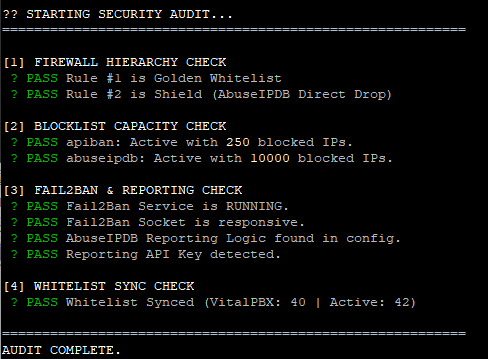
CIDR Range Blocking Upgrade
Block whole IP ranges in CIDR notation, such as 107.189.0.0/19, because the VitalPBX blacklist doesn't always work with CIDR blocks.
Version 1.0, compatible with VitalPBX Security Suite v2.0 and later.
The original suite uses hash:ip ipsets, which only support individual IP addresses. This upgrade adds a new manual_cidr ipset using hash:net, which supports CIDR notation natively, so you can block entire IP ranges.
What This Upgrade Adds
Why CIDR Support Is Needed
The default ipsets use the hash:ip type:
ipset list abuseipdb -t | grep "Type:"
# Output: Type: hash:ip
When you try to add a range like 107.189.0.0/19, it fails silently or only adds the base IP. The hash:net type is needed for CIDR support.
Installation
Step 1: Create the Manual Blacklist Script
nano /usr/local/bin/manual-blacklist.shPaste the following:
#!/bin/bash
# ==============================================================================
# Manual CIDR Blacklist Manager v1.0
# Supports individual IPs and CIDR ranges (e.g., 107.189.0.0/19)
# ==============================================================================

IPSET_NAME="manual_cidr"
BLACKLIST_FILE="/etc/security/manual-blacklist.txt"
WHITELIST_SCRIPT="/usr/local/bin/whitelist-update.sh"

# Ensure directory and file exist
mkdir -p /etc/security
touch "$BLACKLIST_FILE"

# Ensure ipset exists (hash:net for CIDR support)
if ! ipset list -n | grep -q "^${IPSET_NAME}$"; then
    ipset create $IPSET_NAME hash:net hashsize 4096 maxelem 65536
    echo "Created ipset: $IPSET_NAME"
fi

# Ensure iptables rule exists
ensure_iptables_rule() {
    if ! iptables -C INPUT -m set --match-set $IPSET_NAME src -j DROP 2>/dev/null; then
        # Insert at position 2 (after whitelist)
        iptables -I INPUT 2 -m set --match-set $IPSET_NAME src -j DROP
        echo "Added iptables rule for $IPSET_NAME"
    fi
    # Re-apply whitelist to maintain priority
    [ -x "$WHITELIST_SCRIPT" ] && $WHITELIST_SCRIPT >/dev/null 2>&1
}

# Validate IP/CIDR format
validate_entry() {
    local entry="$1"
    if [[ "$entry" =~ ^[0-9]+\.[0-9]+\.[0-9]+\.[0-9]+(/[0-9]+)?$ ]]; then
        return 0
    else
        echo "Invalid format: $entry"
        echo "Use: x.x.x.x or x.x.x.x/xx (e.g., 1.2.3.4 or 10.0.0.0/8)"
        return 1
    fi
}

case "$1" in
    add)
        if [ -z "$2" ]; then
            echo "Usage: $0 add <IP or CIDR>"
            echo "Examples:"
            echo "  $0 add 107.189.0.0/19"
            echo "  $0 add 45.155.205.100"
            exit 1
        fi
        validate_entry "$2" || exit 1
        ensure_iptables_rule

        if ipset test $IPSET_NAME "$2" 2>/dev/null; then
            echo "$2 is already in blacklist"
        else
            ipset add $IPSET_NAME "$2"
            echo "$2" >> "$BLACKLIST_FILE"
            sort -u "$BLACKLIST_FILE" -o "$BLACKLIST_FILE"
            echo "✓ Added $2 to blacklist"
        fi
        ;;

    remove|del)
        if [ -z "$2" ]; then
            echo "Usage: $0 remove <IP/CIDR>"
            exit 1
        fi
        if ipset del $IPSET_NAME "$2" 2>/dev/null; then
            sed -i "\|^${2}$|d" "$BLACKLIST_FILE"
            echo "✓ Removed $2 from blacklist"
        else
            echo "$2 was not in blacklist"
        fi
        ;;

    test|check)
        if [ -z "$2" ]; then
            echo "Usage: $0 test <IP>"
            exit 1
        fi
        if ipset test $IPSET_NAME "$2" 2>/dev/null; then
            echo "✓ $2 IS blocked by manual blacklist"
        else
            echo "✗ $2 is NOT in manual blacklist"
        fi
        ;;

    list)
        COUNT=$(ipset list $IPSET_NAME 2>/dev/null | grep -c "^[0-9]")
        echo "=== Manual Blacklist ($COUNT entries) ==="
        ipset list $IPSET_NAME | grep -E "^[0-9]" | sort -t. -k1,1n -k2,2n -k3,3n -k4,4n
        ;;

    count)
        COUNT=$(ipset list $IPSET_NAME 2>/dev/null | grep -c "^[0-9]")
        echo "$COUNT entries in manual blacklist"
        ;;

    stats)
        echo "=== Manual Blacklist Statistics ==="
        COUNT=$(ipset list $IPSET_NAME 2>/dev/null | grep -c "^[0-9]")
        DROPS=$(iptables -L INPUT -v -n | grep "match-set ${IPSET_NAME}" | awk '{print $1}')
        echo "Entries: $COUNT"
        echo "Packets blocked: ${DROPS:-0}"
        ;;

    flush|clear)
        read -p "Are you sure you want to remove ALL entries? (y/N): " confirm
        if [[ "$confirm" =~ ^[Yy]$ ]]; then
            ipset flush $IPSET_NAME
            > "$BLACKLIST_FILE"
            echo "✓ Blacklist cleared"
        else
            echo "Cancelled"
        fi
        ;;

    import)
        # Re-import from file (used for boot persistence)
        ensure_iptables_rule
        if [ -f "$BLACKLIST_FILE" ] && [ -s "$BLACKLIST_FILE" ]; then
            IMPORTED=0
            while IFS= read -r entry || [ -n "$entry" ]; do
                entry=$(echo "$entry" | tr -d '[:space:]')
                if [ -n "$entry" ] && [[ ! "$entry" =~ ^# ]]; then
                    ipset add $IPSET_NAME "$entry" -exist 2>/dev/null && ((IMPORTED++))
                fi
            done < "$BLACKLIST_FILE"
            echo "✓ Imported $IMPORTED entries from $BLACKLIST_FILE"
        else
            echo "No entries to import"
        fi
        ;;

    export)
        echo "# Manual blacklist export - $(date)"
        ipset list $IPSET_NAME | grep -E "^[0-9]"
        ;;

    bulk)
        # Bulk add from file argument
        if [ -z "$2" ] || [ ! -f "$2" ]; then
            echo "Usage: $0 bulk <filename>"
            echo "File should contain one IP/CIDR per line"
            exit 1
        fi
        ensure_iptables_rule
        ADDED=0
        while IFS= read -r entry || [ -n "$entry" ]; do
            entry=$(echo "$entry" | tr -d '[:space:]')
            if [ -n "$entry" ] && [[ ! "$entry" =~ ^# ]]; then
                if ipset add $IPSET_NAME "$entry" -exist 2>/dev/null; then
                    echo "$entry" >> "$BLACKLIST_FILE"
                    ((ADDED++))
                fi
            fi
        done < "$2"
        sort -u "$BLACKLIST_FILE" -o "$BLACKLIST_FILE"
        echo "✓ Added $ADDED entries from $2"
        ;;

    *)
        echo "Manual CIDR Blacklist Manager"
        echo ""
        echo "Usage: $0 <command> [argument]"
        echo ""
        echo "Commands:"
        echo "  add <IP/CIDR>      Add IP or range to blacklist"
        echo "  remove <IP/CIDR>   Remove IP or range from blacklist"
        echo "  test <IP>          Check if IP is blocked"
        echo "  list               Show all blacklisted entries"
        echo "  count              Show number of entries"
        echo "  stats              Show entries and packets blocked"
        echo "  flush              Remove all entries (with confirmation)"
        echo "  import             Reload entries from file (boot recovery)"
        echo "  export             Output entries for backup"
        echo "  bulk <file>        Add multiple entries from file"
        echo ""
        echo "Examples:"
        echo "  $0 add 107.189.0.0/19"
        echo "  $0 add 45.155.205.100"
        echo "  $0 test 107.189.10.70"
        echo "  $0 remove 1.2.3.0/24"
        ;;
esac
Make it executable:
chmod +x /usr/local/bin/manual-blacklist.shStep 2: Add Boot Persistence to Crontab
crontab -eAdd this line after your existing @reboot entries:
@reboot sleep 35 && /usr/local/bin/manual-blacklist.sh import >/dev/null 2>&1Your crontab should now look similar to this:
# Define the PATH so Cron can find 'iptables' and 'ipset'
PATH=/usr/local/sbin:/usr/local/bin:/sbin:/bin:/usr/sbin:/usr/bin

# 1. APIBan Updater (Self-Healing)
*/10 * * * * /usr/local/bin/apiban-update.sh >/dev/null 2>&1

# 2. AbuseIPDB Updater (Self-Healing)
0 */6 * * * /usr/local/bin/abuseipdb-update.sh >/dev/null 2>&1

# 3. Boot Safety (Persistence)
@reboot sleep 30 && /usr/local/bin/apiban-update.sh >/dev/null 2>&1
@reboot sleep 30 && /usr/local/bin/abuseipdb-update.sh >/dev/null 2>&1
@reboot sleep 35 && /usr/local/bin/manual-blacklist.sh import >/dev/null 2>&1
Step 3: Add Self-Healing to the APIBan Script
When VitalPBX reloads its firewall, for example when you click Apply Changes in the GUI, it wipes custom iptables rules. apiban-update.sh runs every 10 minutes, so it can restore the manual_cidr rule automatically.
Edit the script:
nano /usr/local/bin/apiban-update.shAdd this block before the final whitelist-update.sh call:
# 6. Self-Healing for Manual CIDR Blacklist
MANUAL_SET="manual_cidr"
if ipset list -n | grep -q "^${MANUAL_SET}$"; then
    if ! iptables -C INPUT -m set --match-set $MANUAL_SET src -j DROP 2>/dev/null; then
        iptables -I INPUT 2 -m set --match-set $MANUAL_SET src -j DROP
    fi
fi

# 7. Self-Healing for Geo-Firewall
for set in $(ipset list -n | grep "blacklist_"); do
    if ! iptables -C INPUT -m set --match-set "$set" src -j DROP 2>/dev/null; then
        iptables -I INPUT -m set --match-set "$set" src -j DROP
    fi
done

# 8. Re-Apply Whitelist to ensure it stays on top
/usr/local/bin/whitelist-update.sh >/dev/null 2>&1
Step 4: Update the Security Audit Script
The audit script needs to recognise manual_cidr as a valid shield at Rule #2.
nano /usr/local/bin/security-audit.shReplace all of the code with:
#!/bin/bash

# ==============================================================================
# VITALPBX SECURITY AUDIT TOOL (v2 - Fixed Drop Detection)
# Verifies Firewall Order, Shield Health, Fail2Ban Config, and Reporting.
# ==============================================================================

# --- Colors ---
PASS=$(printf '\033[32m✔ PASS\033[0m')
FAIL=$(printf '\033[31m✖ FAIL\033[0m')
WARN=$(printf '\033[33m! WARN\033[0m')
BOLD=$(printf '\033[1m')
RESET=$(printf '\033[0m')

echo -e "\n${BOLD}🔒 STARTING SECURITY AUDIT...${RESET}"
echo "=========================================================="

# ------------------------------------------------------------------------------
# 1. FIREWALL HIERARCHY CHECK (The "Ironclad" Test)
# ------------------------------------------------------------------------------
echo -e "\n${BOLD}[1] FIREWALL HIERARCHY CHECK${RESET}"

# Get the first 3 input rules
RULES=$(iptables -L INPUT -n --line-numbers | head -n 5)

# Parse Rule 1
RULE_1_TARGET=$(echo "$RULES" | grep "^1" | awk '{print $2}')

# Parse Rule 2 (Capture Target AND Options to detect "match-set")
RULE_2_LINE=$(echo "$RULES" | grep "^2")
RULE_2_TARGET=$(echo "$RULE_2_LINE" | awk '{print $2}')

# Check Rule 1 (Must be Whitelist)
if [[ "$RULE_1_TARGET" == "custom-whitelist" ]]; then
    echo -e " $PASS Rule #1 is Golden Whitelist"
else
    echo -e " $FAIL Rule #1 is '$RULE_1_TARGET' (Expected: custom-whitelist)"
    echo -e "       ${WARN} Run /usr/local/bin/whitelist-update.sh to fix."
fi

# Check Rule 2 (Accepts shields: apiban, abuseipdb, manual_cidr, or geo-firewall)
if [[ "$RULE_2_TARGET" == "apiban" ]]; then
    echo -e " $PASS Rule #2 is Shield (APIBan Chain)"
elif [[ "$RULE_2_TARGET" == "DROP" ]] && echo "$RULE_2_LINE" | grep -q "abuseipdb"; then
    echo -e " $PASS Rule #2 is Shield (AbuseIPDB Direct Drop)"
elif [[ "$RULE_2_TARGET" == "DROP" ]] && echo "$RULE_2_LINE" | grep -q "manual_cidr"; then
    echo -e " $PASS Rule #2 is Shield (Manual CIDR Blacklist)"
elif [[ "$RULE_2_TARGET" == "DROP" ]] && echo "$RULE_2_LINE" | grep -q "blacklist_"; then
    echo -e " $PASS Rule #2 is Shield (Geo-Firewall)"
elif [[ "$RULE_2_TARGET" == "abuseipdb" ]]; then
    echo -e " $PASS Rule #2 is Shield (AbuseIPDB Chain)"
else
    echo -e " $FAIL Rule #2 is '$RULE_2_TARGET' (Expected: apiban, abuseipdb, manual_cidr, or blacklist_)"
    echo -e "       ${WARN} Run /usr/local/bin/apiban-update.sh to fix."
fi

# ------------------------------------------------------------------------------
# 2. BLOCKLIST CAPACITY CHECK (Are lists empty?)
# ------------------------------------------------------------------------------
echo -e "\n${BOLD}[2] BLOCKLIST CAPACITY CHECK${RESET}"

# Function to check ipset count
check_ipset() {
    NAME=$1
    EXPECTED=$2
    if ipset list -n | grep -q "^$NAME$"; then
        COUNT=$(ipset list $NAME -t | grep "Number of entries" | cut -d: -f2 | tr -d ' ')
        if [ "$COUNT" -gt "$EXPECTED" ]; then
             echo -e " $PASS $NAME: Active with ${BOLD}$COUNT${RESET} blocked IPs."
        else
             echo -e " $FAIL $NAME: Empty or too low ($COUNT entries)."
        fi
    else
        echo -e " $FAIL $NAME: Chain missing from Kernel."
    fi
}

check_ipset "apiban" 50
check_ipset "abuseipdb" 1000

# ------------------------------------------------------------------------------
# 3. FAIL2BAN & REPORTING CHECK
# ------------------------------------------------------------------------------
echo -e "\n${BOLD}[3] FAIL2BAN & REPORTING CHECK${RESET}"

# Service Status
if systemctl is-active --quiet fail2ban; then
    echo -e " $PASS Fail2Ban Service is RUNNING."
else
    echo -e " $FAIL Fail2Ban Service is DEAD."
fi

# Socket Ping
if fail2ban-client ping | grep -q "pong"; then
    echo -e " $PASS Fail2Ban Socket is responsive."
else
    echo -e " $FAIL Fail2Ban Socket is unreachable."
fi

# Reporting Configuration Check
if grep -q "action_abuseipdb" /etc/fail2ban/jail.local; then
     echo -e " $PASS AbuseIPDB Reporting Logic found in config."
else
     echo -e " $FAIL AbuseIPDB Reporting Logic MISSING from jail.local."
fi

# API Key Check
API_KEY=$(grep "abuseipdb_apikey =" /etc/fail2ban/jail.local | cut -d= -f2 | tr -d ' ')
if [[ ${#API_KEY} -gt 10 ]]; then
    echo -e " $PASS Reporting API Key detected."
else
    echo -e " $FAIL Reporting API Key is missing or empty."
fi

# ------------------------------------------------------------------------------
# 4. WHITELIST INTEGRITY (Sync Check)
# ------------------------------------------------------------------------------
echo -e "\n${BOLD}[4] WHITELIST SYNC CHECK${RESET}"

VPBX_WL_COUNT=$(iptables -S vpbx_white_list 2>/dev/null | grep "\-s" | wc -l)
CUSTOM_WL_COUNT=$(iptables -S custom-whitelist 2>/dev/null | grep "\-s" | wc -l)

# We expect Custom to satisfy VitalPBX + 1 (Localhost)
EXPECTED=$((VPBX_WL_COUNT + 1))

if [ "$CUSTOM_WL_COUNT" -ge "$EXPECTED" ]; then
    echo -e " $PASS Whitelist Synced (VitalPBX: $VPBX_WL_COUNT | Active: $CUSTOM_WL_COUNT)"
else
    echo -e " $WARN Whitelist Mismatch! VitalPBX has $VPBX_WL_COUNT, Active has $CUSTOM_WL_COUNT."
    echo -e "       ${WARN} Run /usr/local/bin/whitelist-update.sh to re-sync."
fi

# ------------------------------------------------------------------------------
# 5. GEO-FIREWALL RULE CHECK
# ------------------------------------------------------------------------------
echo -e "\n${BOLD}[5] GEO-FIREWALL RULE CHECK${RESET}"

GEO_SETS=$(ipset list -n | grep "blacklist_")
if [ -z "$GEO_SETS" ]; then
    echo -e " ${GREY}No Geo-Firewall sets detected.${RESET}"
else
    GEO_OK=0
    GEO_MISSING=0
    for set in $GEO_SETS; do
        if iptables -C INPUT -m set --match-set "$set" src -j DROP 2>/dev/null; then
            ((GEO_OK++))
        else
            ((GEO_MISSING++))
            echo -e " $FAIL Missing iptables rule for $set"
        fi
    done
    if [ "$GEO_MISSING" -eq 0 ]; then
        echo -e " $PASS All $GEO_OK Geo-Firewall rules active"
    else
        echo -e "       ${WARN} Run: for set in \$(ipset list -n | grep blacklist_); do iptables -I INPUT -m set --match-set \"\$set\" src -j DROP; done"
    fi
fi

echo -e "\n=========================================================="
echo -e "${BOLD}AUDIT COMPLETE.${RESET}\n"
Step 5: Update the Security Monitor Dashboard
Add the manual_cidr statistics to the dashboard.
nano /usr/local/bin/security-monitorFind the DEFENSE METRICS section and update it to include:
MANUAL_DB=$(get_ipset_count "manual_cidr")
MANUAL_DROPS=$(get_drop_count "manual_cidr")
Then add this line after the AbuseIPDB printf:
printf " Manual CIDR | ${WHITE}%-25s${RESET} | ${YELLOW}${BOLD}%-20s${RESET}\n" "$MANUAL_DB ranges" "$MANUAL_DROPS"Usage Examples
Adding IP Ranges
# Block a /19 range (8,192 IPs)
manual-blacklist.sh add 107.189.0.0/19

# Block a /24 range (256 IPs)
manual-blacklist.sh add 45.155.205.0/24

# Block a single IP
manual-blacklist.sh add 107.54.1.123
Testing Whether an IP Is Blocked
# Test if a specific IP within a range is blocked
manual-blacklist.sh test 107.189.10.70
# Output: ✓ 107.189.10.70 IS blocked by manual blacklist
Viewing Blocked Entries
# List all entries
manual-blacklist.sh list

# Show count only
manual-blacklist.sh count

# Show statistics with packet counts
manual-blacklist.sh stats
Removing Entries
# Remove a specific range
manual-blacklist.sh remove 107.189.0.0/19
Bulk Import from a File
Create a file with one entry per line:
# /tmp/bad-ranges.txt
107.189.0.0/19
45.155.205.0/24
193.32.162.0/24
# Comments are ignored
Import it:
manual-blacklist.sh bulk /tmp/bad-ranges.txtFirewall Hierarchy
After installation, your firewall rules are ordered like this:
| Position | Rule | Purpose |
|---|---|---|
| 1 | custom-whitelist | Trusted IPs bypass all blocks |
| 2 | manual_cidr | Your custom CIDR ranges |
| 3 | abuseipdb | Top 10,000 worst IPs |
| 4 | apiban | Active VoIP attackers |
| 5+ | vpbx_* | VitalPBX native rules |
Verify with:
iptables -L INPUT -n --line-numbers | head -n 10Verification Commands
| Command | Description |
|---|---|
ipset list manual_cidr -t | grep "Type:" | Verify the ipset type is hash:net |
manual-blacklist.sh test 107.189.10.70 | Test whether an IP is blocked |
manual-blacklist.sh stats | View the entry count and blocked packets |
/usr/local/bin/security-audit.sh | Run the full security audit |
watch -n 2 -c /usr/local/bin/security-monitor | Live security dashboard |
CIDR Quick Reference
| CIDR | IPs Blocked | Example |
|---|---|---|
| /32 | 1 | Single host |
| /24 | 256 | 192.168.1.0/24 |
| /19 | 8,192 | 107.189.0.0/19 |
| /16 | 65,536 | 10.0.0.0/16 |
| /8 | 16,777,216 | 10.0.0.0/8 |
Troubleshooting
Rule Disappears After VitalPBX GUI Changes?
This is expected. The self-healing in apiban-update.sh restores it within 10 minutes. To restore it immediately, run:
manual-blacklist.sh importSecurity Audit Shows FAIL for Rule #2?
If manual_cidr is at position 2, update the audit script as described in Step 4. This is a false positive: the rule is working correctly.
Entries Not Surviving a Reboot?
Check that your crontab has the @reboot entry:
crontab -l | grep manual-blacklistIt should show:
@reboot sleep 35 && /usr/local/bin/manual-blacklist.sh import >/dev/null 2>&1Whitelist Manager Upgrade
Whitelist a trusted IP or range in one command. It goes into the firewall at Rule #1 and into Fail2Ban's ignoreip, with no VitalPBX GUI reload needed.
Version 1.0, compatible with VitalPBX Security Suite v2.0 and later. Tested on VitalPBX 4.
The Golden Whitelist (Phase 2) is meant to copy the IPs from the VitalPBX GUI whitelist to Rule #1. In production we found three problems with this.
On VitalPBX 4 the Sync Imports Nothing
VitalPBX 4 stores the GUI whitelist in an ipset called vpbx_white_list. The chain of the same name holds one --match-set rule instead of one -s rule per IP. The Phase 2 script only looks for -s rules, so only your hardcoded IPs reach Rule #1. The audit still shows PASS because it counts the -s inside --match-set.
Using the GUI Wipes Your Shields
Adding an IP in the GUI means clicking Apply Changes. That wipes the custom whitelist and shields, and can reset jail.local.
The GUI Whitelist Doesn't Reach Fail2Ban
ignoreip in jail.local is maintained by hand. A trusted IP can still be banned, and reported to AbuseIPDB, if a device behind it fails authentication.
Check Whether Your Server Is Affected
iptables -S vpbx_white_listIf you see -A vpbx_white_list -m set --match-set vpbx_white_list src -j ACCEPT, your GUI whitelist has not been reaching Rule #1.
What This Upgrade Adds
Installation
Step 1: Fix the VitalPBX 4 Whitelist Sync
Back up the script, then open it:
cp /usr/local/bin/whitelist-update.sh /root/whitelist-update.sh.orig
nano /usr/local/bin/whitelist-update.sh
In section 3. AUTO-SYNC, find this line:
IP_LIST=$(iptables -S $VPBX_CHAIN | awk '$3 == "-s" {print $4}' | grep -v "0.0.0.0/0")Replace it with this. It reads both the old -s format and the VitalPBX 4 ipset:
IP_LIST=$( { iptables -S $VPBX_CHAIN | awk '$3 == "-s" {print $4}'; ipset list $VPBX_CHAIN 2>/dev/null | sed -n '/^Members:/,$p' | grep -Eo '^[0-9.]+(/[0-9]+)?'; } | grep -v "0.0.0.0/0" | sort -u )Step 2: Add Whitelist File Support
In the same file, find the 2. Hardcoded Safety Nets section. Directly after your server IP line (iptables -A $CHAIN_NAME -s YOUR_SERVER_IP -j ACCEPT), add:
# 2b. MANUAL WHITELIST FILES (managed by manual-whitelist.sh)
for ip in $(grep -Eho '^[0-9.]+(/[0-9]+)?' /etc/security/*-whitelist.txt 2>/dev/null | sort -u); do
    iptables -A $CHAIN_NAME -s "$ip" -j ACCEPT
done
This loads every file in /etc/security/ whose name ends in -whitelist.txt. You can keep groups separate, for example manual-whitelist.txt and sipis-whitelist.txt. The manual blacklist file (manual-blacklist.txt) is not matched.
Save, then check the syntax and run it:
bash -n /usr/local/bin/whitelist-update.sh && echo "syntax OK"
/usr/local/bin/whitelist-update.sh
iptables -L custom-whitelist -n | grep -c ACCEPT
The count should now include your GUI whitelist entries. If the syntax check fails, restore the backup with cp /root/whitelist-update.sh.orig /usr/local/bin/whitelist-update.sh.
Step 3: Create the Whitelist Manager Script
nano /usr/local/bin/manual-whitelist.shPaste the following:
#!/bin/bash
# ==============================================================================
# Manual Whitelist Manager v1.0 (itproexpert.com)
# Adds trusted IPs / CIDR ranges to the Golden Whitelist (Rule #1)
# and to Fail2Ban ignoreip with a single command.
# ==============================================================================

WL_FILE="/etc/security/manual-whitelist.txt"
WL_GLOB="/etc/security/*-whitelist.txt"
JAIL="/etc/fail2ban/jail.local"
WHITELIST_SCRIPT="/usr/local/bin/whitelist-update.sh"
CHAIN_NAME="custom-whitelist"
F2B_RELOAD=0
BACKUP=""

mkdir -p /etc/security
touch "$WL_FILE"

# ------------------------------------------------------------------------------
# Helpers
# ------------------------------------------------------------------------------
valid() {
    local re='^[0-9]{1,3}(\.[0-9]{1,3}){3}(/[0-9]{1,2})?$'
    [[ "$1" =~ $re ]] && return 0
    echo "Invalid format: $1"
    echo "Use: x.x.x.x or x.x.x.x/xx (e.g. 1.2.3.4 or 10.0.0.0/24)"
    return 1
}

esc()         { printf '%s' "$1" | sed 's/\./\\./g'; }
norm()        { [[ "$1" == */* ]] && echo "$1" || echo "$1/32"; }
in_files()    { grep -El "^$(esc "$1")([[:space:]]|$)" $WL_GLOB 2>/dev/null; }
all_entries() { grep -Eho '^[0-9.]+(/[0-9]+)?' $WL_GLOB 2>/dev/null | sort -u; }
f2b_tokens()  { grep -m1 '^ignoreip' "$JAIL" | cut -d= -f2- | tr -s ' \t' '\n' | sed '/^$/d'; }
fw_has()      { iptables -S "$CHAIN_NAME" 2>/dev/null | grep -Fq -- "-s $(norm "$1") "; }

backup_jail() {
    [ -n "$BACKUP" ] && return 0
    BACKUP="/root/jail.local.bak-$(date +%F-%H%M%S)"
    cp "$JAIL" "$BACKUP"
}

f2b_add() {
    [ $# -gt 0 ] || return 0
    if ! grep -q '^ignoreip' "$JAIL" 2>/dev/null; then
        echo "[!!] No ignoreip line in $JAIL - add these manually: $*"
        return 1
    fi
    local TOKENS ADD="" e
    TOKENS=$(f2b_tokens)
    for e in "$@"; do grep -Fxq -- "$e" <<< "$TOKENS" || ADD+=" $e"; done
    if [ -z "$ADD" ]; then
        echo "[OK] Fail2Ban ignoreip already contains these entries"
        return 0
    fi
    backup_jail
    sed -i "0,/^ignoreip *=/ s|^ignoreip *=.*|&$ADD|" "$JAIL"
    echo "[OK] Added to Fail2Ban ignoreip:$ADD"
    F2B_RELOAD=1
}

f2b_remove() {
    grep -Fxq -- "$1" <<< "$(f2b_tokens)" || return 0
    backup_jail
    local E
    E=$(esc "$1")
    for _ in 1 2 3 4 5; do
        grep -Eq "^ignoreip *=.* ${E}( |$)" "$JAIL" || break
        sed -i -E "/^ignoreip *=/ s#( )${E}( |$)#\2#" "$JAIL"
    done
    echo "[OK] Removed $1 from Fail2Ban ignoreip"
    F2B_RELOAD=1
}

f2b_apply() {
    [ "$F2B_RELOAD" = 1 ] || return 0
    if fail2ban-client --help 2>&1 | grep -q -- '--test' && ! fail2ban-client -t >/dev/null 2>&1; then
        echo "[!!] Fail2Ban config test failed - restoring $BACKUP"
        cp "$BACKUP" "$JAIL"
        return 1
    fi
    if fail2ban-client reload >/dev/null 2>&1; then
        echo "[OK] Fail2Ban reloaded"
    else
        systemctl restart fail2ban
        sleep 10
        if fail2ban-client ping >/dev/null 2>&1; then
            echo "[OK] Fail2Ban restarted"
        else
            echo "[!!] Fail2Ban not responding - check: journalctl -u fail2ban -n 30"
        fi
    fi
}

fw_apply() {
    "$WHITELIST_SCRIPT" >/dev/null 2>&1
    if [ "$(iptables -S INPUT | sed -n '2p')" = "-A INPUT -j $CHAIN_NAME" ]; then
        echo "[OK] Golden Whitelist rebuilt at Rule #1 ($(iptables -S "$CHAIN_NAME" | grep -c ' -j ACCEPT') entries)"
    else
        echo "[!!] $CHAIN_NAME is not Rule #1 - run $WHITELIST_SCRIPT and check the firewall order"
    fi
}

# ------------------------------------------------------------------------------
# Commands
# ------------------------------------------------------------------------------
case "$1" in
    add)
        [ -n "$2" ] || { echo "Usage: $0 add <IP/CIDR> [\"comment\"]"; exit 1; }
        valid "$2" || exit 1
        FOUND=$(in_files "$2")
        if [ -n "$FOUND" ]; then
            echo "[OK] $2 is already in: $(echo $FOUND)"
        else
            echo "$2${3:+ # $3}" >> "$WL_FILE"
            echo "[OK] Added $2 to $WL_FILE"
        fi
        f2b_add "$2"
        f2b_apply
        fail2ban-client unban "$2" >/dev/null 2>&1
        fw_apply
        ;;

    remove|del)
        [ -n "$2" ] || { echo "Usage: $0 remove <IP/CIDR>"; exit 1; }
        valid "$2" || exit 1
        FOUND=$(in_files "$2")
        if [ -z "$FOUND" ]; then
            echo "$2 is not in any whitelist file (if it is in the VitalPBX GUI whitelist, remove it there)"
            exit 0
        fi
        for f in $FOUND; do
            sed -i -E "\#^$(esc "$2")([[:space:]]|$)#d" "$f"
            echo "[OK] Removed $2 from $f"
        done
        f2b_remove "$2"
        f2b_apply
        fw_apply
        ;;

    test|check)
        [ -n "$2" ] || { echo "Usage: $0 test <IP/CIDR>"; exit 1; }
        valid "$2" || exit 1
        FOUND=$(in_files "$2")
        if [ -n "$FOUND" ]; then echo "[OK] Whitelist file : $(echo $FOUND)"; else echo "[--] Whitelist file : not listed"; fi
        if fw_has "$2"; then echo "[OK] Firewall       : ACCEPT at Rule #1"; else echo "[--] Firewall       : not in $CHAIN_NAME"; fi
        if grep -Fxq -- "$2" <<< "$(f2b_tokens)"; then echo "[OK] Fail2Ban       : in ignoreip"; else echo "[--] Fail2Ban       : not in ignoreip"; fi
        if [[ "$2" != */* ]]; then
            HITS=""
            for s in $(ipset list -n 2>/dev/null); do
                ipset test "$s" "$2" >/dev/null 2>&1 && HITS+=" $s"
            done
            if [ -n "$HITS" ]; then echo "[!!] Found in ipsets:$HITS"; else echo "[OK] Not in any ipset"; fi
            for j in $(fail2ban-client status 2>/dev/null | sed -n 's/.*Jail list://p' | tr -d ','); do
                fail2ban-client status "$j" | grep -Fqw -- "$2" && echo "[!!] Currently banned in Fail2Ban jail: $j"
            done
        fi
        ;;

    list)
        for f in $WL_GLOB; do
            [ -f "$f" ] || continue
            echo "=== $f ($(grep -Ec '^[0-9]' "$f") entries) ==="
            grep -E '^[0-9]' "$f"
        done
        ;;

    bulk)
        if [ -z "$2" ] || [ ! -f "$2" ]; then
            echo "Usage: $0 bulk <file> [\"comment\"]"
            exit 1
        fi
        ADDED=0
        NEW=()
        while IFS= read -r line || [ -n "$line" ]; do
            first=$(awk '{print $1}' <<< "$line")
            [[ "$first" == *:* ]] && continue      # skip IPv6 addresses
            e=$(grep -Eo '^[0-9.]+(/[0-9]+)?' <<< "$first")
            [ -z "$e" ] && continue                # skip headers, comments, blank lines
            valid "$e" >/dev/null || { echo "Skipped invalid: $line"; continue; }
            if [ -z "$(in_files "$e")" ]; then
                echo "$e${3:+ # $3}" >> "$WL_FILE"
                ADDED=$((ADDED+1))
            fi
            NEW+=("$e")
        done < "$2"
        echo "[OK] $ADDED new entries added to $WL_FILE"
        if [ ${#NEW[@]} -gt 0 ]; then
            mapfile -t NEW < <(printf '%s\n' "${NEW[@]}" | sort -u)
            f2b_add "${NEW[@]}"
            f2b_apply
            fail2ban-client unban "${NEW[@]}" >/dev/null 2>&1
        fi
        fw_apply
        ;;

    sync)
        mapfile -t ALL < <(all_entries)
        f2b_add "${ALL[@]}"
        f2b_apply
        fw_apply
        echo "[OK] ${#ALL[@]} whitelist file entries checked"
        ;;

    *)
        echo "Manual Whitelist Manager"
        echo ""
        echo "Usage: $0 <command> [argument]"
        echo ""
        echo "Commands:"
        echo "  add <IP/CIDR> [\"comment\"]   Whitelist an IP or range (firewall + Fail2Ban)"
        echo "  remove <IP/CIDR>            Remove an IP or range"
        echo "  test <IP>                   Show whitelist, Fail2Ban and blocklist status"
        echo "  list                        Show all whitelist file entries"
        echo "  bulk <file> [\"comment\"]     Whitelist every IPv4 address in a file"
        echo "  sync                        Re-apply everything (e.g. after a GUI change)"
        echo ""
        echo "Examples:"
        echo "  $0 add 203.0.113.10 \"Office static IP\""
        echo "  $0 add 198.51.100.0/24 \"SIP trunk provider\""
        echo "  $0 test 203.0.113.10"
        echo "  $0 remove 203.0.113.10"
        ;;
esac
Make it executable:
chmod +x /usr/local/bin/manual-whitelist.shStep 4: Fix the Security Audit Whitelist Check
The original Section 4 of the audit counts -s rules, which isn't meaningful on VitalPBX 4. This version checks that every IP in the GUI whitelist and the whitelist files is actually active at Rule #1.
nano /usr/local/bin/security-audit.shReplace everything in the 4. WHITELIST INTEGRITY (Sync Check) section, from the [4] WHITELIST SYNC CHECK echo down to its closing fi, with:
echo -e "\n${BOLD}[4] WHITELIST SYNC CHECK${RESET}"

EXPECTED_LIST=$( { iptables -S vpbx_white_list 2>/dev/null | awk '$3 == "-s" {print $4}'; ipset list vpbx_white_list 2>/dev/null | sed -n '/^Members:/,$p' | grep -Eo '^[0-9.]+(/[0-9]+)?'; grep -Eho '^[0-9.]+(/[0-9]+)?' /etc/security/*-whitelist.txt 2>/dev/null; } | grep -v "0.0.0.0/0" | sort -u )
ACTIVE_RULES=$(iptables -S custom-whitelist 2>/dev/null)
WL_TOTAL=0; WL_MISSING=0

for ip in $EXPECTED_LIST; do
    WL_TOTAL=$((WL_TOTAL+1))
    [[ "$ip" == */* ]] || ip="$ip/32"
    grep -Fq -- "-s $ip " <<< "$ACTIVE_RULES" || WL_MISSING=$((WL_MISSING+1))
done

if [ "$WL_MISSING" -eq 0 ]; then
    echo -e " $PASS Whitelist Synced ($WL_TOTAL entries active at Rule #1)"
else
    echo -e " $WARN Whitelist Mismatch! $WL_MISSING of $WL_TOTAL whitelisted entries missing from Rule #1."
    echo -e "       ${WARN} Run /usr/local/bin/whitelist-update.sh to re-sync."
fi
Step 5: Verify
/usr/local/bin/manual-whitelist.sh sync
/usr/local/bin/security-audit.sh
Expected output:
syncshows[OK] Golden Whitelist rebuilt at Rule #1.- The audit shows
Rule #1 is Golden WhitelistandWhitelist Synced (N entries active at Rule #1).
Usage Examples
Whitelisting an IP or Range
# Single IP with a note
manual-whitelist.sh add 203.0.113.10 "Office static IP"

# Whole range (use the network address, e.g. .0/24 not .5/24)
manual-whitelist.sh add 198.51.100.0/24 "SIP trunk provider"
Each add does four things:
- Saves the entry to
/etc/security/manual-whitelist.txt. - Adds it to Fail2Ban
ignoreip, backing upjail.localfirst. - Reloads Fail2Ban and lifts any existing ban.
- Rebuilds the Golden Whitelist at Rule #1.
Checking an IP
manual-whitelist.sh test 203.0.113.10Example output for an IP that is being blocked:
[--] Whitelist file : not listed
[--] Firewall       : not in custom-whitelist
[--] Fail2Ban       : not in ignoreip
[!!] Found in ipsets: voipbl
Any IP showing [OK] Firewall : ACCEPT at Rule #1 bypasses every blocklist below it, including AbuseIPDB, APIBan, voipbl and Geo-Firewall.
Listing and Removing
# Show all whitelist files and entries
manual-whitelist.sh list

# Remove an entry (firewall + Fail2Ban)
manual-whitelist.sh remove 203.0.113.10
remove only affects IPs in the whitelist files. If the IP is also in the VitalPBX GUI whitelist, remove it there as well, or it will stay at Rule #1.
Bulk Import
Paste a list into a file, one IP per line. Header lines, blank lines, comments and IPv6 addresses are skipped automatically.
nano /tmp/new-ips.txt
manual-whitelist.sh bulk /tmp/new-ips.txt "Provider name"
After Any VitalPBX GUI Firewall Change
If you do use the GUI whitelist or click Apply Changes, restore everything with:
/usr/local/bin/whitelist-update.sh && /usr/local/bin/apiban-update.sh
/usr/local/bin/manual-whitelist.sh sync
sync re-adds any file-managed IPs missing from Fail2Ban ignoreip, which covers the case where a GUI change reset jail.local. If your AbuseIPDB settings were also lost, follow Troubleshooting, Section F above.
Real-World Example: Groundwire Push Notifications Not Arriving
Symptom: Acrobits Groundwire (or Acrobits Softphone and Cloud Softphone) rings when the app is open, but calls never arrive when it's in the background. Some users are affected and others aren't.
Cause: In the background, the phone doesn't register directly. Acrobits' push servers (SIPIS) register to your PBX on the phone's behalf and send the push when a call arrives. Each SIPIS server handles thousands of users, so these IPs regularly get reported to public VoIP blacklists. On our server, two SIPIS IPs were listed in voipbl, the VoIP blacklist VitalPBX ships and applies by default. Every user assigned to those two servers silently lost push calls.
Check
manual-whitelist.sh test 165.227.190.186Fix
Copy the current IPv4 SIPIS list from the Acrobits allowlist page. The list changes over time, so always use the live page.
Import it:
nano /tmp/acrobits-sipis.txt        # paste the IP list
manual-whitelist.sh bulk /tmp/acrobits-sipis.txt "Acrobits SIPIS"
Ask the user to turn their account off and on in the app, then confirm traffic is being accepted:
iptables -L custom-whitelist -n -v | grep 165.227.190.186A packet counter above 0 means the push server is getting through.
Also check the Asterisk log for the user whose credentials are failing through the SIPIS IP. Whitelisting stops the ban, but it won't fix a wrong password in the app.
Troubleshooting
Failed to access socket path After a Fail2Ban Change?
Fail2Ban can take a few seconds to start. Wait 10 seconds and run fail2ban-client ping. If there's still no pong, follow Troubleshooting, Section B, step 2 above.
[!!] Fail2Ban config test failed?
The script has already restored the previous jail.local. Check the ignoreip line with grep '^ignoreip' /etc/fail2ban/jail.local. Backups are kept in /root/jail.local.bak-*.
Audit Shows Whitelist Mismatch for a CIDR Entry?
iptables stores ranges by network address. An entry like 10.0.0.5/24 becomes 10.0.0.0/24 and won't match. Remove it and add it again using the network address.
Removed an IP but It's Still Accepted?
It's also in the VitalPBX GUI whitelist or another *-whitelist.txt file. Run manual-whitelist.sh test <IP> to see where.
Verification Commands
| Command | Description |
|---|---|
manual-whitelist.sh test 1.2.3.4 | Full whitelist, Fail2Ban and blocklist status |
manual-whitelist.sh list | Show all file-managed whitelist entries |
manual-whitelist.sh sync | Re-apply the firewall and Fail2Ban whitelist |
iptables -L custom-whitelist -n -v | Live Rule #1 entries with packet counters |
grep '^ignoreip' /etc/fail2ban/jail.local | View the Fail2Ban ignore list |
/usr/local/bin/security-audit.sh | Run the full security audit |
Feedback on the Security Suite?
If something behaves differently on your server, let us know.