Selecting the Right UniFi Protect Recorder
Choosing the ideal Ubiquiti UniFi Protect recorder depends on your network architecture and surveillance needs. You can select from two robust deployment paths:
- All-in-One Cloud Gateways: Integrated solutions that combine your NVR with built-in routing, firewall, and network management capabilities.
- Dedicated NVR Appliances: Standalone hardware focused exclusively on maximum video processing and storage.
Understanding Camera Capacity Limits To determine the best fit, consult the capacity chart based on your anticipated camera count and resolution (2K or 4K). When reviewing the limits, please keep the following in mind:
- Maximum Thresholds: The listed figures represent the absolute system limits. For example, if a UNVR supports a maximum of thirty 2K cameras or eighteen 4K cameras, fully utilizing the eighteen 4K slots leaves no remaining capacity for additional cameras.
- Mixed Deployments: You can successfully mix and match camera resolutions by sharing the available system resources. For instance, deploying nine 4K cameras (50% of that limit) leaves enough processing power to add a proportionate number of lower-resolution cameras, such as ten 2K models.
- Note: Always check how much drive space you will need on your UniFi recorder. Use our UniFi Protect Storage Drive Size Calculator to work out total number of cameras vs TB HDD storage capacity required.
If you are planning on using SuperLink / Sensors or Motion/Door Alarm System or Doorbell – you will need a system that has UniFi Protect installed with a drive, it will not work without some kind of storage.
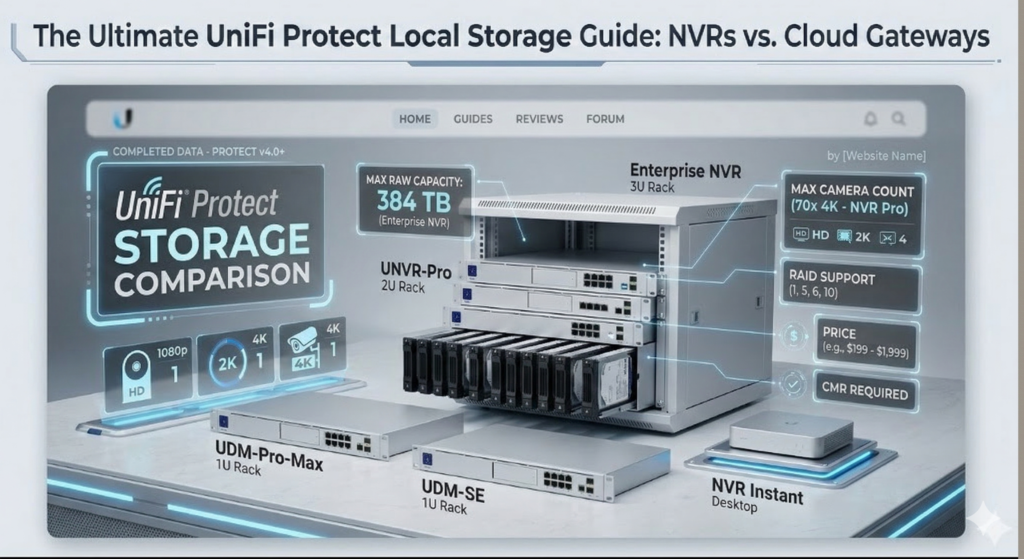
UniFi Protect – Local Storage Device Comparison (March 2026)
All devices support on-device HDD/SSD recording. Max raw capacity reflects largest confirmed-compatible drives. Camera limits based on Ubiquiti Protect tech specs (v4.0+).
UniFi Protect Comparison Sheet
| Device | Type | Form Factor | Drive Bays | Drive Type | Max per Bay | Max Raw Capacity | RAID Support | HD (1080p) | 2K | 4K | Approx. Price |
|---|---|---|---|---|---|---|---|---|---|---|---|
| Dedicated NVR | |||||||||||
| UNVR Instant | NVR | Desktop | 1 × 3.5″ | HDD · SSD (SATA) | 24 TB | 24 TB | No RAID, single bay | 15 | 8 | 6 | £$199 |
| Network Video Recorder (UNVR) | NVR | 1U Rack | 4 × 2.5/3.5″ | HDD · SSD (SATA) | 8 TB official (~20 TB reported) | 32 TB (4×8 TB official) | RAID 1 · 5 | 60 | ~30‡ | 18 | £$299 |
| NVR Pro (UNVR-Pro) | NVR | 2U Rack | 7 × 2.5/3.5″ | HDD · SSD (SATA) | 24 TB | 168 TB | RAID 1 · 5 · 10 | 70 | 35 | 24 | £$499 |
| Enterprise NVR (ENVR) | NVR | 3U Rack | 16 × 2.5/3.5″ | HDD · SSD (SATA) | 24 TB | 384 TB | RAID 1 · 5 · 10 | 210 | 140 | 70 | £$1,999 |
| Cloud Gateways NVR | |||||||||||
| Dream Machine Pro (UDM-Pro) | Gateway + NVR | 1U Rack | 1 × 2.5/3.5″ | HDD · SSD (SATA) | 24 TB | 24 TB | No RAID, single bay | 24 | 14 | 8 | £$379 |
| Dream Machine SE (UDM-SE) | Gateway + NVR | 1U Rack | 1 × 2.5/3.5″ | HDD · SSD (SATA) | 20 TB (tested to 16 TB official) | 20 TB | No RAID, single bay | 24 | 14 | 8 | £$399 |
| Dream Machine Pro Max (UDM-Pro-Max) | Gateway + NVR | 1U Rack | 2 × 3.5″ + 128 GB NVMe† | HDD · SSD (SATA) + built-in | 24 TB | 48 TB raw (24 TB usable in RAID 1) | RAID 1 | 50 | 25 | 15 | £$599 |
| Dream Wall (UDW) NEW | Gateway + NVR | Wall-mounted | Built-in only | microSD + SSD (built-in) | N/A | 512 GB microSD + 128 GB SSD | No RAID, built-in | 12 | 7 | 4 | £$699 |
| Dream Router 7 (UDR7) NEW | Gateway + NVR | Compact desktop | Built-in only | microSD (built-in, 64 GB) | N/A | 64 GB | No RAID, built-in | 5 | 2 | 1 | £$279 |
| Cloud Gateway Max (UCG-Max) NEW | Gateway + NVR | Compact desktop | 1 × M.2 NVMe | NVMe SSD (selectable, up to 2 TB) | 2 TB | 2 TB | No RAID | 15 | 8 | 5 | £$199 (no drive) / £$279 (512 GB) |
| Cloud Gateway Fibre (UCG-Fibre) NEW | Gateway + NVR | Compact desktop | 1 × M.2 NVMe | NVMe SSD (selectable, up to 2 TB) | 2 TB | 2 TB | No RAID | 15 | 8 | 5 | £$279 |
- † UDM-Pro-Max built-in SSD: The 128 GB NVMe SSD is reserved for detection clip recordings (AI events, motion thumbnails). The two 3.5″ bays are for continuous recording storage. Both 3.5″ drives must be the same model/size for RAID 1 to work properly.
- ‡ UNVR 2K figure: Ubiquiti officially lists only 60 HD / 18 4K for the UNVR. The ~30 2K cameras is an interpolated/estimated value — official 2K count is not explicitly confirmed.
- NVMe note: UCG-Fiber and UCG-Max use a single M.2 NVMe SSD (up to 2 TB currently) for Protect storage. They are the only UniFi consoles supporting NVMe, but camera capacity is limited (~6–7 cameras, small deployments only). Not included in table as they are compact gateways, not full NVR-class hardware.
- Drive compatibility: All HDD bays require 7200rpm CMR (Conventional Magnetic Recording) drives — SMR is not supported. Recommended models: WD Purple Pro / WD Gold, Seagate SkyHawk AI / IronWolf Pro. All drives in a RAID array must be matched (same size & model preferred). 2.5″ SATA SSDs are supported in all bays but become very expensive at high capacities. WD Gold is our preference.
UniFi Protect Drive Size Calculator
Click for UniFi Protect Drive Size Calculator Link
UniFi UNVR Using SSD
For rapid access storage on some people choose to use 2.5″ SSD’s like the Samsung 860 Pro 4TB (Although current pricing is extreme in 2026).
If you do, take note of TBW value, which is 4800 on this particular drive. Which means if you typically have 1 TBW a day for your recordings. The drive should last 4800 days which is 13 years. Realistically if it lasts 5 to 7 years – you are well into the next line of technology anyway.
If it wasn’t for the price, I would certainly recommend everyone use SSD for their CCTV these days but due to costs, HDD WD Gold is the best bet.