The Death of “Spot the Typo”: Why Your Inbox is a Minefield in 2026 and no Anti-Virus or Firewall will protect you.
10th Feb 2026
If you are still looking for poor grammar or strange sender addresses to identify phishing emails, you are fighting a war that ended two years ago.
As we move deeper into 2026, cybersecurity experts are issuing their starkest warnings yet: the era of “easy” phishing detection is over. A new wave of sophisticated, automated, and psychologically manipulative attacks has rendered traditional advice obsolete. The threat landscape has shifted this year from random spam to highly targeted, AI-driven compromises that weaponize our most trusted digital relationships.

AI has landed and its making criminals hundreds of millions each month – its big business now and You Are the Target…
The “Friend” Trap: No More Fake Emails – Real Emails from Known Associates.
The most chilling development in 2026 is the industrial-scale weaponization of legitimate email accounts. Gone are the days of display name spoofing or look-alike domains (like amzon-support.com). Today, the call is coming from someone you know and trust.
Attackers are now utilizing compromised accounts of your actual friends, colleagues, and family members to send malicious but sneaky emails. How? They have access to the victim’s history, documents, contacts lists and they use AI – Large Language Models (LLMs) to generate replies that perfectly mimic the sender’s tone, referencing previous conversations to build immediate trust and good reason to click a link or open a document.
“You receive an email from your accountant or your brother, from their actual address, replying to a thread you started last week. The context is perfect, the language is natural, and there are no fake headers. The only difference is the link or attachment they are ‘sharing’ with you.”
These attacks bypass antivirus detection by utilizing “Living off the Land” (LotL) tactics—using legitimate, code-signed (trusted) software to facilitate the attack. Instead of a malicious .exe file, the link might open a legitimate remote administration tool (like automox/splashtop) that the user is tricked into authorizing, effectively handing over the keys to the kingdom under the guise of a “secure document viewer” or “software update.”

The “Lock and Shop” Attack – All New 2026 Trick You Need to Know About
“On-Device Fraud (ODF) combined with Attended Remote Access”
One of the most aggressive tactics emerging this year is the “Lock and Shop” exploit, a ruthless combination of trick tactics, remote access and immediate financial and data theft. It all starts with either a trusted email (possibly even a reply to your last email), a website advert or a phone call from ‘tech support’.
You are then tricked into downloading legitimate remote access software (PC/Mac or Android Mobile) via an accredited web site or an email from someone you know but this then triggers a fake “Critical System Update” or “System Error”. This full-screen overlay mimics a legitimate Windows or macOS update screen and locks the user’s interface, preventing the user from closing the window or accessing their desktop screen.
While the user stares helplessly at a fake progress bar (“Update In Progress – Do Not Interrupt”) that never moves, the legitimate remote access app allows the hackers to work in the background without you seeing anything. They either use your actual browser on your system (remember – you can’t see this happening) to perform purchases or they inject additional custom coded malware to gather the user’s active browser session—complete with logged-in cookies (they seem to even include windows/network passwords), this allows them to continue on another system if you discover the trick and kick them off. These methods allows the hackers access to easily access verified website without password or 2FA/MFA. Websites like Amazon, Banking, Email Accounts, Cloud Data/Drives, Admin Systems, Browser Passwords, eBay, Paypal, Shopify, etc.. Because the traffic originates from the victim’s own IP address and device, fraud detection systems will fail to flag the activity as they have already pre-authenticated in the past and they have the golden ticket to do anything without any checks taking place. As they can access your emails via the web browser or outlook app, they can even password reset any password or 2FA/MFA locking you out of your own accounts after the event.
Attackers purchase often go for high-value digital gift cards or vouchers first, usually by hitting 10-100 smaller transaction, often around £$100 each time which mostly goes unflagged by banks even for fraud checks but it can reach the tens of thousands very quickly. These vouchers/gift cards are instantly emailed to a burner account and cashed out instantly. By the time the user forces a reboot, after thinking an hour is very long for an update – their bank account has been drained without any notification, and the digital vouchers/goods are long gone. Nobody can reverse or recover from this loss. Amazon typically does not refund for a situation like this. Banks also have a no refund policy from standard accounts. However if they happened to use one of your credit cards, then a credit card company could refund up to a certain point.
Its not just the possible financial loss, there is the cost of a forensic investigation of the event which is very expensive, reporting data breach to the ICO within 72 hours, the loss of any documents, photos, passport or ID images, customer data, password lists and of course they will use your credibility to attack the next set of people using your email account with your contacts list.
The PDF That Isn’t a PDF – You Literally Can’t Trust Anything Anymore
This is something most people have not heard of yet, but there is a resurgence of file-based attacks that exploits Windows features. According to a alarming new report released this month by ThreatDown/Malwarebytes, attackers have refined a technique dubbed “DEAD#VAX” where a file appearing to be a PDF is actually a trap door into your system.
As detailed in the report Open the wrong “PDF” and attackers gain remote access to your PC, this campaign tricks users into downloading what looks like a harmless invoice. However, the file is often a Virtual Hard Disk (VHD) or similar container file disguised with a PDF icon.
When double-clicked, instead of opening Adobe Reader, Windows “mounts” the drive and silently executes a hidden script (often a WSF file). This script injects the AsyncRAT malware directly into the memory of legitimate system processes like RuntimeBroker.exe. The result? Attackers gain full remote control of your PC without ever writing a traditional virus file to the hard drive, making it nearly invisible to standard antivirus scans.
The Extension Crisis: Spying on Your Thoughts – You Cannot Trust Browser Extensions Anymore
Perhaps the most insidious threat of 2026 lies in the browser itself. With the explosion of AI tools, users have flocked to browser extensions that promise to enhance ChatGPT, Claude, or DeepSeek workflows or help with AI Email creation or simply block Ads. Attackers have poisoned this well.
A separate investigation highlighted in Malicious Chrome extensions can spy on your ChatGPT chats reveals that thousands of users have unknowingly installed spyware masquerading as productivity tools.
Some of these extensions, which managed to acquire “Featured” badges on web stores before being removed, are designed to sit quietly in the browser. They do not just block ads; they intercept the authentication tokens for AI services. This allows attackers to bypass login screens and remotely access a victim’s entire history of AI conversations.
For businesses, this is a nightmare scenario: sensitive proprietary code, legal strategy, or confidential data pasted into ChatGPT is now in the hands of cybercriminals.
What You Can Do
In 2026, trust must be verified, not assumed. IT Pro Expert recommends the following steps:
- Verify Out-of-Band: If a friend/customer/supplier sends a link or document or PDF or invoice or ANY request – call them to confirm via any end-to-end encrypted app like Signal or WhatsApp, a regular phone call might be acceptable but often the emails or documents contain fake numbers to call which they could then mimic any voice using AI. Do not reply to the email or test any links.
- Audit Extensions: Remove any browser extension you do not strictly need. If an extension asks for permission to “read and change all your data on all websites,” assume it is a risk. You would need to check on the extension page to see if this has been requested and most do. Don’t install extensions unless it has been vetted by a cyber security specialist.
- Unhide File Extensions: Configure Windows to “Show file name extensions.” If a file ends in
.vhd,.wsf, or.jsbut looks like a document, delete it immediately. If you don’t understand this, get training. - Isolate Finances: All staff and especially staff with finance access should get fraud prevention training as the human error is the weakest link.
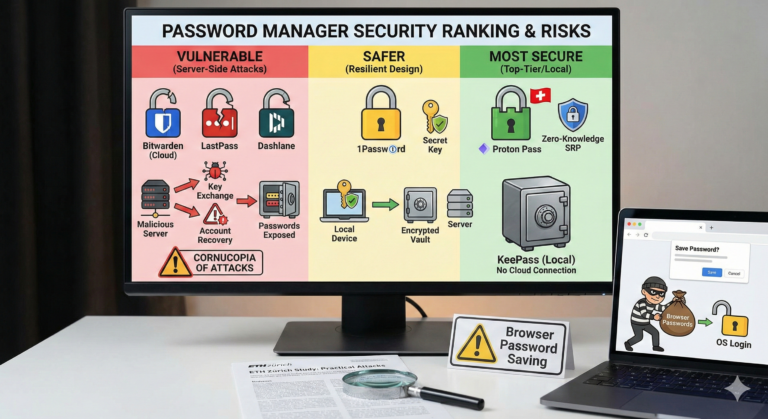
- Don’t save passwords into the browser, use a reputable password manager like ProtonPass but put on a 1 to 2 minute quick release PIN lock and if you need extra security switch to a YubiKey for hardware authenticated passwords.
- Install a firewall/gateway that can block all remote access software like, ideally a Ubiquiti UniFi solution which has IDS/IPS/App Blocking.
- Lock your PC. Give all users their own secure logins with encrypted profiles. Ideally avoid hot desks. Create an isolation system. Backup securely.
- Using email protection solutions won’t protect against this as it is a known email account with legitimate link.
- Consider AppLocker or App Lock functions, typically configured as an add on to software like ThreatDown as an additional service/cost. Block paths in advanced settings like this – C:\Users*\Downloads*.exe C:\Users*\Desktop*.exe C:\Users*\AppData*.exe as many remote access apps don’t even require administration access to run.
- If you are under attack – first unplug the gateway/router immediately to cut access and then call for IT support immediately.