Why Nations and Giant Corps Are Quietly Quitting Windows 100+ Examples
There is a complex shift happening because it is not just "companies" leaving, but entire nations and sovereign entities. The "crisis" for Microsoft is that their biggest clients—governments and critical…
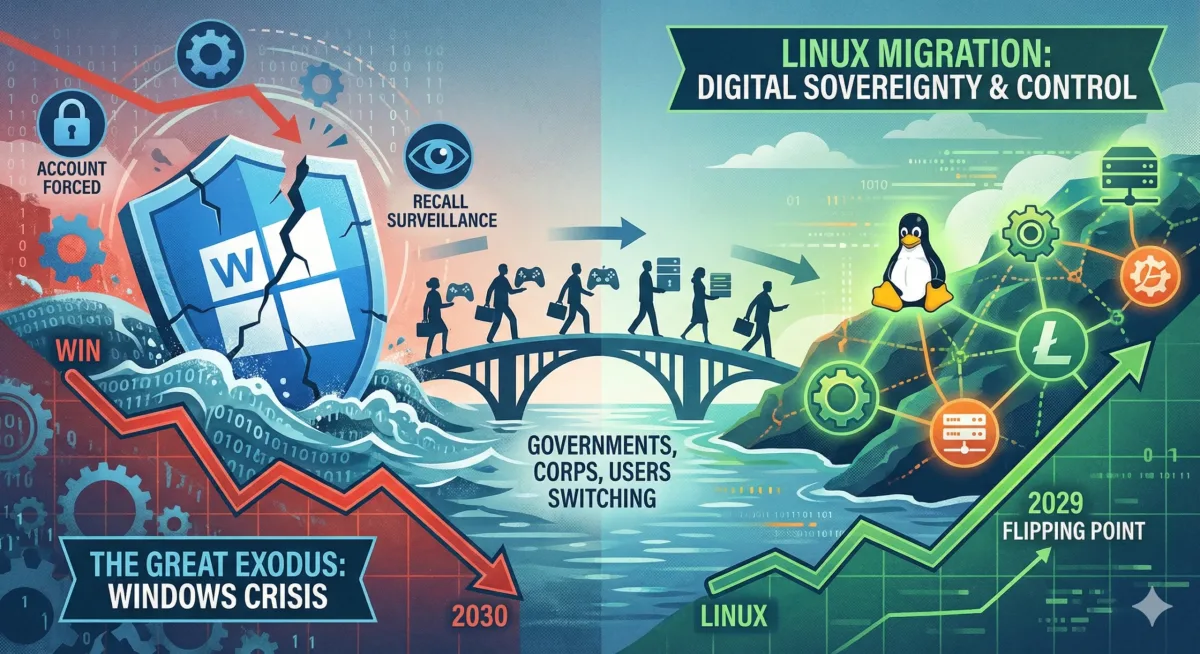
Governments, public bodies and a growing number of businesses are rethinking how much of their estate should depend on Microsoft. The drivers are sovereignty, resilience, privacy and cost — but the move is slower, narrower and more interesting than the “mass exodus” headlines suggest.
First published: 12 January 2026. Updated: 19 September 2026. Topic: digital sovereignty, cyber security and enterprise IT.
While consumers argue about the Windows 11 taskbar, a quieter shift is happening in the back offices of European governments. Some are leaving Microsoft Office and Microsoft 365. A smaller number are replacing Windows itself. Understanding the difference matters, because it tells you what is realistic for your own organisation — and what is still hype.
What has changed since January
Why organisations are reconsidering Windows
Cost used to be the whole argument. Today it is one of four, and for governments it is rarely the main one.
Sovereignty
US providers remain subject to the CLOUD Act wherever the data sits, and sanctions have shown that access to a US service can be switched off for political reasons.
Resilience
A single faulty update crashed millions of Windows machines in 2024. Boards now ask what happens when one vendor has a bad day.
Privacy
Mandatory online accounts, telemetry, AI features and cloud-held encryption keys all move control away from the device owner.
Cost and lock-in
Recurring subscriptions, rising prices and Windows 11’s hardware requirements make the total bill harder to predict.
The CrowdStrike wake-up call
In July 2024 a faulty CrowdStrike update crashed around 8.5 million Windows machines worldwide, grounding flights and disrupting banks and hospitals. Linux servers were largely unaffected by that incident. The lesson for most CIOs is not that Linux is immune — any platform running kernel-level security software can be hit by a bad update — but that a monoculture is a single point of failure. Diversifying operating systems, staging updates and testing them before they reach every machine are now board-level resilience questions.
Privacy, telemetry and Recall
Recall, the Windows feature that takes periodic snapshots of the screen so users can search their history, caused an outcry when it was announced. Microsoft has since made it opt-in, limited it to Copilot+ PCs, encrypted the snapshots behind Windows Hello, and switched it off by default on managed business and enterprise devices. That reduces the risk considerably. It does not remove the wider concern many security teams share: an operating system that sends telemetry by default is harder to justify on machines that handle sensitive or classified work.
Vendor lock-in and rising costs
Microsoft continues to push customers towards subscriptions, including cloud PCs through Windows 365. For a large public body, a per-user monthly fee across tens of thousands of staff is a budget line that can only grow. Linux itself costs nothing to licence; the real costs are support, migration and training. Danish municipalities including Copenhagen and Aarhus have cited rising costs alongside sovereignty in announcing plans to phase out Microsoft systems.
Windows 11’s hardware requirements, including TPM 2.0, add a second cost: many perfectly serviceable PCs cannot officially upgrade. With consumer Windows 10 security updates ending on 13 October 2026, some owners of those machines are choosing Linux over new hardware.
The Microsoft account controversy
The argument over mandatory Microsoft accounts is not really about a login screen. It is about ownership. For decades, a PC you bought worked whether or not it was online. Tying setup, encryption and features to a cloud identity changes that relationship.
Who holds the spare key?
When a consumer signs in to Windows 11 with a Microsoft account on supported hardware, device encryption (BitLocker) is typically switched on automatically and the recovery key is backed up to that account — often without the user noticing. Two risks follow.
The first is access. In January 2026 Microsoft confirmed it had provided BitLocker recovery keys to the FBI under a court order in a 2025 investigation, and said it receives around 20 such requests a year; most fail because the key was never stored in the cloud. Microsoft did not break BitLocker. It simply held a copy of the key. Forbes first reported the case.
The second is lock-out. If a Microsoft account is suspended and the drive later asks for its recovery key — after a firmware update or hardware change, for example — the only copy may be inside the account you can no longer open.
Strong encryption is only as private as the place the recovery key is kept.
The end of anonymous computing
A local account was just a user on a machine in your room. A Microsoft account links sign-ins, apps, Xbox activity, Office documents and, with Copilot, potentially what you type, to one persistent online identity. Privacy advocates argue that this makes anonymous use of a PC practically impossible and gives one company an unusually complete picture of a person’s digital life.
The war on workarounds
Microsoft first removed the familiar OOBE\BYPASSNRO command, then in October 2025 blocked start ms-cxh:localonly, saying these shortcuts skipped important setup screens and that setup should be completed online with a Microsoft account. Local accounts are still possible through unattended installation files or image-based deployment, but the easy routes have gone. For power users, the message is clear: the vendor, not the owner, decides how the machine is set up.
Businesses are affected differently. Managed devices are normally enrolled with a work account through your own Microsoft 365 tenant rather than a personal Microsoft account, which is one reason properly managed deployments matter.
A gateway for AI
The account is also the gateway to Copilot and Microsoft’s other AI features. Critics argue that making the account compulsory makes every user “AI-ready” by default, and that depending on the service and settings, interactions may be used to improve Microsoft’s models unless users find and change the relevant options.
The operating system as a storefront
Once signed in, users see “recommended” apps in the Start menu, prompts to back up to OneDrive and upsells for Microsoft 365. If free Microsoft cloud storage fills up, Outlook.com mail can stop sending and receiving until space is freed or more is bought. For many people, that is the moment Windows stops feeling like a product they bought and starts feeling like a shop they live inside.
The account is the point where the PC starts serving the vendor as well as the owner.
Who is actually moving — and what they are moving
Much of the coverage lumps very different things together. It helps to separate three groups: organisations leaving Microsoft’s office and cloud software, organisations replacing Windows on the desktop, and sectors where Linux has run the show for years and Windows was never the main platform.
European governments and public bodies
Earlier examples still hold up as reference points: Toulouse reported saving around €1 million by moving to LibreOffice, Valencia built its LliureX Linux distribution for public schools, and schools in Kerala, India, moved very large numbers of computers to Linux.
Sanctions and state-driven exits
Outside Europe the drivers are harder-edged. China has reportedly instructed state-owned enterprises to replace foreign software by 2027 under a directive known as Document 79, with domestic Linux distributions such as Kylin and UOS taking Windows’ place. Russian organisations under sanctions, including large state enterprises, have been moving to domestic distributions such as Astra Linux. Turkey developed Pardus for public-sector use. These are exits driven by trade policy and security doctrine rather than by any shortcoming in Windows itself.
Where Linux already runs the show
Many organisations often cited as “leaving Windows” never really used it for the work in question. They show where Linux is strongest, not a sudden exodus.
Science and supercomputing
Every one of the world’s 500 fastest supercomputers has run Linux since 2017. CERN runs Linux, and the ISS moved its station support laptops from Windows to Debian.
Finance and exchanges
The London Stock Exchange moved its trading platform from Windows to Linux in 2010. NYSE, CME, Deutsche Börse and Nasdaq trading engines all run on Linux.
Cloud and the web
AWS, Google, Meta, Wikipedia and most of the modern web run on Linux servers. Google’s staff desktops run its own Debian-based gLinux.
Vehicles, VFX and retail
Tesla, Automotive Grade Linux and Android Automotive power car dashboards. Studios such as DreamWorks and Pixar render on Linux, and many tills and kiosks run it too.
What the market-share numbers really show
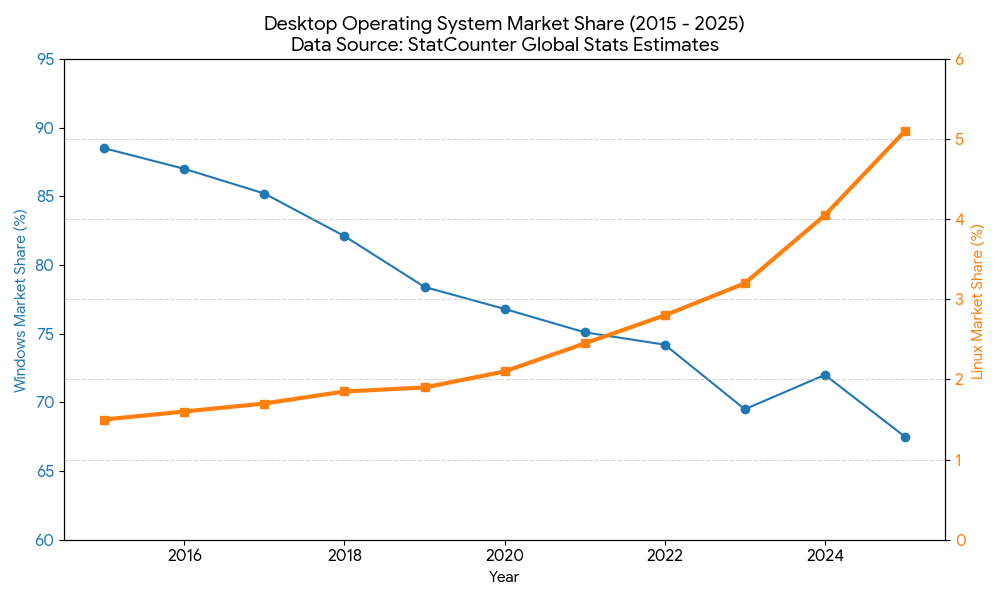
Our January chart showed Windows falling from nearly 90% of desktop usage in 2015 to around two-thirds, and Linux rising from about 1.5% to around 5%. The direction is right. The 2026 figures need careful reading, though.
In June 2026 StatCounter put Windows at 56.55% of worldwide desktop web traffic — its first reading under 60% in years — and Linux at 4.39%. Most of Windows’ apparent fall, however, was absorbed by an “Unknown” category of more than 20%, which analysts attribute to privacy tools masking the operating system and, increasingly, to automated AI traffic. StatCounter measures web page views, not installed machines. On Steam, Linux reached a record 5.33% of surveyed gaming systems in March 2026 before settling back to 3.69% in June.
Our January projections, revisited
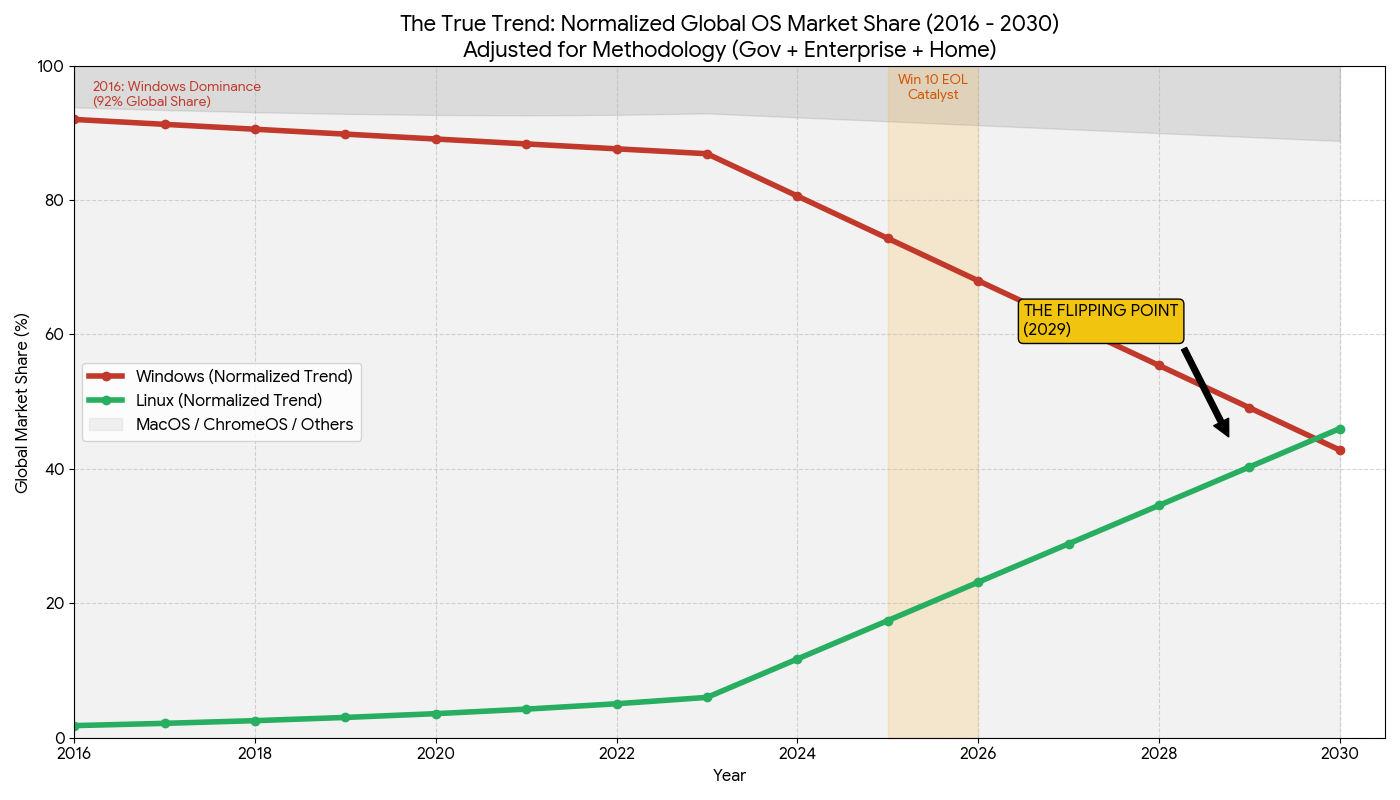
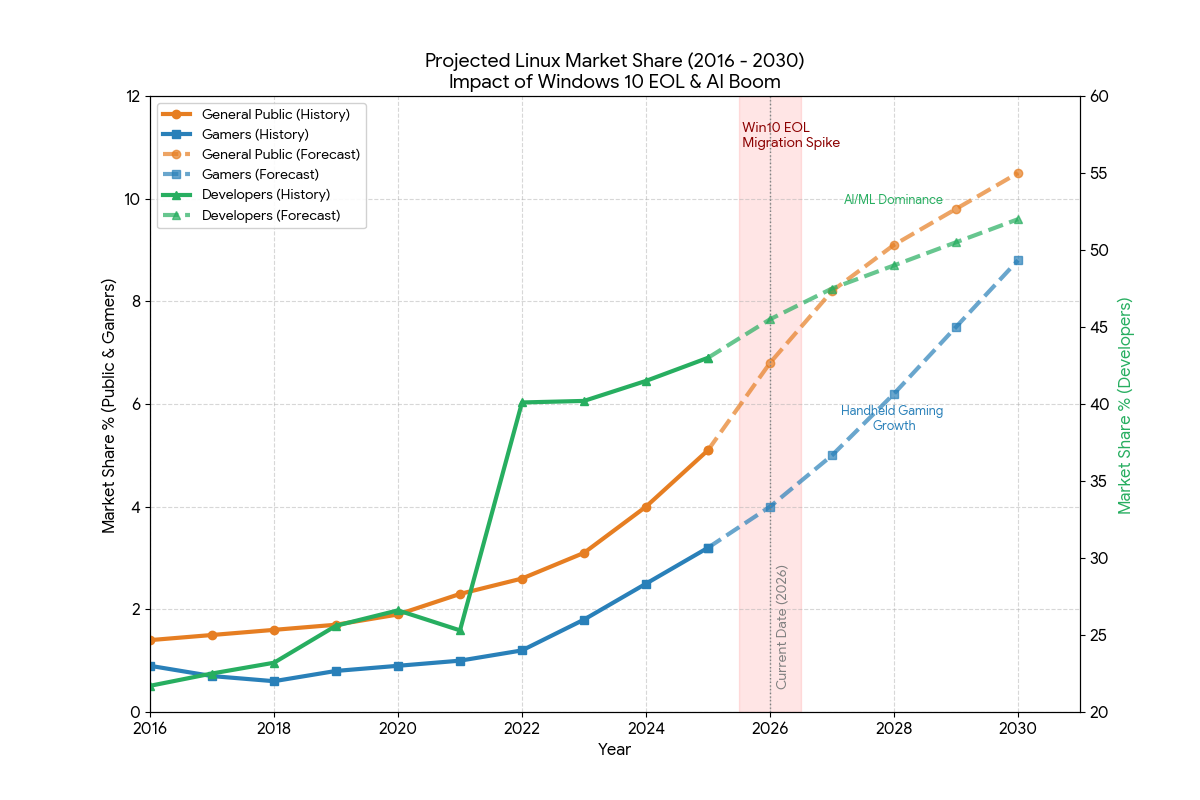
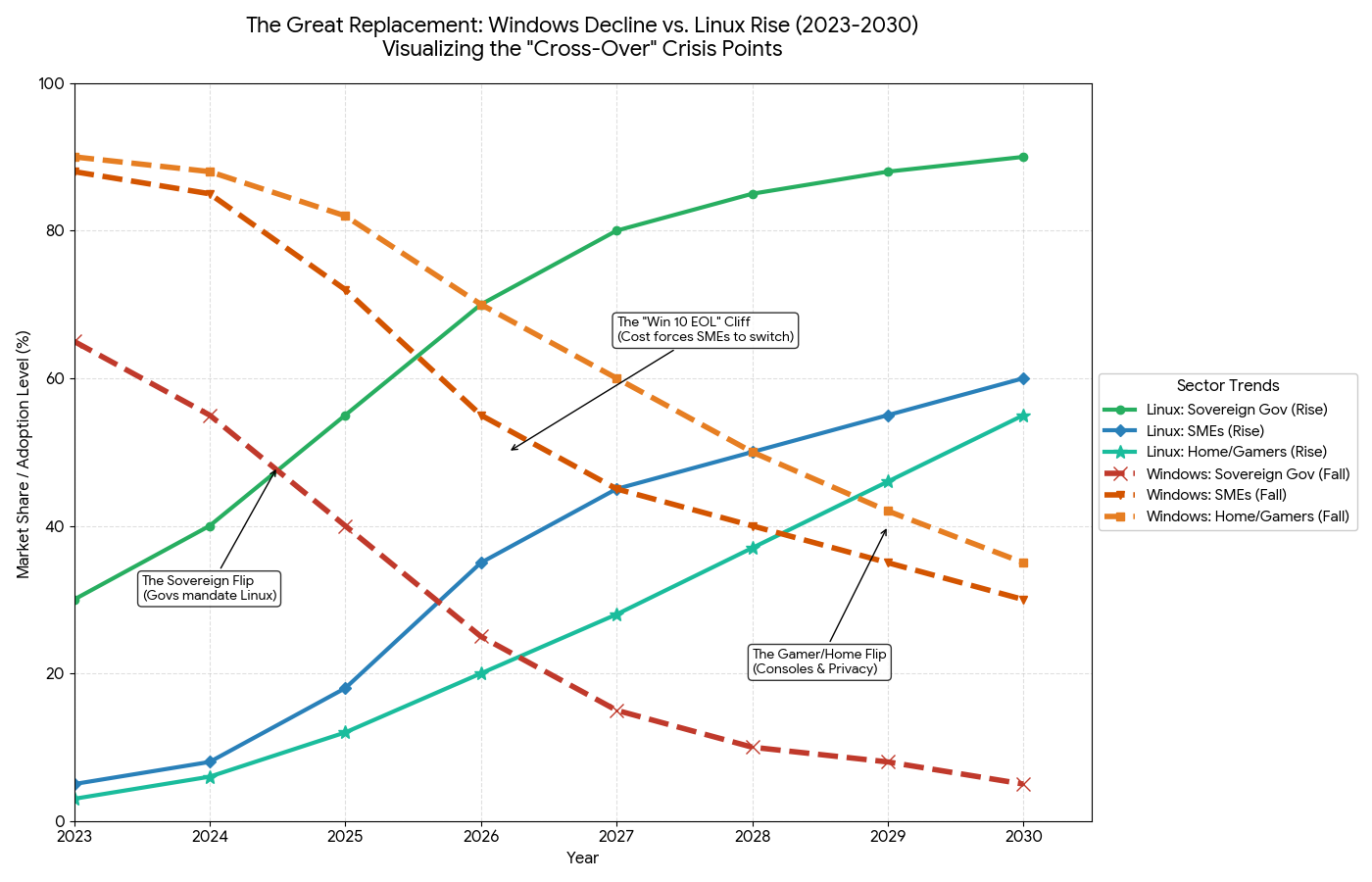
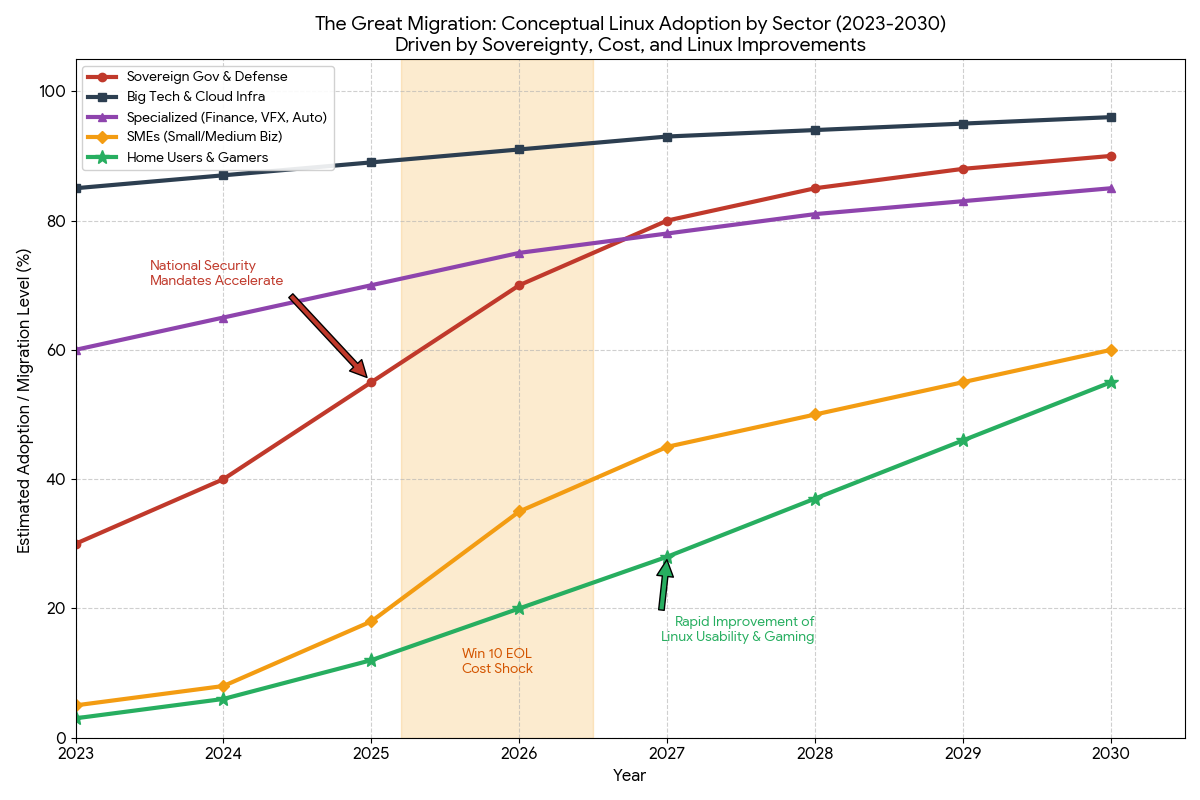
The charts below are the trend extrapolations we published in January. They projected Windows sliding by about a point a year until 2025, then falling sharply as Windows 10 reached end of life and sovereignty mandates took hold, with Linux overtaking Windows around 2029. The grey gap between the lines represents macOS, ChromeOS and others, which the projection held broadly stable at 10–15%.
We are keeping them here for transparency, but treat them as a scenario, not a forecast. Nine months on, the government mandates are real, while desktop share has not moved anywhere near fast enough for a 2029 crossover.
Where they are going
Organisations that do move rarely “just install Linux”. They move to a complete stack: an operating system, an office suite, email and collaboration tools, identity management and support.
Cost: Windows versus Linux
Linux was historically “free but expensive to support”. For many large organisations the maths has shifted — though not for everyone.
Licensing
Windows: recurring Microsoft 365 and Windows Enterprise subscriptions that can rise unpredictably. Linux: no licence fee; optional support contracts are often cheaper.
Hardware
Windows 11 needs TPM 2.0 and newer processors, and AI features demand more. Linux runs well on older machines, extending their useful life by several years.
Downtime
Forced restarts for updates can disrupt work on Windows. Linux live patching can apply many kernel fixes without a reboot, particularly on servers.
Training
Staff already know Windows. Linux needs retraining, although modern desktops such as KDE Plasma narrow the gap considerably.
Should you switch?
Not everyone, and not yet for every role. For many people the switch is liberating; for others it would be a productivity problem. Here is a realistic assessment.
Good candidates
Proceed with care
Stay put for now
For small and medium businesses
The savings are real: roughly £150 to £350 ($200–$400) per machine once a Windows Pro licence and an eventual Office subscription are taken into account. Across ten staff, that is thousands of pounds.
Security improves too, with an important caveat. Linux desktops are far less targeted by commodity Windows ransomware today, but that advantage shrinks as adoption grows, and phishing, malicious browser extensions and stolen credentials work on any platform. You still need proper cyber security, backups and user training.
The risks are people and software. If your accountant cannot work efficiently or the sales team cannot print, productivity falls. And if your line-of-business software — dental practice management, warehouse inventory, specialist finance — only runs on Windows, you cannot switch that role.
For home users
If you dislike Recall, Start menu recommendations or being required to sign in with a Microsoft account, Linux is the most complete way out. Modern distributions such as Linux Mint and Zorin OS look and feel close to Windows 10, updates install in the background, and there is no “do not turn off your PC” screen when you are trying to leave the house. If you are still on Windows 10 in the UK, remember that consumer security updates end on 13 October 2026.
Try it from a USB stick
Boot a “live” copy of Linux without touching Windows. Check your Wi-Fi, printer and favourite websites.
Dual boot
If it works, install Linux alongside Windows and choose which to start each time you switch on.
Commit when ready
After a few weeks of everyday use, decide whether Windows still earns its place on the machine.
The hybrid route: de-Microsoft gradually
If you are not ready to leave Windows, you can reduce your dependence on it now, which makes any future move far easier.
Final verdict
Switch now if you have older hardware, work mainly in a browser, or care deeply about privacy. Wait if you depend on Adobe tools or specialist Windows-only software. Either way, test for a few weeks before committing.
For organisations, the bigger question in 2026 is often not Windows itself but where your data, identities and encryption keys live, and who could be compelled to hand them over. That is worth reviewing whether or not you ever install Linux.
Planning a migration, or hardening what you have?
We help businesses in London, Kent and Sussex, the US and remotely plan Linux pilots, secure Windows and Microsoft 365, and keep control of their keys.