Best AI Portrait Photo Enhancer Editor
Compare five AI photo enhancers that sharpen portraits without the plastic look, tested for natural results on real faces rather than benchmark scores.
Most AI photo enhancers can make a portrait sharper. Far fewer can do it without making the subject look like a waxwork. We tested the leading options on real faces to find the ones that hold up under scrutiny.
Enhancing a landscape is forgiving. Invent a bit of extra texture in a rock face and nobody notices. Faces are different: we are all experts at reading them, and we spot a wrong one instantly, even when we cannot say why. That is why the tool that wins every upscaling benchmark is often the worst choice for a headshot.
The five tools below were chosen on one criterion: does the result still look like a photograph of that person? Anything that smooths skin into plastic, redraws an iris, or quietly changes the shape of a nose was ruled out, however impressive the resolution jump.
What "natural" actually means when the subject is a face
There is a real technical difference between two things that get sold under the same "AI enhancement" label. Reconstruction recovers detail the sensor genuinely captured but the file lost to noise, compression or a soft lens. Generation invents plausible detail that was never there. Both make an image look better on a small screen. Only the first survives being viewed at full size next to the original.
For portraits the distinction matters more than anywhere else, because generative models have strong priors about what a face should look like. Feed one a slightly blurred face and it will happily produce a sharp, symmetrical, pore-free face — just not the same face. On a stock image this is harmless. On a client's team page, a passport-style headshot, or a photograph of somebody's late grandmother, it is a failure.
The five tools worth your time
Let's Enhance
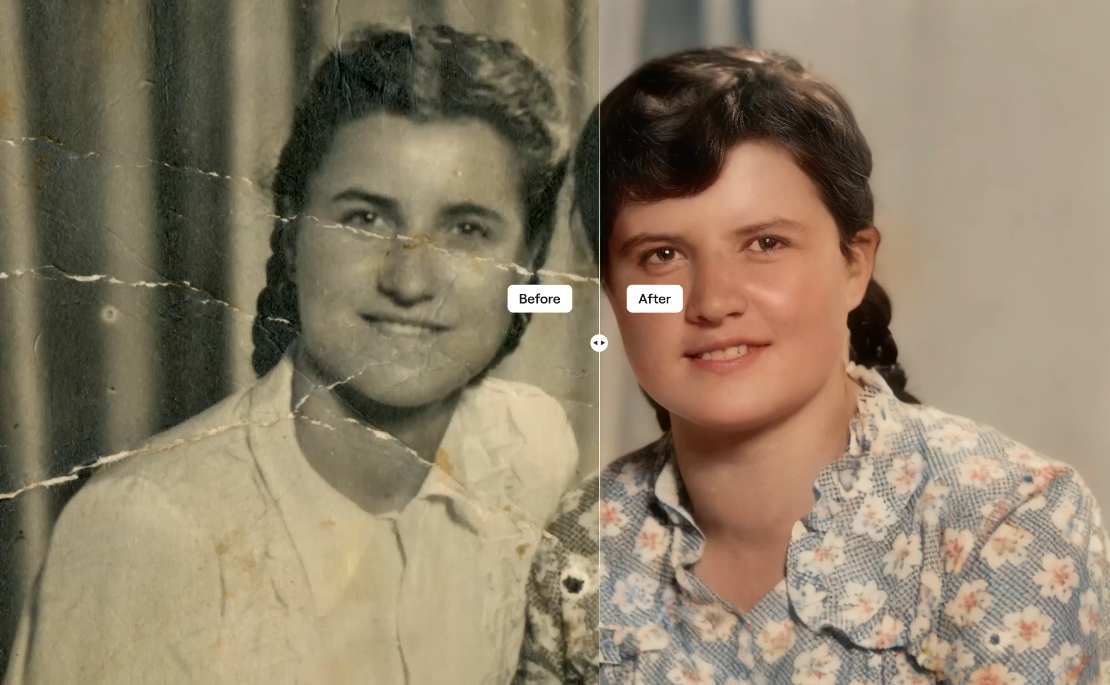
Let's Enhance runs entirely in the browser, which makes it the fastest way to rescue a single image without installing anything. Alongside the general upscaler it has a dedicated Face Enhancer, plus separate tools for unblurring, unpixelating, denoising and restoring old photographs — being able to pick the specific operation, rather than letting one model do everything at once, is a large part of why its output stays believable.
It is credit-based: one image costs one credit. Ten free credits come with a new account, though free outputs are watermarked, so treat the free tier as a demo rather than a trial. Paid plans start at 100 credits a month, and unused credits roll over while you stay subscribed, up to six times your monthly allowance. Cancel and any remaining credits are forfeited at the end of the billing period.
Luminar
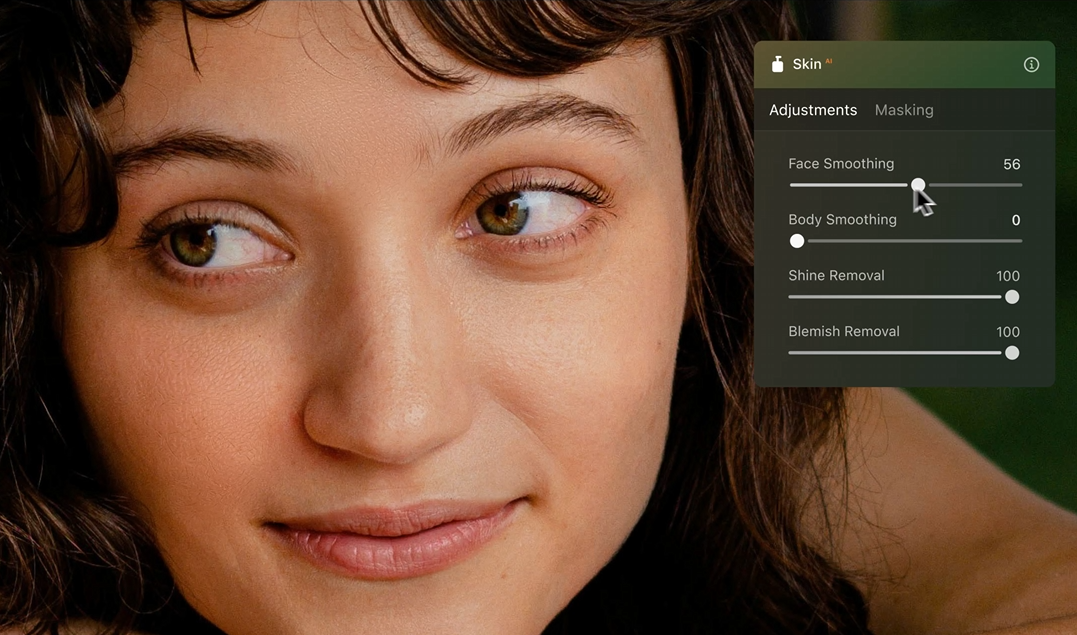
Skylum's Luminar is the only tool here that is a complete photo editor as well as an enhancer, and the only one you can genuinely buy outright. Its portrait set — Face AI, Skin AI, Body AI and Portrait Bokeh AI — is restrained by default, and Skylum's own documentation is honest about the limits: the portrait tools want the face to fill at least a quarter of the frame to work properly. It runs as a standalone application and as a plug-in for Photoshop, Lightroom and Apple Photos.
The licensing has one wrinkle worth understanding before you buy. The application itself is yours permanently, but the generative tools (Restoration, GenErase, GenSwap, GenExpand and AI Assistant) come with 365 days of unlimited use, after which they need a Luminar Prime subscription to keep working. The core editing and portrait tools are unaffected.
Topaz
Topaz still produces the best pure enhancement quality of anything here, particularly on files that are genuinely damaged — heavy high-ISO noise, missed focus, a heavy crop. Its Face Enhancer and Recover Faces models are tuned specifically to avoid the identity drift that general upscalers introduce, and the desktop applications process locally rather than in the cloud.
Two things have changed and both affect the buying decision. Topaz withdrew perpetual licences for new customers in late 2025, so the range is subscription-only; existing owners keep the version they bought. And on 25 June 2026 Adobe announced a definitive agreement to acquire Topaz Labs, expected to close in the second half of 2026 subject to regulatory approval. Adobe has said the standalone applications will continue to be sold and existing licences remain valid, but no pricing or roadmap commitments were made beyond that. If you want certainty about what you will be paying in three years, factor that in.
Aperty
Aperty is Skylum's dedicated portrait editor, developed with portrait photographer Julia Trotti, and it is the most focused tool on this list. Where Luminar has portrait features among many others, Aperty is built around nothing else: retouching, reshaping, shine removal, studio light control, a frequency separator, and portrait bokeh. Skylum states its face mesh works to around 4,000 points per face with segmentation across up to 30 face and body classes, which is what allows the reshaping tools to stay subtle instead of smearing.
It processes locally, works offline, and runs standalone or as a plug-in for Photoshop, Lightroom and macOS Photos. Usefully, it is sold both as a subscription and as a one-time lifetime licence — and at the time of writing the lifetime price is the same as the first year of the annual plan, which makes the subscription hard to justify.
Evoto
Evoto is the choice if you are processing hundreds of portraits rather than one. It is built for volume portrait work — school and graduation sets, corporate headshots, wedding galleries — with batch retouching, AI colour matching, a body editor, background replacement and, since late 2025, automatic culling. Reviewers consistently note that it will overdo skin if you let it, so it rewards building your own presets rather than accepting the defaults.
The pricing model is unusual and, for the right workload, very good: editing and previewing are free, and you spend one credit only when you export. Basic colour adjustments, cropping, tethered shooting and the manual tools do not consume credits at all. That means you can work through an entire shoot, decide what is worth delivering, and pay only for the finished frames.
Feature comparison
| Tool | Best for | Portrait-specific tools | Where it runs | Cost model | Entry price |
|---|---|---|---|---|---|
| Let's Enhance | Rescuing one low-resolution or damaged portrait, fast | Face Enhancer, Unblur, Unpixelate, Denoiser, Restoration | Browser (cloud); no offline use | Credits — 1 image = 1 credit; subscription or pay-as-you-go | Free (10 watermarked credits); $9/month billed annually for 100 credits |
| Luminar | A single editor that does everything, owned outright | Face AI, Skin AI, Body AI, Portrait Bokeh AI | Desktop (macOS, Windows); local processing; Photoshop, Lightroom and Apple Photos plug-in | One-time purchase; generative tools need Prime after 365 days | $129 one-time (Desktop Only) |
| Topaz | Highest enhancement quality on genuinely damaged files | Face Enhancer (web), Recover Faces (Photo), Face Recovery (Gigapixel) | Desktop apps process locally; Image Web is cloud | Subscription only; perpetual licences withdrawn for new customers | $9/month billed annually ($109/year) for Image Web |
| Aperty | Portrait retouching as a specialism, not a side feature | Retouch, Reshape, Frequency Separator, Shine Removal, Studio Light Control, Portrait Bokeh, Makeup | Desktop; local processing, works offline; Photoshop, Lightroom and macOS Photos plug-in | Subscription or one-time lifetime licence; unlimited edits | $174 one-time lifetime, or $174 first year annually |
| Evoto | Batch work — hundreds of portraits from one shoot | Portrait Retouching, AI Body Editor, AI Color Match, AI Background Remover, AI Culling | Desktop, iPad and mobile; editing local, export credited | Credits — 1 credit per exported photo; editing and previewing free | 7-day trial with 50 credits; $80/year for 800 credits |
Prices are in US dollars and were checked in August 2026. Every vendor here runs frequent promotions — Skylum's current Luminar sale ends on 31 August 2026, and several Topaz tiers are showing discounted rates — so check the live pricing page before committing.
What else you get beyond the portrait tools
Portraits are rarely the only thing you need an editor for, and this is where the five diverge sharply. Two are general photo editors that happen to be good at faces. Two do almost nothing but faces. One is an enhancement engine that barely edits at all. That distinction matters more to the total cost than the licence fee does, because a narrow tool means paying for a second one alongside it.
| Capability | Let's Enhance | Luminar | Topaz | Aperty | Evoto |
|---|---|---|---|---|---|
| Old and damaged photo restoration | Yes — Restoration | Yes — Restoration (repairs scratches, recovers detail) | Yes — Photo Restoration, Dust & Scratch | — | — |
| Colourising black and white | — | Yes — part of Restoration | Yes — Colorizer | — | — |
| Upscaling | Yes — up to 16x, outputs to 512 MP | Yes — Upscale (Pro Tools) | Yes — Standard and Creative Upscale; Gigapixel to 16x | — | — |
| Dedicated denoise and sharpen | Yes — Denoiser, Sharpener, Unblur | Yes — Noiseless, Supersharp | Yes — Denoise Standard/Auto/Max, Sharpen, Super Focus | — | Yes — AI Image Denoiser, AI Photo Sharpener |
| Depth of field / background blur | — | Yes — Portrait Bokeh AI | — | Yes — Portrait Bokeh, adjustable depth and transition | Yes — AI Lens Blur with selectable bokeh shapes |
| Sky replacement | — | Yes — SkyAI, 550+ skies, relights scene and water reflections | — | — | Yes — Sky Replacement with manual brush tuning |
| Background removal or replacement | Removal only (16 MP limit) | Yes — Background Removal, Portrait Background | Removal only — Background Remover | — (blur only) | Yes — Remover, Replacer, Studio Backdrop, backdrop cleanup |
| Relighting | — | Yes — Light Depth, Magic Light, Sunrays, AtmosphereAI | Yes — Relight Image, Adjust Lighting | Yes — Studio Light Control, up to five light sources | — |
| Generative object removal and fill | — | Yes — GenErase, GenSwap, GenExpand, Remove Powerlines | Yes — Remove, Healing Brush | Erase tool | Yes — object and distraction removal, clothing de-wrinkle |
| Automatic culling | — | — | — | Star ratings only | Yes — AI Culling |
| Video | Yes — video upscaler, image to video | — | Yes — Topaz Video and Astra, in the Studio bundle | — | — |
| Mobile or tablet app | — (mobile browser only) | Yes — iOS, Android, ChromeOS, with cross-device sync | Yes — Topaz for Mobile | — | Yes — iPad and mobile |
Luminar is far and away the widest. Sky replacement, atmospheric effects, sunrays, powerline removal, HDR merge, focus stacking, panorama stitching, layers, AI masking and a full catalogue sit alongside the portrait set — and it is the cheapest one-off purchase here. If you shoot anything other than faces, that breadth is the strongest argument in its favour, and it is why we still recommend it as the general-purpose half of a two-tool setup.
Topaz is deep rather than wide. It has no sky replacement, no bokeh, no catalogue and no creative toolset, because it was never trying to be an editor. What it does instead is more model variety for the technical fixes than anyone else offers, plus a Gigapixel engine and, on the Studio bundle, professional video enhancement. It is a finishing stage, not a workflow.
Let's Enhance is best understood as a rack of single-purpose tools rather than an editor at all — pick one operation, run it, download the file. That is a genuine strength when you know exactly what is wrong with an image. It is also the only option here with a video upscaler and an image-to-video generator, and the only one with a documented API, which matters if you want to bolt enhancement into an existing pipeline.
Between the two portrait specialists, Evoto is much the broader. Aperty deliberately stops at the edge of the subject: it will light, retouch, reshape and blur, but it will not replace a sky or a background. Evoto does all of that plus culling, denoise, sharpening, backdrop replacement and object removal — which makes it closer to a complete high-volume workflow, and Aperty closer to a precision instrument.
Three different cost models, and how to compare them
The headline figures above are not directly comparable, because the tools charge on fundamentally different bases. Working out which is cheapest for you means estimating one number: how many finished portraits you produce per month.
Credits, paid per image
Let's Enhance and Evoto both charge per image, which is efficient at low volume and punishing at high volume. The trap is re-runs. If a model gets an image wrong on the first pass, the second attempt costs another credit, so budget roughly twenty per cent above your actual image count. Evoto is the better structured of the two here, because you only pay on export — you can process a whole shoot and pay for the frames you deliver. Let's Enhance charges on the operation itself.
One-time purchase
Luminar and Aperty both let you pay once and keep the software. At Luminar's $129 you are ahead of any subscription here within a year, and Aperty's $174 lifetime licence pays for itself against its own annual plan almost immediately. The caveat is that "perpetual" does not mean "permanently current": you get maintenance updates, but major new features and, in Luminar's case, the generative tools after the first year, need further payment.
Subscription
Topaz is now subscription-only, and it is the most expensive way to enhance a portrait on this list — though it is also the most capable. Two details catch business buyers out. The standard tiers include only limited commercial use, restricted to organisations under $1 million in annual revenue; above that you need the Pro tiers, which cost substantially more. And the entry-level Image Web plan caps exports at 32 megapixels, which is fine for web use and a constraint for large prints.
Where your images are processed — and why it matters
This is the question most reviews skip, and for business use it is often the deciding one. Let's Enhance is cloud-only: every image you enhance is uploaded to a third party. So is Topaz Image Web, though the Topaz desktop applications render locally. Aperty runs entirely on your own machine and works offline. Evoto edits locally, with credits consumed at export.
Luminar needs a caveat. Most of it processes locally, but the tools are not uniform: Skylum's documentation confirms that the Restoration tool processes online and requires an internet connection, and the generative tools are cloud operations too. So "Luminar is a local editor" is true of the portrait and creative tools and not true of the whole application. If you are working to a data processing agreement, that distinction is the one your assessment turns on — and it is worth checking per tool rather than per product, for any of these.
If you are enhancing your own holiday photographs, this is a non-issue. If you are processing client staff photographs, images of patients, pupils or vulnerable people, or anything covered by a data processing agreement, it is not. Facial images are biometric data under UK GDPR, and pushing them through a cloud enhancer means you have a processor to identify, a lawful basis to document, and a transfer mechanism to check. A tool that runs entirely on your own hardware removes that problem rather than managing it.
Our pick
For most people, buy Aperty for the portraits and Luminar for everything else — and keep a Let's Enhance account for emergencies.
If you only ever do one thing, do this: Aperty is the best portrait enhancer of the five. It is the only one built solely for faces, it processes locally, its defaults are conservative in a way that makes the results hold up, and the one-time lifetime licence removes any ongoing cost question. For portrait work specifically, it beats its own stablemate Luminar.
Luminar remains the better buy if you want one application to handle your whole catalogue and not just the headshots — landscape, product, general retouching and portraits in the same tool, bought outright for less than most of the subscriptions here cost in a single year.
Let's Enhance earns its place as the tool you reach for when someone sends you a 640-pixel-wide JPEG and asks for a print. Nothing else on this list gets from that to a usable file with less effort, and because you are paying per image you can leave the account dormant between emergencies. Just keep the images non-sensitive.
Topaz is the one we would think hardest about. On quality alone it is still the leader, and for genuinely broken files nothing matches it. But the combination of subscription-only pricing, a commercial-use threshold that catches growing businesses, and an acquisition still awaiting regulatory clearance makes it a difficult recommendation for a firm that wants predictable tooling costs. If it is already central to your workflow, stay. If you are choosing now, the alternatives are close enough.
Evoto is the specialist pick, and the right answer if volume is your problem rather than quality. At a few hundred portraits a month its pay-on-export model is the cheapest way to work, and its culling and batch tools save more time than any single-image enhancer can.
One worth knowing about that did not make the five: Retouch4me sells individual AI retouching plug-ins — Heal, Dodge & Burn, Skin Tone, Portrait Volumes, Mattifier and others — that work inside Photoshop and are widely regarded as the most texture-faithful automated retouching available. It now sells access as a subscription from $20 a month, with a free trial of 20 cloud retouches and several free tools including a Photoshop panel. If you already work in Photoshop and skin texture is the thing you cannot compromise on, start there instead.
Test it properly before you pay
Every tool here offers a free trial or demo mode. Vendor sample images are chosen to flatter the model, so they tell you nothing. Use your own, and use the same set for every tool so the comparison means something.
Build a hard reference set
Six or seven of your own portraits covering the cases that actually break these tools: flat even lighting, hard light with hot highlights on the forehead, glasses with glare across one eye, a deep crop from a larger frame, high-ISO noise, and a subject with textured or freckled skin.
Judge at 100 per cent, never fitted to screen
Almost every enhancer looks excellent scaled down. Open the original and the result side by side at full pixel size and look specifically at pores, individual eyelashes, the edge of the hairline, and the boundary between teeth and lips.
Check the identity, not just the sharpness
Ask someone who knows the subject whether it still looks like them. This catches the failure mode that no technical measure will: a face that is sharper, cleaner, more symmetrical, and no longer quite the right person.
Cost the workflow, not the licence
Run your realistic monthly volume through each pricing model, add around twenty per cent for re-runs on credit-based tools, and check whether your organisation falls inside the vendor's commercial-use limits. The cheapest headline price is frequently not the cheapest year.
Need this handled properly?
We advise businesses on software licensing, data protection and the practical detail of getting tools like these deployed safely.