For years, Discord has been the undisputed king of online community spaces, seamlessly blending voice, video, and text for gamers, developers, and hobbyists alike. However, the landscape is shifting.
Recently, a wave of controversies has pushed power users to look for the exit. The primary catalyst has been Discord’s controversial push toward strict age and ID verification systems, which many fear could compromise user anonymity. Coupled with increasing platform bloat, aggressive monetization tactics (like locking basic features behind Nitro), and growing unease about closed-source data mining, the demand for privacy-respecting, self-hostable alternatives has never been higher.
Fact Check Note: While viral forum rumors have recently claimed direct Discord surveillance ties to government agencies via third-party verification companies, these remain unverified community speculations. However, the core reality—that Discord is a closed-source platform pushing for biometric/ID verification with a history of selling data—is a factual and valid privacy concern.
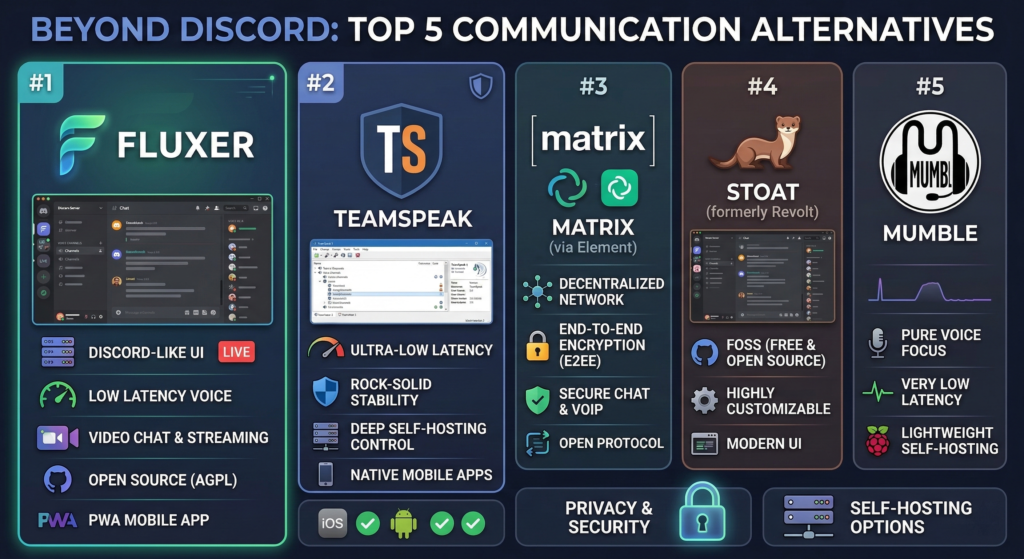
If you are ready to jump ship, here is a deep dive into the top five alternatives, ranked by their ability to replace or improve upon the Discord experience.
1. Fluxer: The 1:1 Discord Successor
Currently dominating the migration wave, Fluxer is an open-source (AGPL) project based in Sweden. Its biggest selling point is its user interface, which is a near-identical clone of Discord. It allows entire communities to transition without having to relearn a new application.
- The Good: Extremely familiar UI, modern voice/text channels, custom emojis without a paywall, and active development.
- The Catch: It is still in public beta. You might experience server hiccups during high-traffic times, and end-to-end encryption (E2EE) is on the roadmap but not yet fully implemented.
2. TeamSpeak: The Low-Latency Legend
TeamSpeak is the old reliable workhorse of voice communication. While it lacks the modern, flashy text-channel interface of Discord, it remains unparalleled for competitive gaming and large-scale voice operations.
- The Good: Industry-leading latency, incredibly low resource usage, and rock-solid self-hosting capabilities.
- The Catch: The UI feels dated, text chat is an afterthought, and it exposes user IP addresses to server admins, meaning you must trust your host or use a VPN.
3. Matrix (via Element): The Decentralized Powerhouse
Matrix isn’t just an app; it’s an open communication protocol. By using a client like Element or Cinny, you can connect to a decentralized, federated network. It is the closest thing to “email for instant messaging.”
- The Good: True decentralization, default end-to-end encryption (E2EE), and exceptional privacy. No single company can shut down your server or force feature changes.
- The Catch: The onboarding process can be confusing for non-technical users, and managing “Spaces” and “Rooms” feels slightly more rigid than Discord’s fluid server hopping.
4. Stoat (Formerly Revolt): The FOSS Challenger
Previously known as Revolt, Stoat recently rebranded but kept its mission: providing a free, open-source, user-first chat platform. It offers a very similar layout to Discord and Fluxer but relies on a donation-based model rather than a premium subscription tier.
- The Good: Excellent desktop experience, highly customizable themes, and solid self-hosting through Docker.
- The Catch: Development can be slow. It currently lacks native screen sharing with audio (unless you self-host and configure it yourself), which is a dealbreaker for many gamers.
5. Mumble: The Open-Source Audio Purist
Like TeamSpeak, Mumble prioritizes voice over text. It is a completely free, open-source voice over IP (VoIP) application designed primarily for use by gamers.
- The Good: Absolutely free, open-source, incredibly secure, and offers some of the lowest latency positional audio available.
- The Catch: No video chat, no native live streaming, no modern text features, and the mobile apps are strictly functional rather than user-friendly.
Comprehensive Feature Comparison
Latency, Video Chat, and Live Streaming
| Feature | Fluxer | TeamSpeak | Matrix (Element) | Stoat | Mumble |
| Audio Latency | Moderate | Ultra-Low | Moderate | Moderate | Ultra-Low |
| Video Chat | Yes (via LiveKit) | No | Yes (1-on-1 & Group) | No | No |
| Live Streaming | Yes (No audio yet on Windows) | No | Limited | No (Self-host workaround only) | No |
| Groups & Roles | Excellent (Discord clone) | Strong (Hierarchical) | Good (Spaces/Rooms) | Excellent | Basic |
The Mobile Experience (iOS & Android)
A communication platform lives and dies by its mobile app. Here is what you can and cannot do on the go:
- Fluxer: Currently relies on a Progressive Web App (PWA). Native iOS and Android apps are on the roadmap but not fully realized. You can chat and manage servers, but the experience isn’t as snappy as a native app.
- TeamSpeak: Offers solid, native iOS and Android apps. You can join servers, talk, and manage basic permissions, but the apps are strictly for voice—don’t expect to share memes or stream mobile games.
- Matrix (Element): Excellent native apps for both iOS and Android. You get full access to encrypted group chats, voice calls, and file sharing. It is the most complete mobile experience on this list.
- Stoat: Mobile apps are currently in beta (available via TestFlight and Google Play). They are functional for text chat but lack the polish and feature parity of their desktop counterpart.
- Mumble: Relies on third-party mobile clients (like Plumble for Android). They work for voice chat in a pinch but are clunky and lack modern UX design.
Mobile App Abilities: What They Can and Cannot Do
A communication platform’s mobile experience is often the deciding factor for active communities. Here is how the top five alternatives stack up on iOS and Android.
| Platform | App Availability | What it CAN do | What it CAN’T do |
| Fluxer | Progressive Web App (PWA) | Basic text chat, server navigation, and role management. | No native push notifications yet, no mobile screen share, and the UI can feel sluggish compared to native apps. |
| TeamSpeak | Native iOS & Android | High-quality voice chat, server joining, and managing basic permissions. | No video chat, clunky text interface, and poor handling of media/image sharing. |
| Matrix (Element) | Native iOS & Android | Encrypted text, voice/video calls, robust media sharing, and managing spaces. | Room management can feel complex on mobile, and initial account setup has a steeper learning curve. |
| Stoat | Native Beta (TestFlight/Google Play) | Text channels, custom themes, and basic server management. | Push notifications are currently buggy, no mobile screen sharing, and the overall UI lacks final polish. |
| Mumble | Third-Party Apps (e.g., Mumla) | Extremely low-latency voice chat and background audio support. | No official first-party app, zero video support, strictly basic text, and a highly dated user experience. |
The Privacy Factor & Self-Hosting
If privacy is your primary reason for leaving Discord, how you host your server matters just as much as the software you choose.
- Fluxer: Open-source (AGPL). Offers free self-hosting (currently in active development, labeled as “TBD” for full public release) and an “Operator Pass” for enterprise. Privacy is strong, but federation and E2EE are still pending.
- TeamSpeak: Closed-source but allows complete self-hosting control. Privacy depends entirely on your server administrator, as IPs are visible to the host.
- Matrix: The gold standard for privacy. Fully open-source, decentralized, and E2EE by default. You can easily spin up a self-hosted instance using Docker Ansible deployments, keeping your data entirely in your hands.
- Stoat: Open-source and privacy-respecting. Self-hosting is highly encouraged and fully supported via Docker Compose, giving you complete ownership of your community’s data.
- Mumble: Open-source and highly secure. Self-hosting a “Murmur” server is incredibly lightweight and can be run on almost any hardware, including a Raspberry Pi.
Operating System & Console Compatibility
One of Discord’s massive advantages is its official integration with PlayStation and Xbox for OS-level voice chat. Because the alternatives below are primarily open-source or independent projects, none of them currently offer native console apps or system-level integration for Xbox, PlayStation, or Nintendo Switch. However, some can still be accessed via console web browsers for text chat.
| Platform | Windows | macOS | Linux | Xbox | PlayStation | Nintendo Switch |
| Fluxer | Yes (Web/PWA) | Yes (Web/PWA) | Yes (Web/PWA) | Web Browser Only | Web Browser Only | No |
| TeamSpeak | Yes (Native) | Yes (Native) | Yes (Native) | No | No | No |
| Matrix (Element) | Yes (Native) | Yes (Native) | Yes (Native) | Web Browser Only | Web Browser Only | No |
| Stoat | Yes (Native & Web) | Yes (Native & Web) | Yes (Native & Web) | Web Browser Only | Web Browser Only | No |
| Mumble | Yes (Native) | Yes (Native) | Yes (Native) | No | No | No |
Note: For users trying to use Fluxer, Matrix, or Stoat on an Xbox or PlayStation browser, functionality is typically limited to text chat only. Console browsers generally do not support the microphone permissions required for web-based voice chat.
Making the Final Call: Which Alternative is Right for Your Community?
Choosing to migrate away from Discord is no small feat, especially when it means sacrificing the seamless, built-in voice integration that Xbox and PlayStation users have come to rely on. As our comparisons show, the biggest trade-off when leaving Discord is the current lack of native console support among its competitors. However, what you lose in console convenience, you gain back entirely in privacy, self-hosting capabilities, and true ownership over your community’s data.
When making your final decision, consider your community’s core needs:
- For the easiest transition: Choose Fluxer. Its familiar interface means your users won’t have to relearn how to chat, even if the mobile experience is still maturing.
- For absolute privacy and security: Choose Matrix (via Element). With default end-to-end encryption and unparalleled decentralized architecture, it is the safest bet for protecting user data across all desktop and mobile devices.
- For pure gaming performance: Choose TeamSpeak or Mumble. If text chat is an afterthought and ultra-low latency audio is your only priority, these lightweight legends are still unbeatable.
- For the open-source tinkerer: Choose Stoat. It provides a highly customizable, modern chat environment that gives self-hosters plenty of room to build out their ideal server.
The perfect, one-size-fits-all Discord replacement might not exist yet, but the alternatives are stronger—and more necessary—than ever. It all comes down to what your community values most: familiarity, privacy, or performance.
PS: If you are running a local community then rather simply consider Signal or even WhatsApp.