Website hacking by AI has exploded - here's what it means for your site
AI is discovering website vulnerabilities in hours, not weeks. Learn what the surge in automated exploits means for your WordPress site's security.

Historically, a reasonably up-to-date website was a safe bet. In the last few months that assurance has stopped meaning anything at all. Large or small, well known or invisible, sites are being broken into quietly and in volume — because finding the flaw no longer needs a person.
For most of the last decade the economics protected you. A human had to read the code, spot a mistake and write a working exploit, and humans are slow and expensive. So attackers went after big targets and after flaws that were already public, and everyone else got by on being too small to be worth the hours.
That constraint has gone. Machines now do the reading, across every line of every plugin, theme and bespoke snippet on the internet, at a cost measured in pounds rather than person-weeks. Nobody is beneath the effort any more, because there is barely any effort. The result is visible in the numbers, and it is visible in the traffic hitting our clients' servers.
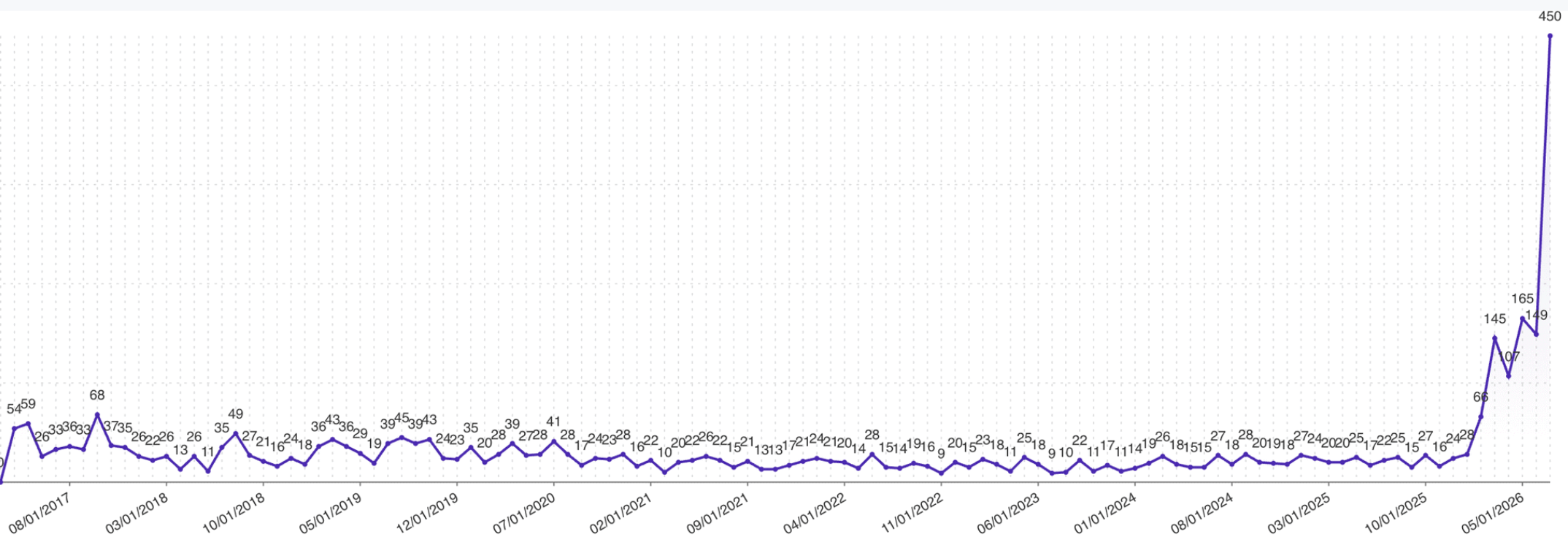
Those first two figures come from Patchstack's State of WordPress Security in 2026. The third comes from WordPress's own bug bounty intake: nine years of reports running at a few dozen a month, climbing past a hundred a month this spring, then 450 in July.
Who is finding the holes now
The 450 figure is not a sudden burst of human enthusiasm. WordPress 7.0.3, released on 6 August 2026 with twelve security fixes, credits an unauthenticated cross-site scripting flaw that can chain to PHP code execution to pwn.ai — a company selling autonomous penetration testing — and a separate CSS filter bypass to Anthropic, the AI lab. The release before it patched a pre-authentication SQL injection chain that Searchlight Cyber produced by pointing a large language model at WordPress core: a working exploit in ten hours, for roughly twenty-five dollars of compute.
A flaw that used to cost a specialist a fortnight now costs an attacker an afternoon and the price of a takeaway.
The same shift is showing up on the offensive side. Palo Alto's Unit 42 documented a threat actor this year running an AI agent that researched vulnerabilities, compared how many instances of each product were exposed online, downloaded proof-of-concept code and attempted exploitation against more than 460 targets — compressing what the researchers described as hundreds of hours of targeting analysis into minutes. Check Point's AI Security Report 2026 describes intrusions where AI generated thousands of commands across dozens of sessions with barely any human direction.
None of this requires the attacker to be sophisticated. It requires them to rent a model and point it at the internet.
Ninety minutes from patch to payload
The practical consequence is that your maintenance window is now the attack window. When WordPress 7.0.2 fixed the SQL injection chain in July, Patchstack watched the clock: the fix was committed to core about ninety minutes before the release was tagged, and the first real exploitation attempts arrived roughly ninety minutes after release. Three hours, commit to live payloads. In the days that followed they blocked more than 65,000 exploitation attempts from over 1,500 unique IP addresses, almost all of it from cloud and VPS ranges — a land rush rather than a single botnet. Most of that traffic was probing to find vulnerable sites. A small cluster went straight for the full chain: create an administrator, install a plugin that is really a web shell, execute code.
A patch is a public disclosure. Anyone can read the diff and work backwards to the exploit, and now anyone can hand the diff to a model and have it done for them. "We patch on the first Tuesday of the month" is a schedule written for a threat that no longer exists.
Why you probably would not notice
The most damaging misconception we meet is that a hacked website looks hacked. Defacement is rare now, because a defaced site gets cleaned. A quiet site keeps earning.
Monarx, which analysed close to nine trillion file signals in 2025 for the Patchstack report, found the centre of gravity has moved from dropping obvious malicious files to injecting malicious snippets into legitimate core, plugin and theme files. You cannot simply delete those — they are files your site needs. Two variants of one malware family, Lock360, accounted for 38% and 32% of all injected file detections; it holds code in server memory and rewrites cleaned files the moment they are restored, which is why so many owners describe cleaning the same infection over and over.
The most common injected code of all was Parrot TDS, a traffic direction system found in 64% of injected sequences. It decides what to show based on who is asking: search engine crawlers get keyword-stuffed spam to move the attacker's rankings, real human visitors get redirected to phishing pages and fraudulent shops, and security scanners get shown nothing at all. Newer variants have added AI crawlers to the list of visitors served clean content. The site owner, logged in and checking the homepage, sees a perfectly normal website.
Your reputation, rented out
Cloaked spam and redirects monetise your domain's search authority. The bill arrives as a Google warning, a blocklisting, or traffic that quietly stops converting.
Your data, copied
Customer records, order history, form submissions and password hashes are read out of the database. There is no ransom note, because selling the data quietly pays better.
Your server, put to work
Phishing pages hosted on a subfolder, spam relayed through your mail configuration, credential stuffing proxied through your IP. Persistent uploader scripts keep the access alive.
Patchstack's data describes that last category as a deliberate strategic shift: uploader scripts surged in the middle of 2025 and stayed elevated, which they read as attackers moving on from opportunistic one-off compromises and investing in persistent infrastructure — access that survives a partial clean-up.
It does not stop at the website
This is the part that turns a website problem into a business problem. A web shell is code execution as the web server user. That user is not root, but on a Linux server it is a local process — and 2026 has been an extraordinary year for Linux local privilege escalation.
Three separate root exploits were disclosed inside two weeks in spring: Copy Fail, Dirty Frag and Fragnesia, all with public proof-of-concept code from day one. In July, researchers published GhostLock, a kernel flaw whose exploit reportedly returns a stable root shell about 97% of the time in around five seconds. CloudLinux put it plainly in their advisory: on an affected server, this is the difference between one hacked website and a compromised server. Separately, CISA flagged a LiteSpeed cPanel plugin flaw that lets anyone with FTP or web shell access escalate to root on shared hosting.
One unpatched plugin on one small site is now a credible route to root on the machine hosting everyone else.
Once an attacker is root, the conversation changes completely. They can read every database credential in every wp-config.php on the box, install a kernel-level or systemd-level backdoor that no website scanner will ever see, tamper with your backups, harvest SSH keys and pivot into whatever those keys reach. The server-side request forgery flaw patched in WordPress 7.0.3 is the same theme in miniature: it lets a request from your website reach link-local addresses, which is the first step from "just the website" to "poking around your internal network".
Recovery at that point is not a clean-up. It is a rebuild from known-good media, with every credential rotated, and it takes days.
Forgotten code is the soft underbelly
Ask most owners what is installed on their site and you get a partial answer. The deactivated plugin from a campaign three years ago. The default themes nobody removed. The staging copy at /old/. The bespoke function a freelancer added in 2019 that nobody has read since. Deactivated is not disarmed: files still on disk can still be reachable, and code nobody maintains is code nobody patches.
The vendors have the same problem, which is why supply chain compromise has become routine. On 31 July 2026 WPManageNinja served backdoored builds of Fluent Forms Pro and Ninja Tables Pro for around five hours, entirely through its own official update channel. The cause, in the founder's own post-mortem, was a decommissioned server left running after a migration while proxy routing rules still pointed at it. Customers who did exactly the right thing — updating promptly, including automatically — received the tampered files.
What that backdoor did is worth memorising, because it is a fair template for what modern implants look like. It created administrator accounts, planted files in wp-content/mu-plugins/ and wp-content/uploads/, registered a REST API endpoint for command and control, set up scheduled tasks for persistence, and added its own rogue administrators to the allowlists of the security plugins already installed, so the alerts that should have fired never did. Files in mu-plugins load on every request and never appear on the Plugins screen. In June, Wordfence disclosed a comparable compromise of ShapedPlugin's build pipeline that went undetected for roughly three weeks.
The PHP version underneath everything
There is a second, quieter cost to leaving old code in place: it holds your PHP version hostage. A plugin nobody maintains eventually stops working on modern PHP, so the upgrade gets postponed, and the whole site sits on an interpreter that no longer receives security patches. Every line of your website runs through that interpreter.
Where things stand in August 2026: PHP 8.1 and everything before it reached end of life on 31 December 2025 and receive nothing at all. PHP 8.2 is in its security-only phase and stops being patched on 31 December 2026. PHP 8.3, 8.4 and 8.5 are supported, with 8.5 the current branch. If your site is on 8.1 or older, the interpreter beneath your website is already unpatched; if it is on 8.2, you have months, not years.
The point for maintenance planning is that a PHP upgrade is not a switch your host flips for you. It only goes smoothly if the code on top of it has been kept current — which means testing every plugin, theme and bespoke function against the next PHP version well before the deadline, and treating anything that cannot make the jump as something to replace rather than something to freeze the platform for. Sites that skip this end up doing an emergency PHP migration and an emergency security clean-up in the same fortnight.
What a serious maintenance regime looks like
None of this is an argument against WordPress. Ninety-one percent of the 2025 vulnerabilities were in plugins and nine percent in themes; six were in core, all low risk. WordPress core is well maintained. The risk lives in the extensions you chose, the code you inherited, and the gap between a patch being published and you applying it. Here is what we put in place for the sites we look after.
-
Know exactly what you are running
A written inventory of core version, every plugin and theme with its version and licence status, PHP and database versions, bespoke code, cron jobs, integrations and API keys. You cannot defend an estate you have never listed, and this is the step almost everyone skips.
-
Patch on a schedule measured in hours, not months
Security updates applied within hours of release, on a staging copy first where the site is complex enough to warrant it, with automatic updates enabled for core and for anything low-risk. Monthly maintenance windows are now slower than the attackers by a factor of hundreds.
-
Cover the gap between disclosure and patch
Nearly half of disclosed vulnerabilities have no fix available on the day they go public, so updating promptly is not by itself enough. Virtual patching services such as Patchstack apply targeted mitigation rules the moment a flaw is disclosed. They are a paid subscription, and for any site that carries customer data or revenue they cost a fraction of one incident.
-
Stay on a supported PHP version, deliberately
Track the end-of-life date for the branch you are on, test the site against the next version on staging months ahead, and treat any plugin or bespoke function that blocks the upgrade as a problem to solve now rather than a reason to stay put. Site Health in the WordPress dashboard tells you the version; the migration work is what needs planning.
-
Defend at the server, not just the site
ModSecurity enabled at the web server with the OWASP Core Rule Set is the baseline every server should have and a surprising number do not — but enable it knowing what it is. As the block rates above show, generic rules catch generic attacks; they will not recognise a broken access control flaw in a specific plugin, and rules keyed only on a URL can be bypassed by moving the same payload into the request body. Around it you want server-side malware scanning that reads the filesystem rather than the front page, file integrity monitoring that alerts on any change to core, plugin or theme files, host-based intrusion detection reading your logs, brute-force and bot mitigation, and a hardening pass on file permissions, PHP execution in upload directories, and XML-RPC. Kernel patching and reboots included — that is what the root exploits above turn on.
-
Add application-level protection
A web application firewall and malware scanner inside WordPress itself, such as Wordfence, sees authenticated requests and application logic that a network-level filter in front of the site cannot. Broken access control accounted for 57% of the attacks Patchstack blocked, and it looks like ordinary logged-in traffic to anything watching from outside.
-
Delete everything you do not need
Unused plugins and themes removed from disk, not deactivated. Old staging copies, backup archives and abandoned subdomains taken offline. Bespoke code either adopted, documented and maintained, or deleted. Administrator accounts pruned, and everyone who remains on multi-factor authentication with a unique password.
-
Back up as though you will need to rebuild
Off-server, versioned, with enough history to reach back beyond a silent compromise you did not notice for weeks, and restore-tested. A backup an attacker with server access can reach is not a backup.
-
Watch, and know who to call
Uptime and integrity monitoring, search result monitoring, blocklist checks and a named person who receives the alerts and is expected to act on them. Decide in advance who investigates at two in the morning.
Signs worth checking today
If you want a quick reality check before any of the above, these are the indicators that most often turn up a compromise nobody had spotted.
Custom code has no checksum
That last check is easy for anything you downloaded. Core, repository plugins and repository themes can be compared byte for byte against the official release, so a scanner can tell you with confidence that a file has been altered. Your bespoke theme, your client-specific plugin and the snippets bolted into functions.php over the years have no published reference copy. Nothing can tell you they changed, which is precisely why attackers like hiding there — and why an injection into custom code can sit undisturbed for years.
The fix is to give that code a reference copy of its own. Keep every bespoke file in version control, deploy from it rather than editing on the server, and you turn an unanswerable question into a one-command comparison. If none of that exists yet, the next best thing is an old offline backup taken before the period you are worried about: compare the two file trees and read every difference that no deployment explains.
Failing that, read the code with these in mind. None of them is proof on its own, but together they are how injected PHP tends to give itself away:
- Obfuscation with no reason to exist. Long base64 or hex blobs, chains of decode-and-inflate functions, strings assembled character by character, or a variable that holds a function name so the dangerous call never appears literally. Legitimate site code does not need to hide from you.
- Execution driven by the request. Anything that runs a value arriving in a GET, POST, cookie or header — eval, assert, system calls, dynamic includes, or writing an uploaded value to a file. This is the shape of nearly every web shell.
- Code that is physically hidden. A payload appended after hundreds of blank lines at the bottom of functions.php, tucked into a file whose name mimics a real one, or placed in a folder full of images. Scroll to the true end of the file, not the end of the screen.
- WordPress hooks doing suspicious work. An init or wp_loaded action that creates users, writes files or phones home; an unfamiliar REST route registered by your own theme; a scheduled event pointing at a callback nobody recognises; a filter that removes a user from the users list or a plugin from the plugins screen. Code that hides its own presence is the strongest single indicator you will find.
- Outbound calls you cannot explain. Remote requests to a domain that has nothing to do with your integrations, especially in code that runs on every page load.
- The database, not just the files. Serialised or base64 values in the options table, injected scripts in post content, widgets or theme options, and capability entries in user meta that grant more than the account should have.
Finally, look at the site the way a visitor does rather than the way an administrator does. Request pages from outside your network, logged out, and again with a search engine crawler's user agent, then compare what comes back with what you see in the dashboard. Cloaked malware is built specifically to look innocent to the person who owns the site — so the only reliable test is to stop looking like that person.
If any of these come back positive, treat the credentials on that server as known to somebody else and get help before you start deleting things. Evidence destroyed during a panicked clean-up is the main reason people end up cleaning the same site three times.
The website maintenance checklist
Print this, or hand it to whoever looks after your site and ask them which lines they can evidence. Anything that cannot be evidenced is not happening.
Running continuously
- Automatic core updates enabled, and automatic updates enabled for any plugin you would patch immediately anyway.
- Virtual patching subscribed and active, so newly disclosed flaws are mitigated before you can get to them.
- ModSecurity enabled at the web server with the OWASP Core Rule Set, and rules kept current.
- Application-level firewall and malware scanner inside WordPress, with alerts going to a monitored inbox.
- Server-side antivirus and malware scanning of the filesystem, on a schedule, with reports someone reads.
- File integrity monitoring and host-based intrusion detection watching core, plugin, theme and system files.
- Off-server, versioned backups running, with enough retention to reach past a compromise you did not notice.
- Uptime, blocklist and search-result monitoring pointed at a named person.
Every week
- Security updates applied within hours of release, not held for a monthly window.
- Scanner, firewall and intrusion detection reports reviewed rather than filed.
- Administrator and editor accounts checked against the list of people who should have them.
- Failed login and unusual traffic patterns glanced at, particularly POSTs to single files.
Every month
- Inventory reconciled: core, plugin, theme, PHP and database versions, bespoke code, cron jobs, integrations, API keys.
- Unused plugins and themes deleted from disk, not deactivated.
- Abandoned staging copies, old subdomains and stray backup archives removed from the server.
- A backup actually restored somewhere and checked. An untested backup is a hope.
- Bespoke code compared against version control or a known-good copy.
- Any plugin whose developer has gone quiet flagged for replacement now, not when it breaks.
Every quarter
- PHP branch checked against its end-of-life date, with the next version tested on staging.
- Kernel and operating system patch status confirmed, including reboots, not just packages downloaded.
- Passwords and API keys rotated, multi-factor authentication verified on every remaining account.
- Third-party integrations and vendor accounts reviewed — their breach becomes your breach.
- Incident plan revisited: who investigates, who authorises taking the site offline, who tells customers.
When something is wrong
- If a critical flaw is public and you cannot patch within hours, take the site or the component offline.
- If you suspect a compromise, preserve evidence before deleting anything, and rotate credentials.
- If the server itself may be involved, assume every site and credential on that machine is affected.
Where we come in
We maintain, monitor and secure websites and the servers underneath them for businesses across the world. That means a real inventory, a patching schedule measured in hours, a PHP version that is still supported, protection at both server and application level, backups that have actually been restore-tested, and someone who answers when something looks wrong at three in the morning. If you would rather find out how your site is doing before an attacker tells you, we can start with a review of what you are running and what is exposed. Note that dedicated servers, managed servers or shared hosting does not automatically include these kinds of advanced security checks and updates, please contact us for more information.
Not sure what is running on your website?
We will inventory it, patch it, harden the server underneath it, and keep it that way.
Related reading: cyber security services, managed website hosting and IT support services.